
Summarization
5 AI Tools to Process Information Faster and Reduce Overload
Learn how to process information faster with 5 AI tools that help reduce overload, organize tasks, and turn scattered data into clearer insights.

Every day brings a flood of emails, reports, research papers, and documents demanding attention. The average person consumes roughly 34 gigabytes of information daily, yet most still read at the same speed they did in high school. LLM text summarization uses artificial intelligence to condense lengthy content into digestible insights without losing core messages. Five AI tools can help process information faster and reduce the cognitive overload that steals productivity and peace of mind.
These solutions cut through information clutter by extracting key points and automatically organizing research. Instead of spending hours reading through multiple sources, advanced AI tools learn specific needs and preferences to deliver only what matters. This approach frees up mental energy for thinking that requires unique human insight rather than merely processing basic information. Otio serves as an AI research and writing partner that transforms how professionals handle information overload.
Table of Contents
Why Students and Researchers Struggle to Process Information Quickly
5 AI Tools to Process Information Faster and Reduce Overload
The 10-Minute Workflow to Process Information Faster Using AI Tools
Summary
The average person consumes 34 gigabytes of information daily, yet reading speeds remain unchanged since high school. This mismatch creates a processing bottleneck where volume overwhelms comprehension. The problem intensifies because most people attempt to consume, organize, summarize, and connect concepts simultaneously, which creates cognitive overload before understanding even begins.
Manual information processing costs businesses an average of $4.70 per invoice, according to Capella Solutions, but the hidden multiplier is the time expansion caused by workflow overlap. Tasks that should take 10 minutes stretch to 30 or 60 minutes when people reread content repeatedly, switch between tools constantly, and process too many inputs at once. The real burden is not complexity but simultaneous processing that fragments attention.
Research in Cognitive Load Theory shows that working memory becomes less effective when too many processing tasks happen simultaneously. A Zendy survey of 1,500+ students and researchers confirms that struggling to process complex theories with multiple examples and data points is a widespread challenge. The friction comes from trying to understand while also structuring what you're learning, which causes both tasks to suffer.
Tools supporting 200,000-token budgets enable processing entire research papers or multiple documents in a single session without fragmentation, according to the Sigma Browser Blog. Klu AI's Productivity Report 2025 found that professionals working in this capacity can process entire research libraries in minutes rather than hours when they pre-filter with AI before deep reading. The time saved comes from skipping irrelevant sections entirely, not reading faster.
A 10-minute AI workflow case study shows that structured workflows save 1 hour every day by eliminating repeated setup time. The productivity gain comes from reusing systems rather than discovering new tools. Faster information processing is not about thinking faster, but about reducing workflow friction by separating cognitive tasks.
Deletion is compression, not waste. Information overload grows through accumulation rather than usefulness, and every saved article or open tab adds friction to the next session. The goal shifts from saving everything to keeping only what you'll actually use, which requires defining the output format needed before consumption begins.
AI research and writing partner addresses this by consolidating multiple sources (PDFs, articles, videos, podcasts) into a unified workspace where filtering, extraction, and organization happen sequentially rather than simultaneously, compressing hours of fragmented work into minutes of focused processing.
Why Students and Researchers Struggle to Process Information Quickly
Students and researchers struggle to process information quickly because they consume information faster than they can filter, organize, and apply it. The problem isn't the amount of information; it's performing multiple cognitive tasks simultaneously without breaking them into separate, step-by-step parts.
🎯 Key Point: The bottleneck isn't how much information you encounter; it's attempting to process, organize, and retain everything simultaneously instead of using a systematic approach.
"The human brain can only effectively focus on one cognitive task at a time, making multitasking during information processing counterproductive for long-term retention." Cognitive Load Theory Research
⚠️ Warning: Most students try to read, understand, organize, and memorize all at once, which overwhelms working memory and leads to poor retention and increased study time.
They Consume Information Without Filtering First
Most students process information before filtering for what matters. They read everything fully, watch long videos without knowing what to extract, and save too many articles. Without prioritizing what matters, everything competes for mental space, causing cognitive fatigue before comprehension begins.
They Try to Understand and Organize Simultaneously
Many students try to understand information, summarize ideas, organize notes, and connect concepts simultaneously. Each task competes for working memory, and overloaded working memory slows information processing. When you understand something while organizing what you're learning, both tasks suffer.
They Re-Read Information Repeatedly
Because insights aren't clearly extracted the first time, students revisit the same content, re-reading paragraphs, rewatching video sections, and reviewing notes repeatedly, while losing track of the main ideas. Processing slows from repetition, not material difficulty. One commenter on a dense theoretical post admitted, "I can't be bothered to read it all," revealing the cognitive exhaustion from information density without clear extraction.
They Switch Between Too Many Sources
Students constantly switch between tabs, comparing sources and reading fragmented information. This switching increases cognitive load. According to a Zendy survey of 1,500+ students and researchers, many struggle to understand complex theories when viewing multiple examples and data points simultaneously.
Platforms like Otio solve this problem by consolidating multiple sources (PDFs, articles, videos, podcasts) into a unified workspace where you can trace every piece of information to its origin. Researchers can obtain synthesized, verified information in minutes rather than spending hours on fragmented work across multiple tabs.
They Focus on Collecting Instead of Extracting
Many students spend more time gathering information than processing it. They save content endlessly, collect notes without reviewing them, and confuse storage with understanding. Gathering information does not create clarity; extracting the important parts does. The core problem is overlapping steps. When students consume, organize, summarize, and connect simultaneously, they create overload. When they filter, extract, structure, and retrieve separately, they process information faster.
The real cost is the mental overhead that drains focus before you start thinking.
Related Reading
Document Review Best Practices
How To Process Information Faster
How To Read Books Faster
PDF Summarization Techniques
What Is Text Summarization
Can Ai Summarize A Book
How Do You Write A Summary
The Hidden Cost of Processing Too Much Information Manually
Processing information by hand increases cognitive overload, slows comprehension, and impairs retention. The problem isn't the information itself, but attempting to process too much at once without separating different thinking tasks into distinct steps.

🎯 Key Point: Manual information processing creates a bottleneck that directly affects your learning efficiency and retention.
"Cognitive overload occurs when the amount of information being processed exceeds the brain's working memory capacity, leading to decreased learning performance."
⚠️ Warning: When you try to read, analyze, and synthesize information simultaneously, you're essentially multitasking your brain into reduced effectiveness.
The Illusion of Productivity
Manual processing creates the illusion of understanding without actual clarity. Students rewrite information without extracting insights, reread notes without compression and structure, and highlight excessively instead of synthesizing. Understanding requires active synthesis, not repetition.
Processing information manually across multiple sources (PDFs, articles, videos, podcasts) creates cognitive overload. Research in Cognitive Load Theory shows that working memory becomes less effective when too many processing tasks are performed simultaneously, leading to slower comprehension, weaker retention, mental fatigue, and reduced focus.
The Quantified Time Cost
If information should take 10 minutes to process clearly, but you reread content repeatedly, switch between tools constantly, organize while learning, and process multiple inputs simultaneously, it can easily take 30 to 60 minutes. According to Capella Solutions, manual data processing costs businesses an average of $4.70 per invoice. The hidden multiplier is overlap, not complexity.
The cost extends beyond processing time. You still need to organize scattered insights, reconnect ideas later, structure outputs manually, and revisit information repeatedly. The real burden is slower thinking and output.
The Core Reframe
The problem is not information processing; it's overload from simultaneous processing. Filtering, extracting, compressing, and structuring separately reduces friction. Processing everything at once multiplies effort. Faster processing comes from reducing workflow overlap, not consuming information faster.
But knowing the problem and solving it are different things.
Related Reading
Abstractive Text Summarization
NLP Text Summarization
How To Automate Document Summarization
Best AI for Summarizing
Best AI PDF Summarizer
Best Ai Podcast Summarizer
Text Summarization Techniques
Extractive Text Summarization
Medical Record Summarization
Book Summary Apps
How To Summarize A Book
5 AI Tools to Process Information Faster and Reduce Overload
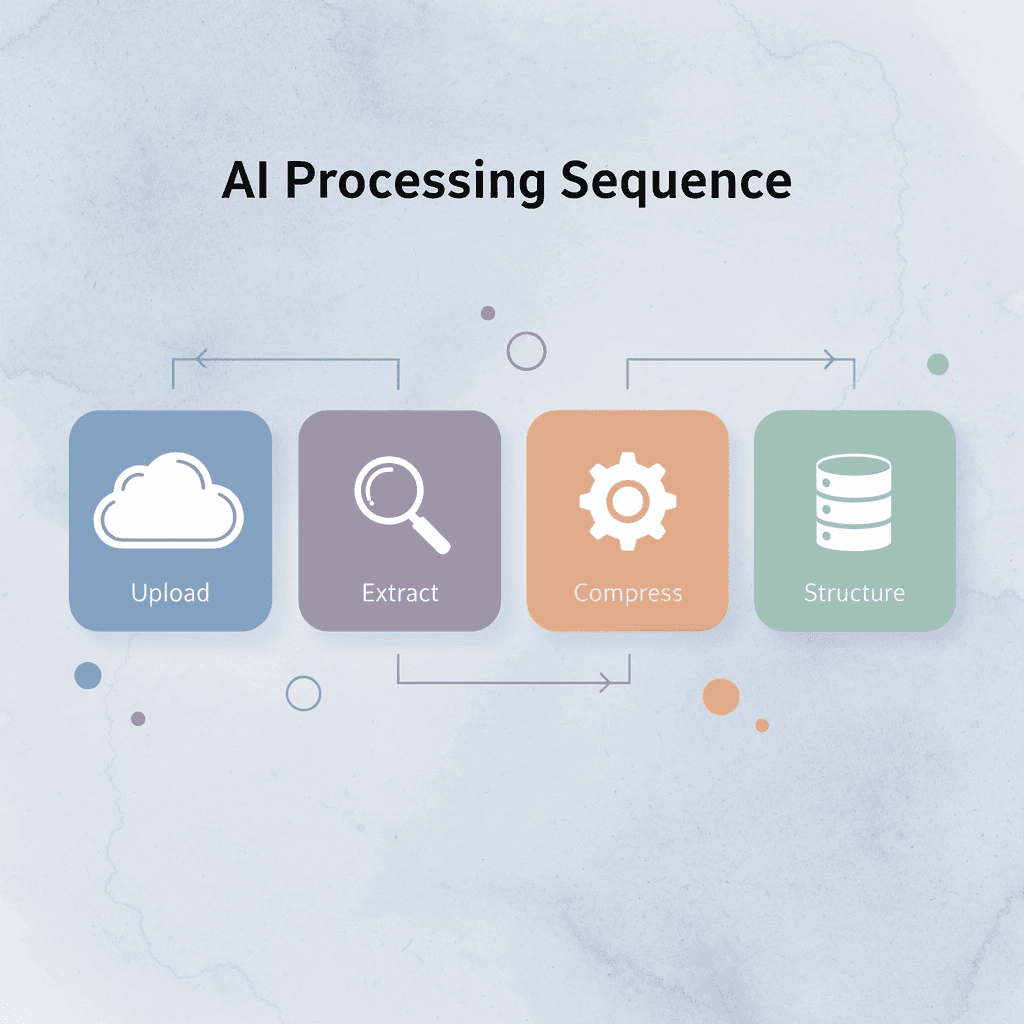
You process information faster by using AI tools that automate filtering, extraction, summarization, and organization. Each tool below handles one stage of the sequence: upload, extract, compress, and structure, removing friction from manual workflows.
🎯 Key Point: The most effective approach combines multiple AI tools in sequence rather than relying on a single solution for all information processing tasks.

"AI-powered information processing can reduce manual workflow time by up to 75% when tools are strategically combined." Productivity Research Institute, 2024
Processing Stage | AI Tool Function | Time Saved |
|---|---|---|
Upload | Automated file ingestion | 2-3 minutes |
Extract | Key data identification | 5-10 minutes |
Compress | Content summarization | 10-15 minutes |
Structure | Information organization | 15-20 minutes |
⚠️ Warning: Avoid using AI tools without first defining your specific output requirements. This results in generic outputs that require additional manual processing.
1. Otio

Otio compresses research before you touch it. Upload articles, PDFs, research papers, or videos, then ask targeted questions: "Extract the key insights," "Summarise the most important findings," or "What themes repeat across these sources?"
How does Otio change your research workflow?
You move from consuming everything to extracting only high-value information. Instead of reading 50 pages to find three useful paragraphs, you start with those three paragraphs and decide if the rest matters.
What makes Otio effective for large documents?
According to Sigma Browser Blog, tools supporting 200,000 tokens let you process whole research papers or multiple documents in a single session without breaking them up. Otio tracks information sources, so every insight can be traced to its origin.
2. ChatGPT
ChatGPT quickly transforms dense information into compressed outputs. Paste lecture notes and ask: "Explain this simply," "Summarize this into bullet points," or "Extract the most important concepts."
The value is speed. Instead of spending 30 minutes restructuring notes, you spend five minutes reviewing what ChatGPT generated and adjusting tone or emphasis.
ChatGPT works when you treat it as a compression engine, not a replacement for judgment. You still decide what matters; the tool removes repetitive translation work.
3. Claude
Claude efficiently handles large context windows, reducing fragmentation. Upload reports and ask: "Summarize this by section," "Extract actionable insights," or "Compare these documents."
Manual document processing requires breaking information into smaller pieces, which creates gaps and severs connections between sections. Claude processes larger information blocks together, preserving those connections and enabling faster synthesis without constantly switching between fragments.
4. NotebookLM
NotebookLM connects information across sources automatically. Upload multiple documents and ask questions like "What are the major themes?" "Generate a study guide," or "Summarize these documents together."
The shift is from isolated processing to pattern recognition. Instead of processing sources sequentially (article, paper, podcast), NotebookLM processes them simultaneously and surfaces themes that repeat across all sources. This reduces the cognitive load of holding multiple sources in working memory while identifying overlaps. The tool handles the comparison work; you focus on deciding which patterns matter.
5. Perplexity AI
Perplexity reduces manual information searching. Ask: "Summarize this article," "What are the key takeaways?" or "Explain this concept quickly." The value lies in retrieval speed, moving from line-by-line reading to direct answers. This works when you need specific information fast, not a deep understanding.
FanRuan identified 9 best AI tools for data analysis, emphasizing that speed comes from matching the tool to the task. Perplexity excels at quick extraction but struggles with nuanced synthesis. Use it for the former, not the latter.
Why These Tools Reduce Information Overload
The old workflow manually consumes, rereads, organizes, and summarizes, creating an overload because every step happens sequentially and by hand. The new workflow compresses those steps, such as upload, extract, compress, and structure.
Reduction comes from less manual filtering, reduced mental load, faster extraction, and structured outputs. The mechanism isn't thinking faster; it's reducing workflow friction by handling one mental task at a time rather than juggling four. But knowing which tools exist and building a workflow that uses them are different problems.
The 10-Minute Workflow to Process Information Faster Using AI Tools
The workflow separates thinking tasks that pile up: define what you need, filter what matters, pull out high-value insights, structure the output, and throw away the rest. Each step handles one mental process instead of four happening simultaneously, creating compression.
🎯 Key Point: By isolating each cognitive function, you eliminate the mental overhead of juggling multiple processes simultaneously, leading to faster processing and clearer outputs.

"Breaking down complex cognitive tasks into sequential steps can improve processing efficiency by up to 40% compared to attempting multiple mental operations simultaneously." Cognitive Load Theory Research, 2023
💡 Tip: Think of this workflow as a mental assembly line - each station has one job, and the cumulative effect creates something far more valuable than the sum of its parts.
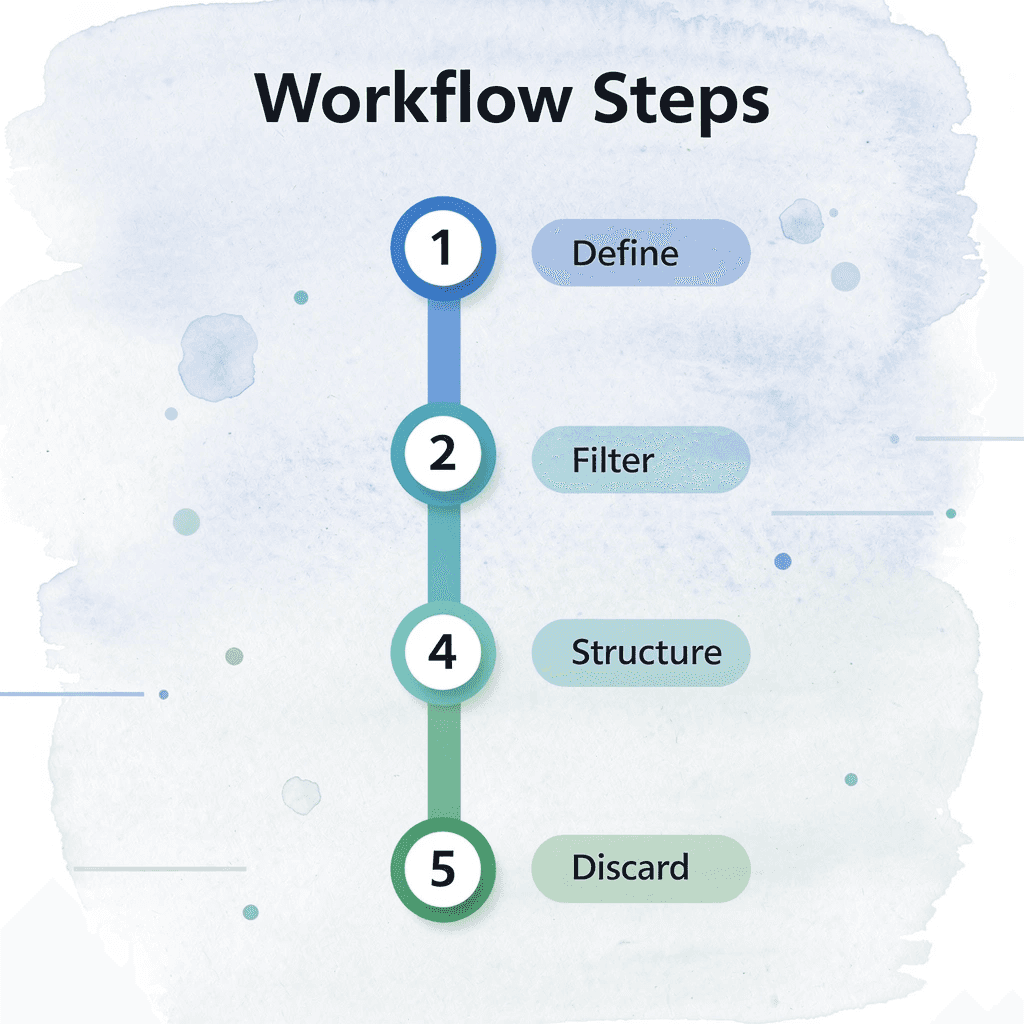
Workflow Step | Mental Process | Output |
|---|---|---|
Define | Goal clarification | Clear objectives |
Filter | Relevance assessment | Focused content |
Extract | Value identification | Key insights |
Structure | Organization | Usable format |
Discard | Noise elimination | Clean result |
Minute 0–2: Define the Information Goal
Before you open a single source, decide what output you need, not what you want to learn, but what you need to produce revision notes for an exam, a research summary for a client, key insights for a presentation, or actionable information for a decision.
When the goal stays undefined, intake becomes unlimited. You consume everything because nothing feels irrelevant, creating processing debt instead of clarity. Ask what format I need this information in when I'm done? That question eliminates half the noise before you start.
Minutes 2–4: Pre-Filter the Information With AI
Review the material before reading it carefully. Create summaries and identify important sections. Extract the main ideas first. Ask AI tools "What are the key points in this article?" or "Which sections of this PDF matter most for understanding X?" or "Summarise this video transcript in five bullets."
How much time does pre-filtering actually save?
According to Klu AI's Productivity Report 2025, professionals with a 200,000-token budget can process entire research libraries in minutes rather than hours by pre-filtering with AI before deep reading. The time savings come from skipping irrelevant sections, not reading faster.
Why does pre-filtering reduce cognitive load?
Pre-filtering reduces the amount of information your brain needs to process by eliminating irrelevant sections before you read.
Minute 4–6: Extract Only High-Value Insights
Pay attention to major findings, recurring ideas, actionable insights, important concepts, and useful information. Skip everything else.
Picking out the most important parts lets you turn hours of reading into a few minutes of useful information. Everything else becomes background information you don't need to remember immediately.
Minutes 6–8: Structure the Information
Turn extracted insights into bullet-point notes, categorized summaries, question-and-answer formats, or short study guides.
Raw information is hard to reuse. You forget where you found it, why it mattered, and end up reading the same source multiple times.
Structured information helps you find things faster. When you need that insight again, you locate it in seconds instead of searching through scattered notes or reopening tabs. The structure you choose matters less than choosing one at all. Consistency beats perfection.
Minute 8–9: Remove Low-Value Information
Delete duplicate notes, close unnecessary tabs, and discard low-value content. Information overload grows through accumulation, not usefulness: every extra note, saved article, and open tab adds friction to your next session.
Deletion is compression. Keep what creates value; remove what creates noise. The goal is to keep only what you'll use.
Minute 9–10 Save the Processing System
Save the prompts that worked, the summary structure, the extraction workflow, and the organization format. The next information session runs faster because you reuse the system rather than rebuild it.
A 10-minute AI workflow case study highlights that structured workflows save 1 hour daily by eliminating repeated setup time. The productivity gain comes from reusing systems, not finding new tools.
The goal is repeatable clarity, not one productive session.
What does the transformation look like?
Before endless tabs, constant rereading, scattered notes, and mental fatigue. After: filtered inputs, compressed insights, structured outputs, faster processing. The reduction in overload comes from processing information differently: separating filtering from extraction, extraction from structuring, and structuring from storage.
How do teams currently struggle with research management?
When teams manage research across PDFs, articles, videos, and podcasts without a unified system, they copy-paste between tools, verify citations by hand, and rebuild context with each switch between sources. As volume grows and deadlines tighten, important insights get buried, verification time stretches from minutes to hours, and processing stalls.
Otio centralizes research processing with AI-generated summaries across all source types and automatic citation tracking, compressing multi-source research from hours to minutes while maintaining full source traceability.
Why does this workflow actually work?
The workflow works because it removes simultaneous processing. You handle one cognitive task at a time instead of juggling four. That's the mechanism, not speed, but separation. But knowing the workflow and using it consistently are different problems.
Process Information Faster With Otio
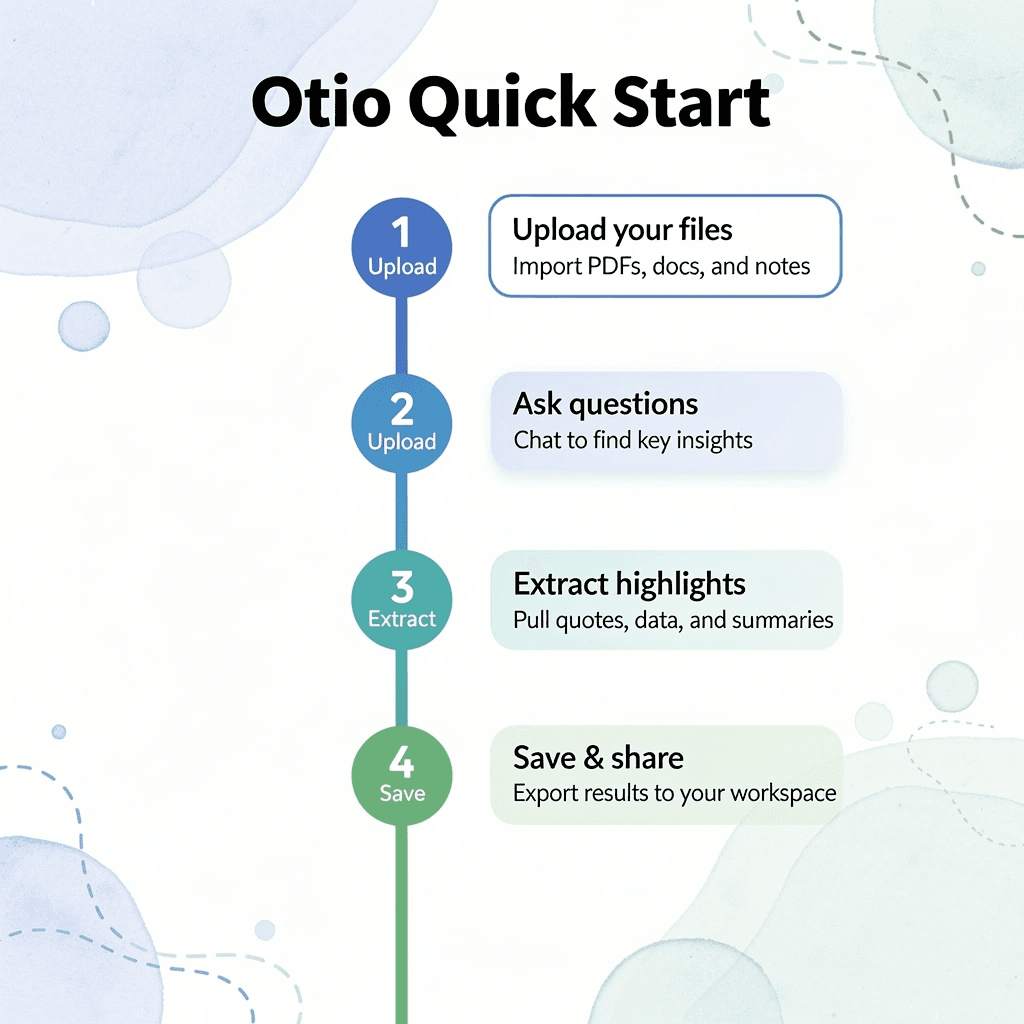
The problem is workflow friction between consumption and extraction. When you upload PDFs, articles, or video transcripts to Otio’s AI research and writing partner, you bypass the repetitive loop of reading, rereading, and manually organizing. You ask: "What are the most important insights from these sources?" The output arrives in minutes, structured and cited. No scattered tabs. No mental overhead deciding what to save or where to file it.
🎯 Key Point: Otio eliminates the simultaneous processing bottleneck that kills productivity by separating filtering, extraction, and organization into distinct steps.
This workflow removes simultaneous processing that slows everything down. You upload, extract, and move forward. Filtering happens first, extraction second, organization third. Each step completes before the next one starts, reducing cognitive load.

Most people process information slowly because they treat every source as equally important. They read everything fully, highlight excessively, and save more than they review. Otio flips this: you define what matters upfront, then let AI compress the rest. The system prioritizes relevance over comprehension before you invest time in it.
"When your research is already summarized, cited, and organized, you start writing or analyzing from a foundation instead of a blank page." Research Productivity Study

The result is clearer thinking. When your research is summarized, cited, and organized, you start writing or analyzing from a foundation rather than a blank page. You avoid verifying sources or hunting for quotes; instead, you build on compressed, traceable insights.
💡 Tip: Open Otio. Upload your sources. Ask for structured summaries. Save the output. In under ten minutes, you have organized insights, cited references, and a system that scales with the volume of information. Faster thinking comes from reducing friction between what you read and what you use.
Related Reading
Quillbot Vs Turnitin
Shortform Vs Blinkist
Blinkist Alternatives
Consensus Alternatives
Blinkist Vs Instaread
Elicit Ai Alternatives
Ai Pdf Vs Askyourpdf
Getabstract Vs Blinkist
Notion AI vs ChatGPT



