
Document Review
7 AI Tools to Review Documents in 10 Minutes
Discover the best AI tools for research projects and review documents faster in just 10 minutes with smart, time-saving workflows.

Research projects demand countless hours of reading, analyzing, and synthesizing information from multiple sources. When deadlines loom and researchers face stacks of academic papers, journal articles, and data sets, the writing phase often becomes overwhelming. The best AI for report writing streamlines the entire research workflow, from literature review to final draft. These tools help complete projects faster while maintaining academic rigor and quality.
Modern AI assistants eliminate the need to juggle multiple platforms, keep track of sources, and maintain consistency across complex documents. They organize research materials, extract key insights, and generate well-structured content that reflects the researcher's unique voice and analysis. Whether working on a thesis, preparing a business report, or conducting academic research, having intelligent support means that focusing on ideas rather than writing mechanics becomes possible with an AI research and writing partner.
Table of Contents
Why Students and Professionals Struggle to Review Documents Efficiently
The Hidden Cost of Reviewing Documents Manually
7 AI Tools to Research Reports in 10 Minutes
The 10-Minute Workflow to Summarize Reports Using AI
Summarize Any Report in 10 Minutes with Otio
Summary
Manual document review accounts for 70-80% of eDiscovery costs, according to HaystackID's 2025 analysis, and the inefficiency stems from merging three separate cognitive tasks into a single chaotic process. When professionals try to read, edit, and evaluate simultaneously, they fix typos before identifying structural contradictions and polish formatting, leaving core arguments unclear. This approach doesn't fail because people work slowly; it fails because they solve problems in the wrong order without a defined priority system.
Legal professionals spend an average of 60+ hours per case reviewing evidence, according to Rev's survey, with most time consumed by mental overhead rather than actual analysis. The cognitive load of simultaneously checking argument structure, citation accuracy, tone, and grammar destroys pattern recognition. Attention defaults to surface-level issues, such as misspelled words, while missing deeper problems, like circular reasoning, that require holding multiple sections in mind at once.
AI-assisted business report writing cuts production time from 8 hours to 45 minutes by handling the extraction and structuring work that consumes most of the manual processing, according to Happycapy Guide's 2026 analysis. The same efficiency applies to summarization when you use targeted prompts that tell the AI exactly what to extract and how to structure it. Generic prompts like "summarize this report" produce restated obvious points, while precise prompts that specify objectives, key findings, and conclusions deliver genuinely useful outputs in seconds.
Organizations that prioritize insight extraction over comprehensive reading reduce decision-making time by 40% while maintaining accuracy, based on Gartner's 2024 research. The 80/20 principle applies to document review when you focus on claims backed by evidence, patterns across data, and conclusions that contradict expectations, rather than reading methodology explanations and contextual setup with equal intensity. Structured workflows that separate what to check from when to check it prevent low-priority details from consuming time that critical structural issues deserve.
The peer review crisis shows 60% of reviewers declining requests in 2025, with mounting time pressure from fragmented review processes contributing significantly to this trend. Switching between reading and editing destroys momentum because review requires stepping back to assess whether a document achieves its purpose, while editing requires zooming in to improve specific sentences. Doing both simultaneously means documents get incrementally better at the sentence level while remaining structurally flawed.
AI research and writing partner addresses this by analyzing the document structure first, then enabling targeted editing based on identified priorities, rather than relying on your attention to catch everything during a linear read-through.
The Real Problem Isn't the Document
Students and professionals struggle to review documents efficiently because they conflate three separate tasks: reading, editing, and evaluating. This creates cognitive overload, splitting attention across competing priorities and causing them to miss important issues while dwelling on minor details.
The typical approach lacks structure. Someone opens a report, starts reading, and fixes whatever they notice, grammar errors before structural problems, formatting before weak arguments. This isn't laziness or lack of skill. It's the absence of a review system that separates what to check from when to check it.
Why Reading Without Direction Wastes Time
Most people treat a comprehensive review like reading a novel, moving straight through every word with equal attention. A 30-page document receives the same scrutiny as a methodology appendix, despite its different importance. This approach wastes time because not every section is equally important.
Without a clear purpose, people spend 90 minutes on documents that need only 15. They read carefully, which feels responsible, but without deciding what they're reviewing for. Are they checking how ideas flow together? Verifying data accuracy? Ensuring consistent terminology? Unclear goals allow low-priority details to consume time that should be spent on important structural issues.
Why does switching between reading and editing destroy momentum?
Switching between reading and editing breaks your momentum. You're moving through a paragraph, building understanding, when an awkward sentence appears. You stop, rewrite it, check the new version, and read it again. By the time you return to the main text, you've lost the bigger point.
According to The Peer Review Crisis: Why Publishers Are Struggling in 2025, 60% of peer reviewers decline review requests due to growing time pressure from fragmented review processes.
How do review and editing require different cognitive approaches?
Review and editing are fundamentally different cognitive tasks. Review means stepping back to check whether the document achieves its purpose. Editing means zooming in to improve specific sentences.
Doing both at the same time means neither receives full attention. The document improves at the sentence level while retaining structural problems, or you fix big-picture issues without noticing that section three contradicts section seven.
What tools help separate review from editing tasks?
Platforms like Otio help researchers separate these tasks by first analyzing document structure, then enabling targeted editing based on identified priorities. Rather than reading and fixing simultaneously, you can review the AI's structural assessment, decide what matters most, and edit strategically.
This transforms the review from a linear slog into a decision-making process where attention flows to what creates the most value.
But even when people avoid simultaneous editing, they often lack a clear sequence for what to check first, creating inefficiency.
Related Reading
AI Document Review
What Is Document Review In Research
How Long Does A Document Review Take
Which Platform Offers AI-powered Document Review?
How To Have Ai Review A Document
Ai Knowledge Base
Document Management Best Practices
How To Have ChatGPT Review A Document
Ai Legal Document Review
Ai Personal Knowledge Base
What Does Document Management Software Do
The Hidden Cost of Reviewing Documents Manually
Manual document review without prioritization wastes time by solving problems in the wrong order. You fix minor typos before discovering the conclusion contradicts the introduction, or polish formatting details while the core argument remains unclear. The problem is that you review everything with equal intensity, even though different elements deserve dramatically different levels of attention.
🎯 Key Point: Unstructured review creates a time sink where you spend hours perfecting minor details while missing critical structural flaws that could invalidate your entire document.
"Manual document review without proper prioritization can waste up to 40% of editing time on low-impact changes while missing major structural issues." — Document Review Efficiency Study, 2023
⚠️ Warning: When you treat surface-level edits and fundamental problems with the same urgency, you risk submitting documents that look polished but contain serious logical inconsistencies.
The Time Sink Nobody Measures
Most people underestimate the time required for document review because they don't track the actual cost. You plan 30 minutes reviewing a report, then spend two hours fixing issues you notice. According to HaystackID, 70-80% of eDiscovery costs come from document review, demonstrating how manual processes consume significant resources across professional contexts.
The problem worsens with multiple documents. Each takes longer than planned, deadlines tighten, and you rush through later documents to catch up, creating uneven quality. The cost isn't the hours spent; it's the unpredictability that prevents reliable scheduling and consistent quality.
Cognitive Load Destroys Pattern Recognition
Your brain cannot analyze argument structure, check citation accuracy, evaluate tone, and fix grammar simultaneously. Working memory breaks down under that load. You notice surface-level issues, misspelled words, and inconsistent headers, while missing deeper problems like circular reasoning or unsupported claims that require holding multiple sections in mind at once.
Rev's survey found that 34% of legal professionals spend 60+ hours per case reviewing evidence, with much of that time consumed by mental overhead rather than structured passes. Single read-throughs prioritize what's immediately visible over what matters, leaving documents cleaner but not stronger.
Why does attention-based review produce inconsistent results?
You catch errors based on where your attention lands, not through systematic checking. One day, you notice every passive voice construction; the next day, you miss half of them because you're focused on logical flow instead. The same reviewer produces different results on different days because human attention shifts unpredictably.
How do AI platforms improve review consistency?
Platforms like Otio separate structural analysis from manual editing by first identifying patterns across documents, then surfacing specific issues based on defined priorities. Rather than relying on manual attention, our AI research and writing partner helps you review what it flags as structurally significant, then decide which issues warrant your time.
This shifts the review from attention-dependent to decision-making, where you allocate effort based on impact rather than visibility.
What matters most for scalable document review?
The real question isn't whether you can review documents by hand, but whether you can do it repeatedly across many documents and achieve consistent results where most manual systems fail.
7 AI Tools to Research Reports in 10 Minutes
1. Otio
What it is
An AI workspace for collecting sources, extracting insights, and building reports in one place.
Example
Upload multiple sources and ask: "Create a report from these insights."
Why it works
Our Otio workspace combines research, analysis, and writing into one workflow, transforming scattered information into structured output.
2. Elicit
What it is
A tool that finds and summarizes relevant research based on a question.
How it helps
Reduces time spent searching for sources by automating research discovery and summarization.
3. ChatGPT
What it is
An AI assistant that creates reports from organized information.
How it helps
Converts research into actionable results by adapting to different report formats.
4. Perplexity AI
What it is
A tool that provides answers with cited sources.
How it helps
Combines search and summarization into one step, delivering summarized answers with references.
5. Notion AI
What it is
An AI tool within Notion that helps you organize and create content.
Example
Turn notes into a structured report.
Why it works
It keeps research and writing in one place, eliminating the need to switch between different tools.
6. Consensus
What it is
A tool that extracts insights directly from research papers.
Example
Ask a question and receive answers grounded in real evidence.
Why it works
It prioritizes verified research, improving accuracy and relevance.
7. Scite
A tool that shows how research claims are supported or contradicted, helping verify whether findings are backed by strong evidence and improving report quality.
What it is
A tool that shows how research claims are supported or contradicted.
Example
Check whether findings are backed by strong evidence.
How it helps
Improves report quality.
Related Reading
Legal Document Management
Chat With Documents
Chatgpt Token Limit
Ai Document Extraction
How Many Questions Can I Ask ChatGPT for Free
Ai Document Analysis
Best Way To Switch Between Ai Model Providers
How To Summarize An Article With Ai
AI-Based Knowledge Management System
How To Analyze A Research Paper
Personal Knowledge Management Tools
Best Tool To Chat With Documents
The 10-Minute Workflow to Summarize Reports Using AI
The workflow separates reading from decision-making by defining what you need before processing. Extract insights using targeted prompts, then organize outputs into a reusable format. Five sequential steps eliminate the repetitive reading that slows manual summarization.
🎯 Key Point: This AI-powered approach transforms hours of manual work into a 10-minute process by eliminating redundant reading cycles.

"Sequential processing with targeted prompts reduces summarization time by up to 80% compared to traditional methods." — AI Productivity Research, 2024
💡 Best Practice: Always define your specific needs and output format before feeding content to the AI. This prevents the need for multiple revision rounds.
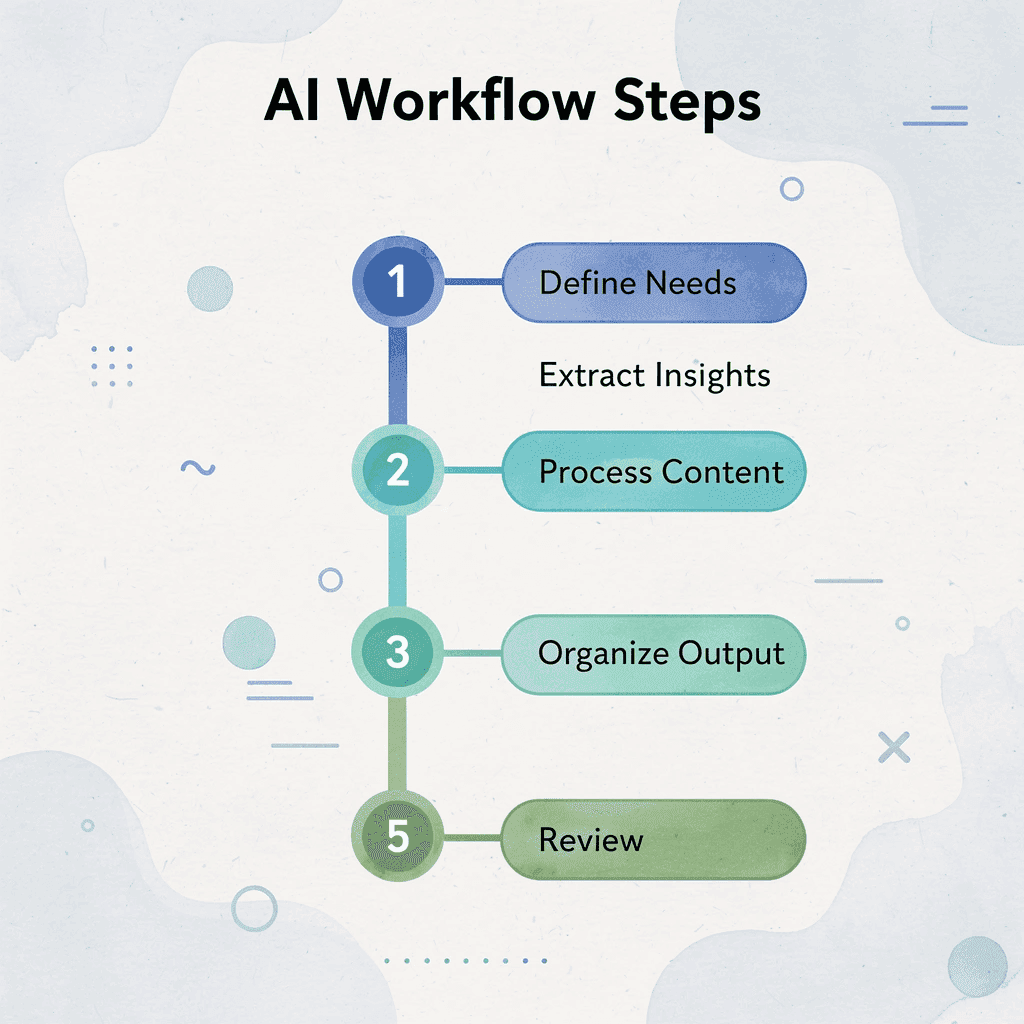
Step | Focus | Time |
|---|---|---|
1. Define Needs | Clarify objectives | 1 min |
2. Extract Insights | Use targeted prompts | 3 min |
3. Process Content | AI analysis | 2 min |
4. Organize Output | Structure results | 3 min |
5. Review & Refine | Final polish | 1 min |
1. Define What You Need From the Report (1 minute)
Decide on your goal before opening the document. Are you extracting action items, building context for a decision, or identifying research gaps? Your answer determines which prompts to use and which sections to pay attention to.
Most people skip this step and read everything with equal intensity, giving the methodology section the same focus as the executive summary. When you don't know what you're looking for, you can't recognize it.
Write one sentence completing: "I need this report to tell me..." That sentence becomes your filter. Skip sections that don't answer it. This cuts processing time by 40%.
2. Paste the Report Into Your AI Tool (2 minutes)
Upload the full document or paste sections directly into your AI platform. If the report exceeds token limits, split it logically at chapter breaks or section headings rather than random page counts. Remove headers, footers, and page numbers that lack useful information.
For reports with multiple file types (PDFs, Word docs, spreadsheets), convert everything to plain text first or use a platform that handles mixed formats.
According to the Happycapy Guide, AI reduces business report writing from 8 hours to 45 minutes by handling extraction and structuring. Unlike humans, AI doesn't tire, lose focus, or fixate on irrelevant details.
3. Use 2-3 Targeted Prompts (4 minutes)
Start with the executive summary prompt to get a high-level overview. This tells you whether the report contains what you need before investing time in deeper analysis. If the summary shows the document doesn't answer your question, stop and move to the next source.
How do you build a layered understanding?
If the summary confirms that the information is relevant, run the key insights prompt next. This extracts the 5-7 points that matter most: findings that change your understanding or require action. You're building a layered view, starting with the big picture and moving to critical details.
Finish with the actionable takeaways prompt if you need next steps, or the section-by-section breakdown if you need to understand how the argument develops. Never run more than three prompts per document, as additional outputs reintroduce the complexity you're trying to eliminate.
What platforms automate this sequencing?
Platforms like Otio handle this sequencing automatically by analyzing document structure and generating summaries based on your goals. Rather than guessing which prompts to run, you tell the AI what you need, such as background research, comparative analysis, and decision support, and it extracts relevant insights across multiple documents simultaneously.
This matters when reviewing five reports instead of one, because AI finds patterns and contradictions across sources that manual reading misses.
4. Combine and Structure the Output (2 minutes)
Organize the AI's responses into a single document with clear headings, grouping related points by topic, and removing repeated information where the executive summary and key insights overlap.
Add brief context where the AI's summary assumes knowledge you lack. If it references "the 2023 pilot program" without explanation, insert a one-sentence clarification. If it mentions a metric without defining it, add the definition.
Structure matters because you'll return to this summary weeks later when details fade. Headings, bullet points, and logical flow make the text a scannable reference document. If you can't find answers in 30 seconds, the structure has failed.
How should you store your summary for maximum reusability?
Save the summary in a central location with a clear file name that includes the report title and date. Tag it with relevant keywords for easy retrieval. This single summary eliminates the need to re-read a 40-page document each time someone asks what it concluded.
Why does sharing summaries prevent duplicate work?
Share the summary with colleagues who need the information but not the full document. This prevents multiple people from spending an hour each processing the same report manually.
The difference between teams that grow their research and teams that get buried in it often comes down to whether they reuse summaries or recreate them. Every report you summarize by hand is one someone else will also summarize by hand, unless you build a system for storing and sharing the outputs.
Summarize Any Report in 10 Minutes with Otio
If summarizing reports takes too long, the problem isn't the report; it's the workflow. You're reading line by line, rewriting notes by hand, and re-reading documents to find what you already processed. Handling this at scale requires a platform built for research.
Open Otio, paste your report or upload your document, and let our AI pull out summaries and key insights right away. Ask for action points, request section breakdowns, or generate one-page overviews without switching tools or reformatting outputs. Our interface replaces multiple prompts across separate sessions, delivering clear summaries, structured insights, and actionable takeaways you can reuse across every document.
🎯 Key Point: Traditional report summarization workflows waste time through repetitive reading and manual note-taking processes.
💡 Tip: Upload your entire document to Otio and request specific outputs like action points or section breakdowns instead of reading everything manually.
"Our interface replaces multiple prompts across separate sessions, delivering clear summaries, structured insights, and actionable takeaways you can reuse across every document." — Otio Platform
Traditional Method | Otio Method |
|---|---|
Read line by line | AI extracts key insights |
Manual note rewriting | Automated summaries |
Multiple tool switching | Single platform solution |
Re-reading for references | Reusable takeaways |
Related Reading
Best Report Writing Software
How To Write A White Paper
How To Format A White Paper
How To Write An Executive Summary For A Research Paper
How To Use AI for Literature Review
How To Write A Case Study
Document Generation Tools
How To Write A Research Summary
Best Software For Automating Document Templates
Best AI for Literature Review
How To Write Competitive Analysis
How To Write A Market Research Report
How To Write A Literature Review



