The search for grok file upload limit usually starts with one question: “Will my files fit?” For research, the safer answer is: do not treat Grok’s limit as one universal number. Check Grok’s current official help or developer documentation for the exact surface you use, then separate per-file size, attachment count, account quota, model context, and PDF extraction behavior.
That distinction matters because a corpus can fail even when every individual PDF is “small.” Ten clean PDFs, fifty scanned reports, or a mixed set of PDFs and web captures can break in different ways: upload caps, context limits, repeated reattachment, missing page references, or answers that blend sources without a reliable evidence trail.
The practical move is to use Grok for focused questions on a manageable subset, then keep the full source set in a permanent research workspace where files, notes, citations, and model comparisons survive beyond one chat.
Updated November 29, 2026.
What to check before relying on Grok for a research corpus
Before using Grok as the working home for a research corpus, verify the current limit in Grok’s official documentation for the exact interface, account, plan, and model you are using. Do not copy a file-size number from a forum post, an old screenshot, or a third-party guide and assume it applies everywhere.
The practical answer to “what is the Grok file upload limit?” may involve several independent constraints:
- Maximum size of one file: the largest individual file the interface will accept.
- Maximum number of files or attachments: how many files can be attached to one prompt, conversation, project, or workspace.
- Total upload quota: whether your account or plan has a daily, monthly, or rolling cap.
- Model context capacity: how much extracted text the selected model can actually use in one answer.
- File-type support: whether PDFs, images, spreadsheets, audio, or other formats are handled differently.
- Processing behavior: whether the file is parsed, partially extracted, rejected, or accepted but not meaningfully used.
That last category is the one researchers most often underestimate. A chat interface may accept an upload, show a filename, and still fail to incorporate the relevant passages. For a professional research workflow, “uploaded” is not the same as “read, retrievable, and citable.”
Grok’s own release notes also show why dated checks matter: upload handling and file controls can change over time, including how empty files, pasted files, and size-limit displays are handled in the product experience (Grok Release Notes). Treat any limit as a current operating condition, not a permanent architecture.
A useful preflight record looks like this:
- Date checked.
- Product surface tested: Grok web, X interface, mobile app, API, or another surface.
- Account and plan.
- Model selected.
- File type and file count.
- Per-file size and total size.
- Whether the file parsed successfully.
- Whether page references or source locations were visible.
- Whether the answer could be verified against the uploaded source.
This sounds bureaucratic until the same corpus produces different answers in two different sessions. Then the record becomes the only way to know what the model actually saw.
Grok PDF upload limits: file size is only one constraint
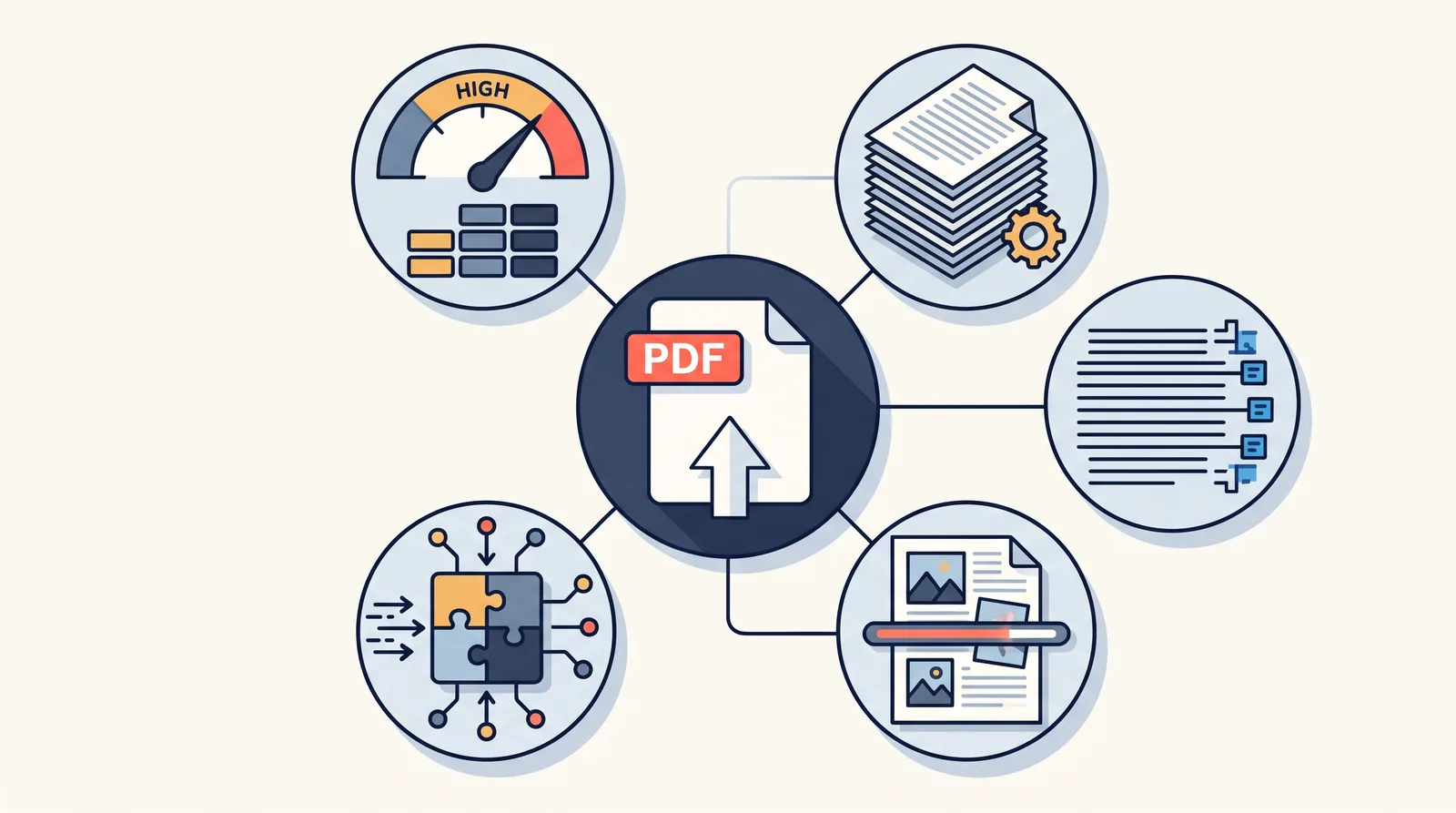
For PDF research, file size is the least interesting limit. It matters, but it rarely tells you whether the document will be useful in practice.
A text-based 8 MB journal article may parse cleanly. A 3 MB scanned contract may be much harder because the system has to interpret images of text. A 20 MB report with dense tables, appendices, figures, footnotes, and two-column layout may produce extraction gaps even if the upload succeeds.
Before describing a PDF as “supported,” check Grok’s current PDF-specific documentation for:
- Supported PDF behavior and file types.
- Any documented page-count limits.
- Whether scanned or image-only PDFs are handled.
- Whether OCR is applied.
- Whether embedded images, charts, and tables are interpreted.
- Whether page references are preserved.
- Whether the selected model can use the extracted text in context.
- Whether processing failures are surfaced clearly.
The most important distinction is between a text-based PDF and a scanned PDF.
A text-based PDF contains selectable text. The model or parser can usually extract passages, search inside the document, and quote from it more reliably.
A scanned PDF is closer to a stack of images. It may require optical character recognition, and OCR can fail on marginalia, poor scans, stamps, tables, handwriting, footnotes, mathematical notation, or low-contrast pages. If the OCR layer is missing or inaccurate, the model may summarize around the visible structure rather than retrieve the exact passage needed.
Do not infer that a PDF will fit because its file size is small. The working burden is shaped by:
- Page count: a small file can still contain hundreds of compressed text pages.
- Extracted text volume: dense appendices can add far more usable text than the file size suggests.
- Layout complexity: two-column papers, tables, footnotes, and figure captions can be parsed out of order.
- Image content: charts and scans may require vision processing rather than text retrieval.
- Context capacity: the model may not be able to use every extracted passage in one answer.
- Retrieval behavior: the answer may draw from only part of the document set.
For research, always inspect the extracted evidence. Ask for the exact passage, page, section, figure, or table that supports a claim. Then compare the answer with the original PDF before using it in a paper, briefing, legal analysis, policy memo, or medical work product.
If the system cannot tell you where a claim came from, treat the output as a lead, not evidence.
Why a large research source set can exceed Grok’s limits
A source set can exceed Grok’s practical limits even when no individual file is large.
Imagine a project with individually modest PDFs: a dozen trial reports, several regulatory documents, two policy memos, interview transcripts, and a few web pages saved as PDFs. Each file may upload on its own. The corpus can still fail because the combined work asks the tool to do too many things at once.
The failure modes are different, and they matter:
- Attachment cap: the interface may limit how many files can be added to one message or session.
- Total upload quota: the account may restrict usage across a period of time.
- Context-window pressure: the selected model may not be able to reason across all extracted text in one response.
- Parsing failures: some PDFs may upload but extract poorly.
- Model availability: a file may be accepted in the interface while the model you want is unavailable, capped, or behaves differently.
- Retrieval limits: the system may retrieve only a subset of passages relevant to the prompt.
- Conversation fragmentation: splitting the corpus across chats makes it harder to compare claims consistently.
Repeated uploads are not just annoying. They change the research process.
If you upload batch A in one conversation and batch B in another, the model may answer from different source sets. If you reattach overlapping files later, you may not know whether an answer came from the new batch, the previous batch, or the prompt’s own assumptions. If you change models midstream, you may change both the reasoning style and the retrieval behavior.
The main risk is traceability.
A short answer can look plausible while omitting contrary evidence, blending batches, or losing page-level context. This is especially dangerous when the output becomes a literature-review paragraph, diligence memo, expert note, legal issue list, or clinical summary. The answer is smooth; the evidence trail is not.
This is not unique to Grok. It is the basic mismatch between chat-style file upload and long-running research. For a broader comparison of how these constraints show up across tools, see Otio’s guide to AI file upload limits for research workflows.
A larger-source-set workflow that preserves provenance
When the corpus is too large or too important for ad hoc uploads, the goal is not to cram more files into one prompt. The goal is to preserve provenance: which source supported which claim, under what version, with what extraction quality, and where the reviewer can verify it.
Workflow provenance is a long-running concern in scientific and technical work because later interpretation depends on knowing how data and outputs were produced. Research on scientific workflow provenance frames this as the need for a holistic view of the workflow lifecycle, not just the final answer (Workflow Provenance in the Lifecycle of Scientific Machine Learning).
For document-heavy research, use a source-first workflow.
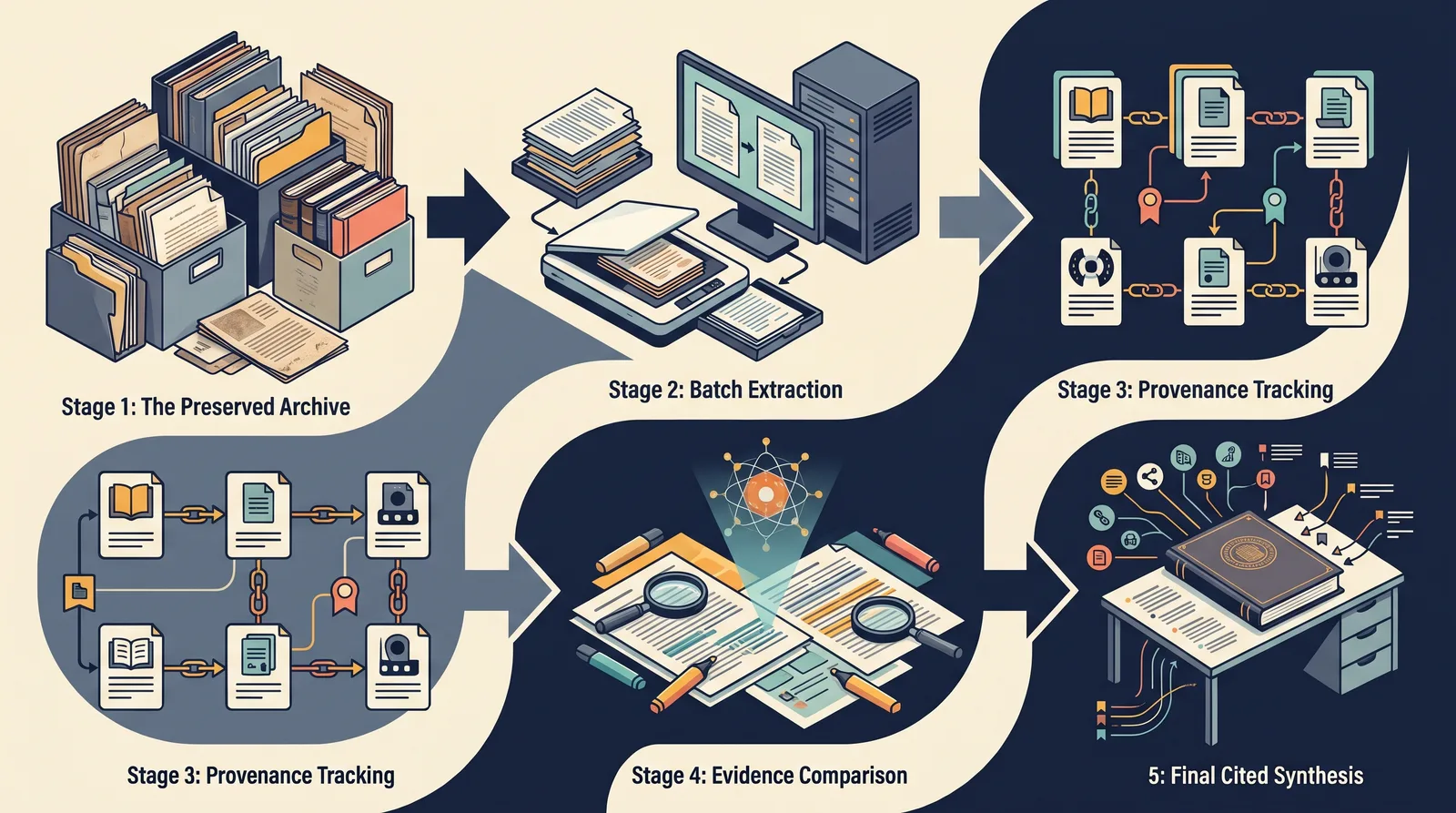
1. Preserve the full corpus before analysis
Start by collecting the complete source set in one place before asking for synthesis.
Keep:
- Original filename.
- Source title.
- Author or organization.
- Publication date.
- URL or database location.
- Access date, if relevant.
- Version number or retrieval date.
- License, confidentiality, or access notes.
- File type and conversion history.
If a PDF came from a web page, keep the URL. If a report was revised, keep the version. If a source was OCR’d, keep the original and the OCR output. If a paper came through a reference manager, keep the citation metadata.
This prevents a common failure: a model cites “the report” but nobody can reconstruct which report, which version, or which page.
2. Organize sources by the research question, not by upload convenience
Do not upload an undifferentiated folder just because the interface accepts it. Organize around the work you need to do.
Useful groupings include:
- Background and theory.
- Primary studies.
- Regulatory or policy sources.
- Methods papers.
- Market or company documents.
- Interviews and transcripts.
- Conflicting evidence.
- Excluded or low-quality sources.
For large retrieval systems, document organization often depends on clean text, meaningful chunks, metadata, and a consistent schema; the same principle applies to a human-led research workspace (Itility on organizing documents for RAG). Good organization improves both machine retrieval and human review.
If your immediate task is “compare the methods used in five papers,” attach only those five papers. If the task is “identify whether the policy changed between 2022 and 2026,” attach the dated policy documents and preserve their versions. Smaller, intentional batches produce better answers than one overloaded prompt.
3. Build a source register
A source register is a simple control layer for your corpus. It can live in a spreadsheet, note, database, or research workspace.
Give each source an identifier:
- S001: Smith et al. clinical trial.
- S002: FDA label.
- S003: company annual report.
- S004: interview transcript.
- S005: systematic review.
Then track:
- Status: unread, extracted, verified, excluded.
- Topic or research question.
- Evidence type.
- Key claims.
- Methods or data source.
- Limitations.
- Page or section locations.
- Extraction problems.
- OCR problems.
- Notes created from the source.
The point is not clerical neatness. It is to stop the model from becoming the only place where the connection between source and conclusion exists.
For PDF-heavy projects, Otio has a related guide on organizing research PDFs without losing notes or citations.
4. Review in batches before synthesis
Batching is not a workaround; it is a quality-control method.
For each batch, extract:
- Main claim.
- Population, sample, jurisdiction, or market covered.
- Method.
- Data source.
- Finding.
- Limitation.
- Relevant quotation.
- Page, section, table, figure, or timestamp.
- Relationship to the research question.
- Conflict with other sources.
Do this before asking for cross-source synthesis. Otherwise, the model may blend findings before you know what each source actually says.
This matters especially when sources disagree. A good synthesis does not average the documents. It explains why they differ: population, time period, measurement, incentives, legal context, sample quality, or methodology.
If the task is multiple-PDF summarization, the output should preserve source context rather than produce one flattened summary. Otio’s guide to summarizing multiple PDFs with citations covers that distinction in more detail.
5. Record which source supported each note or answer
Every note that may later become a claim should retain its provenance.
Use a format like:
- Claim.
- Source ID.
- Page or section.
- Quotation or paraphrase.
- Confidence.
- Reviewer note.
- Open question.
- Conflicting source, if any.
This is the difference between “AI helped me read faster” and “I can defend this statement when challenged.”
In research, provenance is not just about avoiding hallucinations. It helps later reviewers understand how an output was produced, which inputs were used, and where a finding can be checked. The same logic appears in data-preparation guidance that emphasizes building a source corpus before retrieval and preserving provenance through the pipeline (Octoparse on RAG-ready datasets).
6. Synthesize only after the relevant sources have been reviewed
Synthesis should be the last step, not the first.
Ask for synthesis after you have:
- Preserved the full corpus.
- Grouped sources by research question.
- Checked extraction quality.
- Reviewed relevant batches.
- Captured page-level evidence.
- Identified conflicts.
- Marked uncertain or excluded sources.
Then the synthesis prompt becomes narrower and more auditable: compare these sources on this question, use only these source IDs, separate consensus from disagreement, and cite the page-level evidence.
That workflow is slower than dragging a folder into a chat. It is faster than trying to reconstruct the evidence trail after the answer has already circulated.
How to use Grok beside a permanent research workspace
Grok is useful for focused questions, fast exploration, and manageable subsets of sources. It is not the same thing as a durable research library.
Use Grok when:
- The question is narrow.
- The relevant source subset fits the current documented constraints.
- The files parse cleanly.
- The answer can be verified against the original source.
- You do not need long-term project memory or shared source organization.
Use a permanent workspace when the source set is larger, mixed-format, revisited over time, or needs consistent citations.
This is where Otio’s AI PDF reader fits beside Grok. Otio gives researchers a library for PDFs and other source types, then lets them ask cited questions across selected library items instead of repeatedly re-uploading fragments into separate chats.
That matters when a project expands beyond PDFs. A serious research file often contains:
- Journal articles.
- Regulatory PDFs.
- Web pages.
- YouTube lectures or hearings.
- Audio recordings.
- Interview transcripts.
- Spreadsheets.
- Notes.
- Draft memos.
- Screenshots or images.
Otio’s library supports PDFs, DOCX, EPUB, TXT, Markdown, PPTX, CSV, audio, video, images, web links, YouTube videos, tweets, notes, and folders. The workflow is not “summarize this one file.” It is “keep the source set together, ask questions across the relevant items, save evidence to notes, and return to the source when the claim matters.”
For academic projects, the relevant standard is not just speed. It is whether the answer remains connected to the source context later, when you are drafting, revising, defending, or responding to feedback. Otio’s academic research workspace is built for that multi-source use case.
Otio also supports working across multiple AI models. That is useful when a question deserves a second pass: one model may extract cautiously, another may structure a comparison better, and a third may be more useful for drafting. With multiple AI models, you can retry or compare an answer without moving the source set into a new tool each time.
The right division of labor is simple:
- Use Grok for focused prompts and bounded subsets where the current documented limits fit the job.
- Use Otio for the full research workspace when the project needs persistent sources, notes, cited answers, multiple formats, and model comparison.
- Use search engines and discovery tools before either when the job is finding the right literature or sources in the first place.
Otio does not replace Grok, discovery engines, or systematic-review platforms. It solves a different problem: keeping the working corpus, notes, citations, and source context together after discovery and beyond one chat.
When Grok is enough—and when to change the workflow
Grok is enough when the task is narrow and the evidence burden is low.
Examples:
- Ask a question about one clean PDF.
- Compare two or three documents that fit the current documented constraints.
- Extract a passage from a source you can immediately verify.
- Brainstorm search terms or angles from a small source subset.
- Test whether a document contains a specific concept.
Change the workflow when the project starts showing any of these symptoms:
- You are splitting one corpus across repeated uploads.
- You cannot tell which files were attached to which answer.
- You are re-uploading the same PDFs into new chats.
- Page references are missing or inconsistent.
- The answer seems plausible but cannot be traced to a source.
- You need to compare conflicting evidence across batches.
- The corpus includes PDFs, web pages, video, audio, spreadsheets, and notes.
- The work will be revisited over weeks or months.
- A colleague, reviewer, client, or supervisor may ask where a claim came from.
The decision rule:
Use Grok when the source subset is small enough to verify manually inside the current documented constraints. Move to a permanent multi-source workspace when continuity, provenance, citations, or mixed-format organization becomes part of the job.
This is also the point at which model limits become workflow limits. The issue is no longer whether a file uploads. It is whether the research process remains defensible.
Move the full source set into Otio and start a cited, multi-source research workspace that keeps your PDFs, web pages, videos, and notes together while letting you compare answers across AI models.
FAQ
Q: What is the current Grok file upload limit?
A: Do not treat Grok as having one universal limit. Check Grok’s current official help or developer documentation for the exact interface, account, model, and plan you use, and distinguish per-file size from attachment, quota, and context limits.
Q: Does Grok support PDF uploads for research?
A: PDF behavior should be confirmed in the current official documentation for the Grok surface you use. Text extraction, scans, images, page count, and context capacity can affect whether an uploaded PDF is processed completely and reliably.
Q: Why can a research corpus exceed Grok’s limit when each PDF is small?
A: The combined corpus can exceed attachment counts, context capacity, quotas, or practical retrieval limits even when individual files are below the per-file maximum. Repeated uploads can also reduce continuity and make source verification harder.
Q: What should I use when my source set is too large for Grok?
A: Preserve the complete corpus, organize it by project, review it in traceable batches, and record provenance before synthesis. A permanent multi-source workspace such as Otio can keep PDFs, web pages, videos, audio, notes, and cited answers together while supporting multiple AI models.
Related reading
- AI File Upload Limits: Comparing Research Workflows Across Major AI Tools
- NotebookLM File Upload Limit: What to Do With a Larger Research Corpus
- Gemini File Upload Limit: What Researchers Can Do With Larger Source Sets
- How to Summarize Multiple PDFs With Citations and Source Context
- How to Organize Research PDFs Without Losing Notes or Citations