
Otio for iPhone



Your phone's AI app caps you. Otio doesn't.
The ChatGPT app limits files per message and resets your uploads every session. NotebookLM has no real iPhone workflow. Most research tools have no app at all. Otio runs as a native app with no file upload limits, every AI model, and citations you can tap.
The ChatGPT app limits uploads
It caps files per message and resets your uploads every session - your documents don't persist, and citations are often invented. Otio keeps your whole library on your phone with no upload limits and cites every answer.
NotebookLM has no real iPhone workflow
Locked to Gemini, capped sources, and no proper app for working on the go. Otio is a native iPhone app with every AI model, no source limits, and a built-in scanner.
Perplexity is web-search-first
Great at the open web, weaker at reasoning across the files you uploaded, and the free tier is tight. Otio grounds every answer in your own sources and shows the citation you can open.
Most research tools have no app
Several are desktop-and-web only - nothing to open between meetings or on a commute. Otio is a native iPhone app that syncs with the desktop and web.
How the Otio app works
Every model, no upload limits, cited answers, in one app
Pick any AI model, add as many sources as your work needs, and get answers you can verify - then listen on the go. All on your phone.
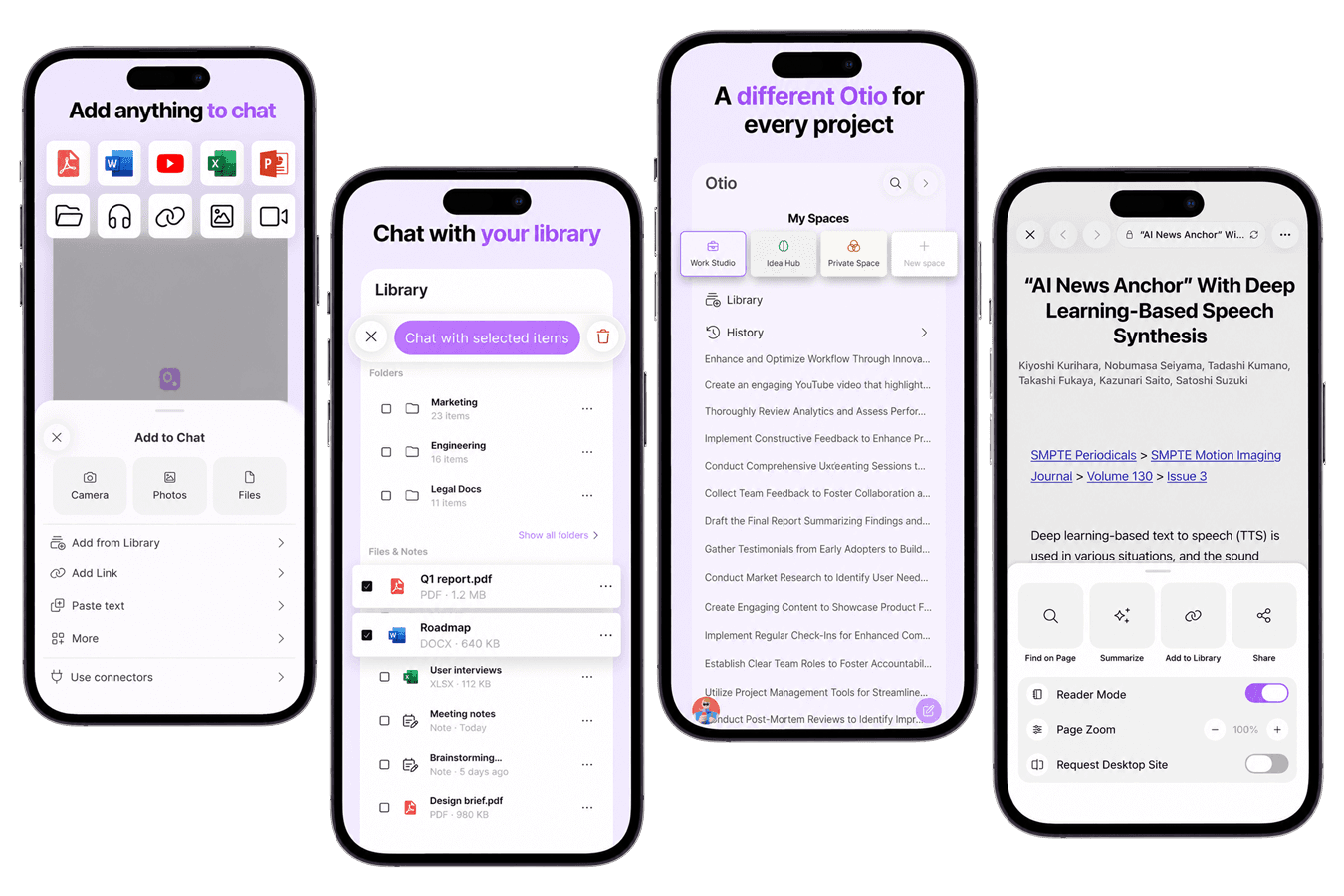
All AI models in one app
ChatGPT, Claude, Gemini, Grok, Llama, DeepSeek and more - switch models mid-chat. Every model on every plan, including free. No model gating.
No file upload limits
Add as many PDFs, articles, YouTube videos and podcasts as you need and chat across all of them at once. No source caps like the ChatGPT app.
Cited to the exact page
Every answer links to the exact page or timestamp. Tap the source pill to open the original and verify before you use it.
Listen with Read Aloud
Tap the speaker under any answer and Otio reads it out loud, with skip and speed controls - get through your reading on a walk or commute.
How it works
Three taps from source to cited answer
Add anything from your phone, ask any model, then read it or listen on the go.
1. Add anything from your phone
Upload PDFs and files, paste a link, share from Safari or any app, or scan a document. Connect Google Drive, Zotero, Mendeley, Dropbox, OneDrive, or Box.
2. Chat with any AI model
Ask across all your sources at once and switch between ChatGPT, Claude, Gemini and more mid-conversation. Tap any citation to open the source.
3. Read, listen, or build on it
Get a structured starting point you can build on — read it, or tap Read Aloud to listen. You do the thinking; Otio gets you there faster.
Who it's for
Research that moves with you
Do real research in the gaps of the day - on the commute, between meetings, in the field.
Researchers and students
Chat across your papers from your phone, pull findings and quotes, and listen to summaries with Read Aloud on the commute. Every answer cites the exact page.
Lawyers
Review case files, contracts, and depositions between meetings and ask Otio to pull facts and contradictions across them. Every answer traces back to the exact source.
Consultants and analysts
Pull key points and figures from client decks and reports, and capture a chart from the reader into a chat. Pick up on iPhone what you started on desktop.
Writers and journalists
Share a web page, video, or PDF into Otio the moment you find it, then ask questions across everything later. Start writing from a structured synthesis.
Apple integration
Otio lives where your other Apple apps live
Spotlight, Siri, the Share sheet, a built-in scanner, and native iOS design - Otio feels like it belongs on your phone.
Share from any app
Send a web page, PDF, photo, or text from Safari, Mail, Files, Photos, or Notes straight into Otio - saved to your library and attached to your chat instantly.
Document scanner built in
The native scanner auto-detects edges, handles multiple pages, and produces a clean PDF you can chat with immediately - AI OCR makes scanned text fully readable.
Designed for the latest iOS
Native Liquid Glass design on iOS 26+, smart haptics, light/dark theming, and over-the-air updates so the app keeps getting better without you having to do anything.
Cross-device
Capture on your phone, finish at your desk
Your library, chats, and Spaces sync across iPhone, desktop, and web - whatever you start on one device is waiting on the next.
Your library and chats sync everywhere
Save a source on your phone and it's waiting on your desktop. Start a chat on the web and keep it going on iPhone. One account, one library, one set of conversations across every device.
Organize projects into Spaces
Keep each project in its own colour-coded Space - research, work, and personal stay separate, not piled into one feed. One connected library you can search and chat across.
Every format, in one place
PDFs, articles, YouTube videos, podcasts, books, and spreadsheets all live together and are all chattable. Summarize a 2-hour video or a 200-page PDF, then ask follow-up questions.
Put a research assistant in your pocket
Every AI model, no file upload limits, cited answers - on iPhone, desktop, and web. Free to download.
Is there an Otio app for iPhone?
Yes. Otio has a native iPhone app on the App Store. It shares the same account, library, and chats as the web and desktop apps, so your research syncs everywhere. Otio is for researchers, analysts, and students who need to generate charts from CSV data inside a research workspace, where the visualization stays connected to the documents that give it context.
Is the Otio app free?
Can I chat with PDFs on my phone?
Which AI models does the app include?
Does the Otio app have file upload limits?
Can it read answers aloud?
Can I scan documents with it?
Does it sync with the desktop and web apps?
Is there an Android app?
