
Otio × Dropbox Integration
Last Updated June 19, 2026
Turn Your Dropbox Library Into a Research Workspace
Your Dropbox files are already your research library. Connect Otio, import in seconds, and ask any AI model questions across your entire library with cited answers.



200,000+
Professionals worldwide
74
Languages supported
Every
Major AI model on every plan
$7
Lite Tier
The Dropbox migration problem
Your PDFs, reports, and case files live in Dropbox because that's where your team stores everything. To use most AI research tools, you start from zero every time.
Years of research, locked in Dropbox
Your PDFs, reports, and case files live in Dropbox because that's where your team stores everything. The download-then-reupload cycle is high enough friction that most professionals never start.
Manual file transfer kills momentum
Every new analysis means find, download, open, upload again. By the time you're ready to ask your first question, you've lost 20 minutes. Otio eliminates the cycle entirely.
Your library stays where it belongs
Dropbox remains your file home. Otio becomes your research workspace. No duplication, no version control headaches, no wondering which copy is current.
One connection, unlimited research
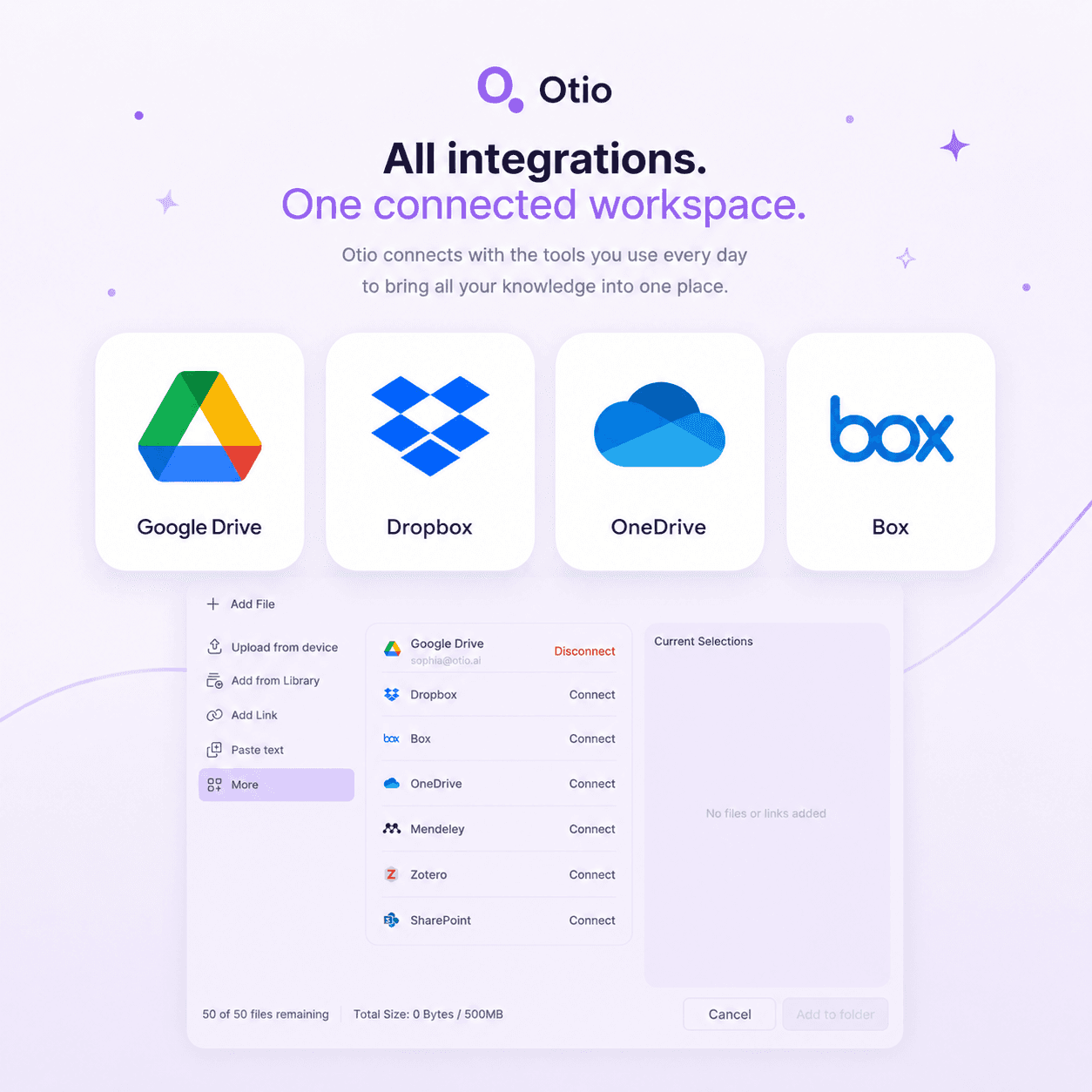
Connect your Dropbox account once. From then on, importing files takes seconds. Mix Dropbox PDFs with web articles, YouTube videos, and podcasts in the same workspace.
Beyond storage - research across everything
Research across your entire library, not one file at a time
Dropbox stores your files. Dropbox Dash finds them. Dropbox AI summarises one at a time. Otio researches across all of them at once, with every leading AI model and cited answers.

Cross-document synthesis
Ask one question, get answers synthesised from your entire Dropbox library, with every claim cited to the exact page.
Every AI model in one place
Claude, GPT, Gemini, DeepSeek, Grok. Switch models mid-session. Compare how each interprets the same Dropbox file.
Cited answers, verify in one click
Every answer traces back to the exact page and passage. Click the citation to jump to the source. No hallucinated references.
Holds more than Dropbox files
Import PDFs from Dropbox. Add articles, YouTube videos, podcasts, CSVs to the same workspace. Query everything together.
How the Dropbox integration works
Three steps: connect, import, research
No manual configuration, no API keys, no IT involvement. Your files stay in Dropbox; Otio imports only what you select.
1
Authorize Otio to access your Dropbox files in one click. No manual configuration, no API keys, no IT involvement. The connection is direct and secure.
2
Browse your Dropbox folders from inside Otio. Choose the PDFs, Word docs, or CSVs for your current project. Import in seconds, no version confusion.
3
Your Dropbox files become part of your research workspace. Pull key findings, compare arguments, or extract specific data across all of them. Every answer cites the exact page.
Built for source-heavy professionals
How professionals use Otio with their Dropbox libraries
Researchers, consultants, lawyers, analysts, writers. Otio works with any source-heavy workflow.
Upload 60 papers from Dropbox. Pull key findings across all of them in one query. Start your literature review from a structured synthesis, with every claim cited to the exact page.
Case files, depositions, compliance docs from Dropbox. Pull facts, themes, contradictions across documents. Every answer traced to the exact source. Stop losing billable hours to discovery piles.
Data files and market reports from Dropbox. Extract specific figures without reading every page. Build visualisations from CSVs. Stop losing a day to data you only needed three lines from.
Connect your Dropbox and try Otio free. Full access, no credit card.
No model lock-in
Claude, GPT, Gemini, DeepSeek. Choose the model, keep your files.
Dropbox AI locks you into Dropbox's model. Otio gives you every leading model in one workspace. Switch mid-session. Compare how each interprets the same Dropbox file.
Claude
GPT-4
Gemini
DeepSeek
+ more
Stop stacking subscriptions
Most professionals pay for multiple AI subscriptions because no single tool does it all. Otio consolidates every model into one workspace. Save the $60–80/month on overlapping subscriptions.
Your train of thought stays on the rails
No more copying your prompt, opening a new tab, pasting it into Claude. Ask once. Switch models with one click. Sources, conversation, and citations stay intact.
Model choice matters for research
Claude handles nuanced synthesis. GPT-4 is strong on structured extraction. Gemini processes large contexts efficiently. Pick the right model per task without rebuilding your workspace.
Cited answers you can trust
Every answer traces back to the exact page and passage
ChatGPT invents authors, fake journals, and page numbers that don't match. Otio generates answers only from the material you've uploaded. Every claim cites the exact source. If the answer isn't in your documents, Otio tells you.
Click any citation and jump directly to the source passage. Verify before you write, present, or submit. Lawyers need citations that hold up in discovery. Researchers need references that pass peer review. Otio is built for both.
100%
of Otio answers cite the exact source page
No hallucinated references. No fake page numbers. Click any citation to verify in one click.
Testimonials
What professionals say about Otio

@otio is really an excellent tool for understanding my papers. It is just like my personal librarian for the internet!

Feng Chun
Neuroscience PhD
I took a 2 hour YouTube video and had the AI in Otio summarise it. I then asked follow-up questions about the highlighted pieces that got my attention. All told, I was able to collect key takeaways in less than 10 mins. Amazing.

DnA
Researcher
I was fed up fighting with ChatGPT every time I wanted to do a deep dive on a library of research papers I had collected. It's the small things that made me switch - can't recommend it enough.

Karthik S.
Policy Analyst





Security and privacy
Your Dropbox files stay yours
Otio imports your files into your private workspace. Used only for research within your account. Never used for model training, never shared, never accessible to anyone else.
OAuth-secured Dropbox connection
You control which files Otio can access. Revoke anytime from Dropbox settings.
No model training, ever
Your documents are used only for your research. Never used to train models. Never shared with third parties.
No vendor lock-in
Your research library is exportable. Take your data with you anytime. Dropbox files stay in Dropbox.
Trusted with sensitive work
Lawyers use Otio for discovery. Pharmaceutical researchers for proprietary data. Consultants for client briefs.
Common questions about Spreadsheet AI in Otio
How does the Dropbox-Otio integration work?
Connect your Dropbox account to Otio using OAuth. Browse your folders from inside Otio and select files to import. Imported files are immediately available to query. Add more anytime.
Does Otio use my Dropbox files for model training?
What's the difference between Dropbox AI and Otio?
Which file types from Dropbox can I import?
Can I add non-Dropbox sources to the same workspace?
How do I know Otio's answers are accurate?
What happens to my files if I cancel?
Can I try it free?
Connect Dropbox and start researching today
Every AI model. Cited answers. Your Dropbox files stay yours.