
Version 2.0 is here!
Last Updated June 18, 2026
Spreadsheet AI that connects your data to your research
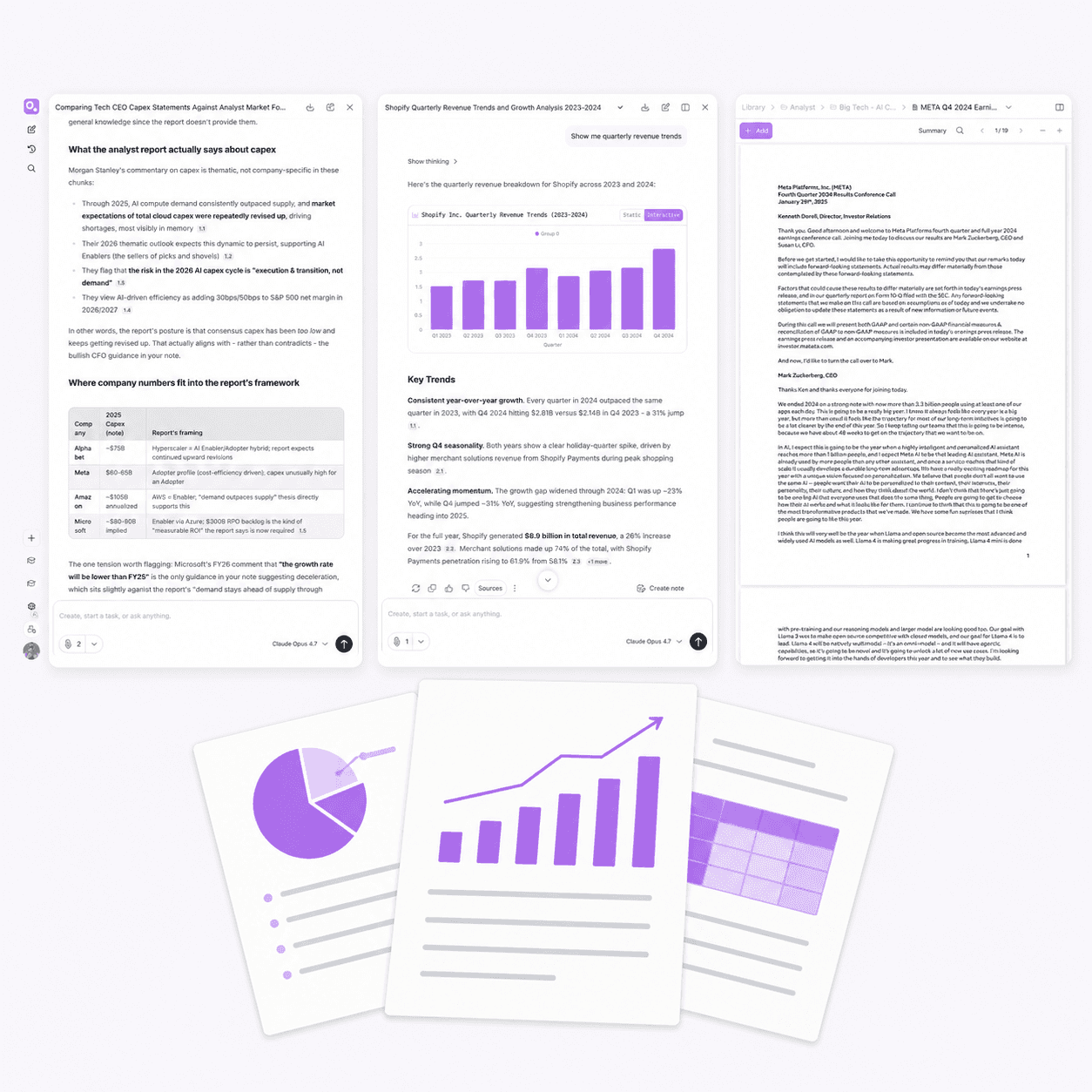
Upload your CSV and your report. Ask one question across both. Otio puts spreadsheet data and your PDFs, transcripts, and articles in the same workspace - cited to the exact source.



200,000+
Professionals worldwide
CSV + PDF
In the same workspace
Every
AI model on every plan
$7
Lite Tier
Boost your productivity
What you can do with a CSV in Otio
Upload your spreadsheet, ask plain-language questions, and get visualizations cited back to the data. Cross-reference figures against the documents that explain them - in one workspace.

Ask in plain language, get charts
Upload your CSV and ask what you want to know. Otio generates the visualization. No formulas, no pivot table configuration.
Extract figures without reading every row
Pull exact numbers from a 500-row dataset in seconds. Ask for totals, averages, or specific values and Otio surfaces them with context.
Cross-reference data with documents
Upload the earnings CSV and the earnings call transcript. Ask one question that spans both, cited to the exact source.
Switch AI models to compare interpretations
Ask the same question using ChatGPT, Claude, or Gemini. No tier gating. Choose the model that interprets your dataset most accurately.
Honest positioning
If you need AI inside Excel or Sheets, this isn't it
If you need AI to generate formulas, build pivot tables, or work inside Excel cells, tools like Copilot or Numerous.ai handle that well. Otio is built for a different workflow — when you have data in a CSV that needs to be understood alongside the report, paper, or transcript that explains it.
Otio doesn't replace your spreadsheet. It reads your data.
The spreadsheet is a source in your research workspace, not the whole workflow. Upload the CSV alongside the documents that explain it and ask one question across both.
Data analysis as part of research, not separate from it
The figure you extracted from a spreadsheet in one tab is answerable in the same session as the paper that explains what caused it. No context-switching, no fragmentation.
Built for analysts and researchers who work across sources
Financial analysts cross-referencing earnings data with call transcripts. Environmental consultants pulling compliance figures while reviewing regulatory filings. Researchers analyzing survey data alongside literature.
How it works
From upload to insight in 3 steps
1
Upload your CSV and related documents
Drag your CSV into Otio alongside the PDFs, reports, or transcripts that provide context. Connect Google Drive, Dropbox, OneDrive, or Zotero if your files live there. Everything stays in one workspace.
2
Ask questions across data and documents
Type your question in plain language. "What were the top three expense categories in Q3?" Otio pulls answers from the CSV and the documents together. Every answer cites the exact source.
3
Generate charts and export when ready
Ask for a visualization and Otio produces the chart. Refine your question or switch AI models to compare interpretations. Export your analysis with citations when you're ready.
Use cases
Who uses Otio for data analysis
Financial analysts
Upload the quarterly earnings CSV and the earnings call transcript. Ask one question that spans both: "What explains the margin compression mentioned in the call?" Otio pulls the figures from the data and the explanation from the transcript, every answer cited.
Environmental consultants
Upload compliance datasets alongside regulatory documents. Extract specific figures without reading every page, then cross-reference them against the filing requirements. The data and the documentation stay connected in one workspace.
Researchers
Upload your survey results as a CSV and the papers that contextualize your findings. Ask Otio to pull trends from the data and compare them to the literature. Start your analysis from a structured synthesis instead of a blank page.
Policy professionals
Upload market analysis CSVs and policy briefs. Ask questions that span both: "How do these employment figures align with the policy recommendations?" Otio connects quantitative data to qualitative analysis, saved for when you're drafting your brief.
Competitive differentiation
Why not just use ChatGPT or a dedicated data tool?
Upload a CSV to ChatGPT and it's gone the next time you open a new session. Otio stores your CSV and your documents in one persistent workspace. The data, the analysis, and the citations stay saved.
Dedicated data tools are built for spreadsheets, not research workflows. They don't let you upload the report that explains the data or the transcript that provides context. Otio connects your CSV to your PDFs, articles, and transcripts in the same session.
Most tools lock you into one AI model or charge extra for access to others. Otio gives you ChatGPT, Claude, Gemini, and more in every plan. Switch models to compare interpretations and choose the one you trust.
Testimonials
What professionals say about Otio




I've been using Otio for a while now and I must say how much I like it! It’s incredibly helpful for summarizing key takeaways from research papers and long videos or podcasts, knowing from the start if the research is what I’m looking for and then allowing me to revisit important points precisely when I need them.

Dana S.
Economist
Truly loved interface: it’s very straight forward and intuitive vs other ai's. Especially vs having 100 tabs open and copy & pasting back and forth from ChatGPT

Natalya Z
Pharmaceutical Researcher
This is the exact tool I've been looking for…I've gathered an overwhelming collection of over 700 bookmarks and 190 open web browser tabs. These resources are my roadmap to research, but navigating through them has become increasingly challenging.
This has been the beacon I need in this sea of information.

Tracy
Founder
Love what you guys are doing and when I tried Otio out it really had me like *WOAH*.

Cosmo
Researcher



Integrations
Works with the tools you already use
Connect your file storage
Link Google Drive, Dropbox, OneDrive, or Box. Your CSVs and documents sync automatically so you don't have to re-upload files every time you start a new session.
Sync your reference manager
Connect Zotero or Mendeley to pull your research library into Otio. Your papers, datasets, and annotations stay organized and queryable in one place.
Upload anything: PDFs, CSVs, videos, podcasts
Drag in any file format. Otio handles them all in the same workspace. Ask one question that spans multiple sources and get an answer cited to each.
Common questions about Spreadsheet AI in Otio
Is Otio a replacement for Excel or Google Sheets?
No. Otio is a research workspace that includes CSV analysis, not a spreadsheet tool for formula writing, dashboard building, or ongoing data management. If you need AI to generate formulas or work inside Excel cells, tools like Copilot or Numerous.ai are better fits.
What can I do with a CSV in Otio?
Can I analyze my spreadsheet data alongside PDFs and reports?
What file types can I upload for data analysis?
How big of a CSV can Otio handle?
Will Otio actually produce useful charts?
How does Otio compare to ChatGPT for data analysis?
Do I need to know how to write formulas or prompts?
Stop switching between your data and your documents
All features, every AI model, every integration. No credit card required.