
AI OCR for PDFs
Last Updated June 18, 2026
AI OCR PDF: scanned documents become research sources
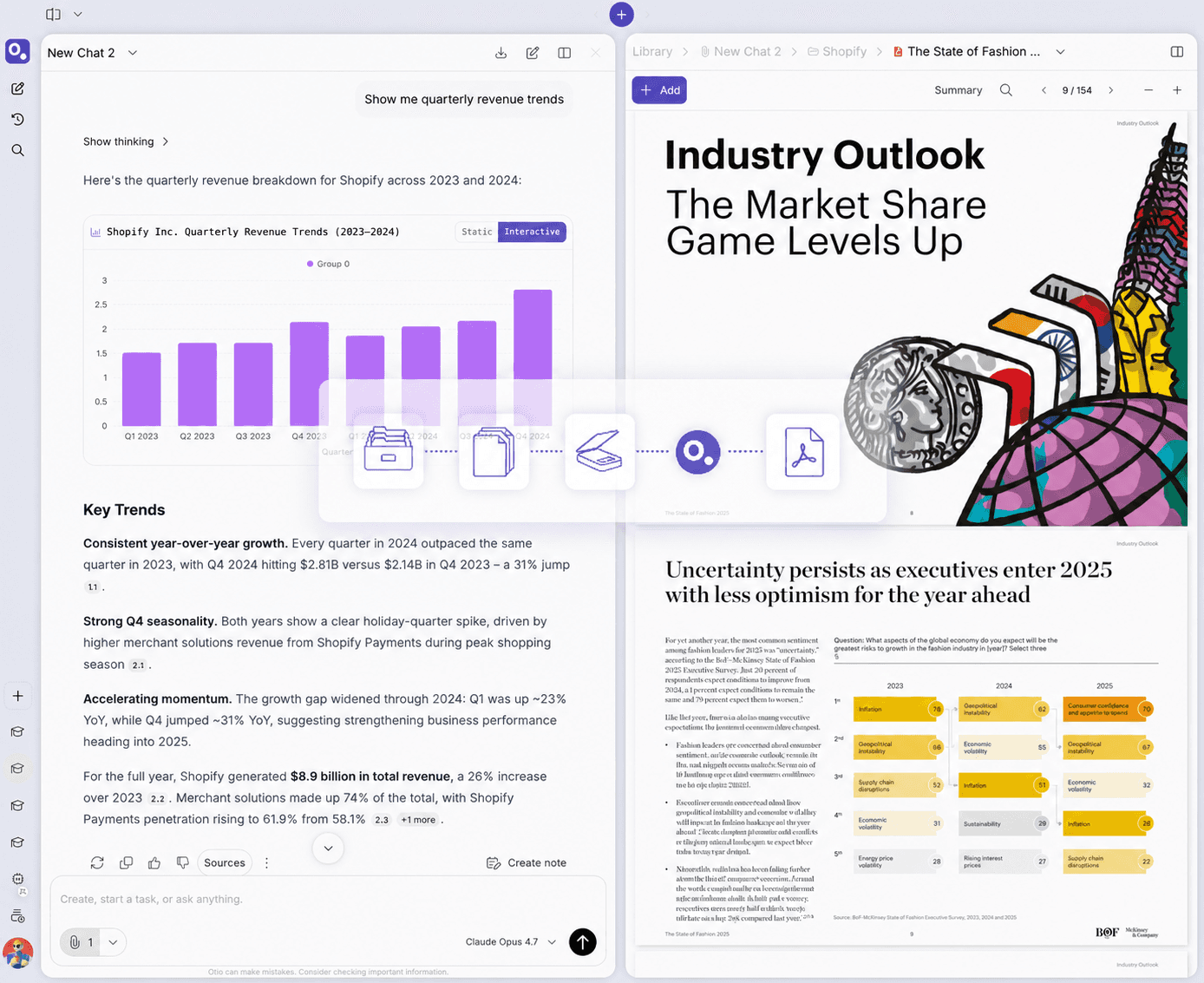
Standard AI tools fail on scanned PDFs. Otio uses its own dedicated OCR service to process legacy case files, archival papers, physical scans. Then they live in your workspace as permanent, queryable sources.



200,000+
Professionals worldwide
Otio's
Dedicated OCR service
100s
Of files, batched at once
$7
Lite Tier
The problem with standard OCR tools
Why most OCR tools leave you stuck
Extraction-only tools hand you back a text file and stop. The scanned PDF doesn't live anywhere useful. The workflow breaks the moment OCR finishes.
Extraction ends, manual work begins
Adobe Acrobat and ABBYY FineReader extract text with high accuracy, then hand you back the file and stop. Copy into ChatGPT. Paste into a note app. Start over for the next document. The extraction solved one problem and created three more.
AI tools fail on scanned documents
ChatGPT, Claude, Gemini cannot read image-based PDFs without OCR preprocessing. Upload a scanned discovery file or archival paper and the AI returns an error or a generic summary proving it never read the content.
No workspace, no workflow
Standard OCR tools don't offer a research workspace. The scanned doc gets converted but doesn't become a queryable library source you can interrogate alongside depositions, case files, or compliance docs.
The copy-paste loop never ends
Extract in one tool. Copy into ChatGPT. Realize you need another scanned doc. Extract that one. New ChatGPT session. Lose your train of thought somewhere in the middle. The OCR tool and the AI tool don't talk to each other.
What makes Otio's OCR different
Scanned PDFs become research sources, not just text files
Dedicated OCR infrastructure, permanent workspace storage, cross-source queries across scanned and modern documents. The workflow connection extraction-only tools don't offer.
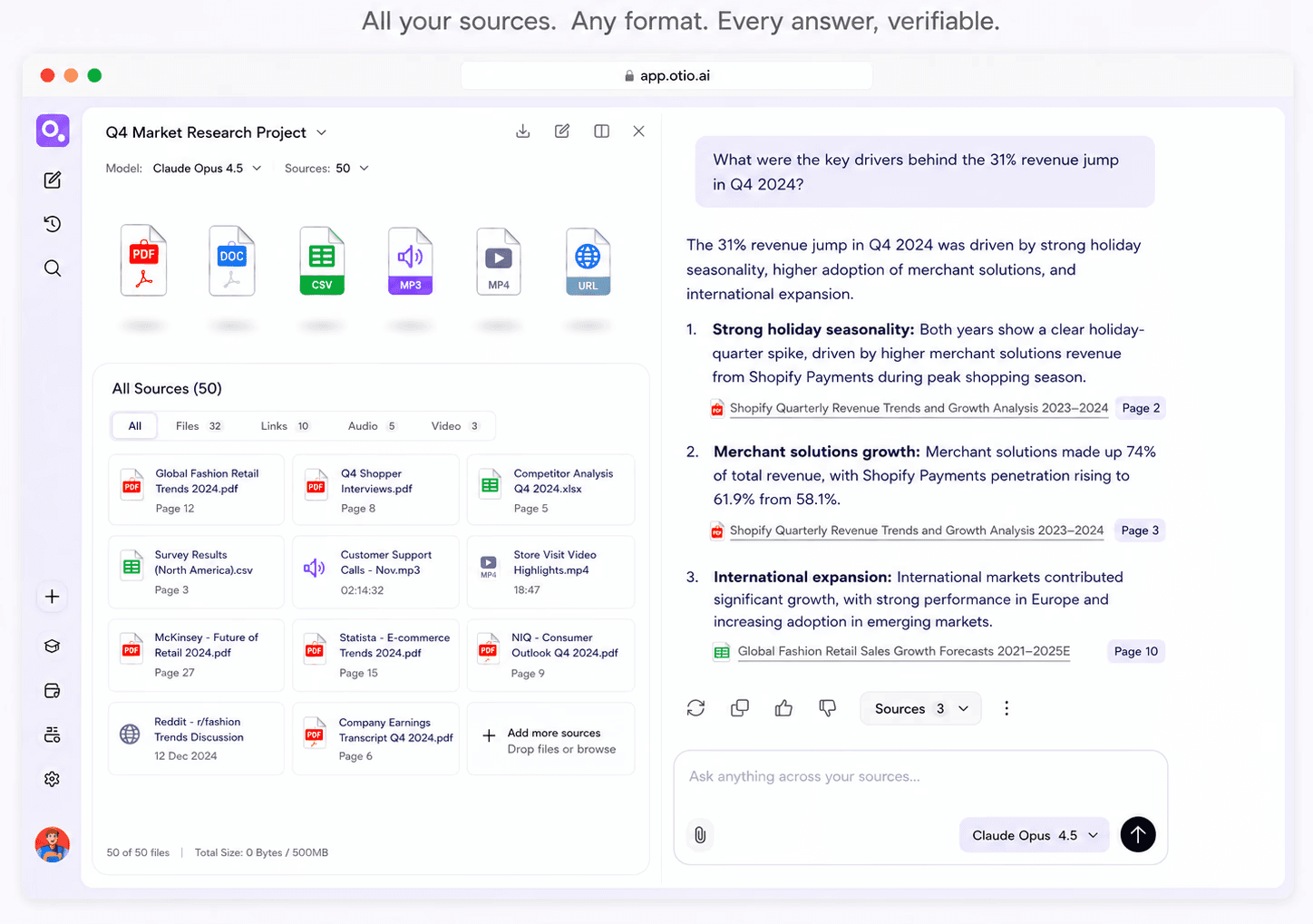
Dedicated OCR — not a fallback
Otio uses its own dedicated OCR system. Not a generic AI layer. Signals professional-grade infrastructure investment.
Permanent workspace storage
After OCR processing, the scanned doc stays in your workspace permanently. Ask today, return next month, cross-reference with materials you upload later.
Cross-source: scanned + modern
Upload the 1990 case file (scanned) and the 2024 paper that cites it. Ask Otio to pull themes across both. Scanned docs treated as equals.
Cited to the exact page
Every answer about the scanned document cites the exact page and passage. Click to verify in one step. Legal-grade precision.
How it works
From scanned PDF to research source in three steps
No manual intervention per file. Upload, let Datalab do its job, query like any other source.
1
Upload your scanned PDFs
Drag and drop, or connect Google Drive, Zotero, Mendeley, Dropbox, OneDrive, Box. One document or a hundred - batch processing handles the volume.
2
Otio processes the OCR
Otio's dedicated OCR system converts scanned pages into readable text. Automatic, in the background, no manual intervention per file. Purpose-built - not a fallback.
3
Query like any other source
The scanned document becomes a permanent workspace source. Ask questions, cross-reference with other materials, choose any AI model. Every answer cites the exact page.
Use cases
Who needs AI OCR PDF capabilities
Legal discovery, archival research, compliance work, physical scan conversions. Anywhere scanned documents pile up.
Legal discovery and case files
Upload 100 scanned discovery PDFs - depositions, case files, compliance docs. Datalab processes them all. Pull key facts, themes, contradictions across the batch. Every answer cites the source. Billable hours stay on analysis, not text extraction.
Archival research and historical documents
Academic work with older journal articles, institutional archives, historical documents. Standard AI tools fail to read them. Otio processes the scan and the 1980 survey lives in the same workspace as the 2024 analysis that references it.
Compliance and regulatory files
Scanned regulatory filings, audit reports, legacy policy documents. Upload the entire pile. Otio reads them all, then lets you query for specific clauses, policy changes, or audit findings. Permanent workspace sources, not one-time extractions.
Physical scan conversions
Meeting notes, handwritten reports, printed research papers — physical documents converted to PDF often lack text layers. AI tools can't read them without OCR. Otio handles the processing via Datalab, then the scan becomes a research source like any other.
Testimonials
What our users say



I've been using Otio for a while now and I must say how much I like it! It’s incredibly helpful for summarizing key takeaways from research papers and long videos or podcasts, knowing from the start if the research is what I’m looking for and then allowing me to revisit important points precisely when I need them.
Dana S.
Economist
Truly loved interface: it’s very straight forward and intuitive vs other ai's. Especially vs having 100 tabs open and copy & pasting back and forth from ChatGPT

Natalya Z
Pharmaceutical Researcher
This is the exact tool I've been looking for…I've gathered an overwhelming collection of over 700 bookmarks and 190 open web browser tabs. These resources are my roadmap to research, but navigating through them has become increasingly challenging.
This has been the beacon I need in this sea of information.

Tracy
Founder
Love what you guys are doing and when I tried Otio out it really had me like *WOAH*.

Cosmo
Researcher



Frequently asked questions about AI OCR PDF
Can Otio read scanned or image-based PDFs?
Yes. Otio uses its own dedicated OCR system, to process scanned and image-based PDFs. Not a fallback or generic AI layer - a purpose-built service. Text-layer PDFs don't need OCR; scanned PDFs are processed via Otio automatically on upload.
What happens to the scanned PDF after OCR?
Can Otio handle poor-quality scans or complex layouts?
Can I process multiple scanned PDFs at once?
Does Otio handle handwritten documents?
How does Otio compare to Adobe Acrobat or ABBYY FineReader?
Can I use Otio with my existing OCR tools?
Turn your scanned pile into a queryable library today
Otio OCR included. Every AI model. Cited answers. No credit card.