
AI Data Analysis
Last Updated June 19, 2026
AI data analysis that connects your CSVs to your documents
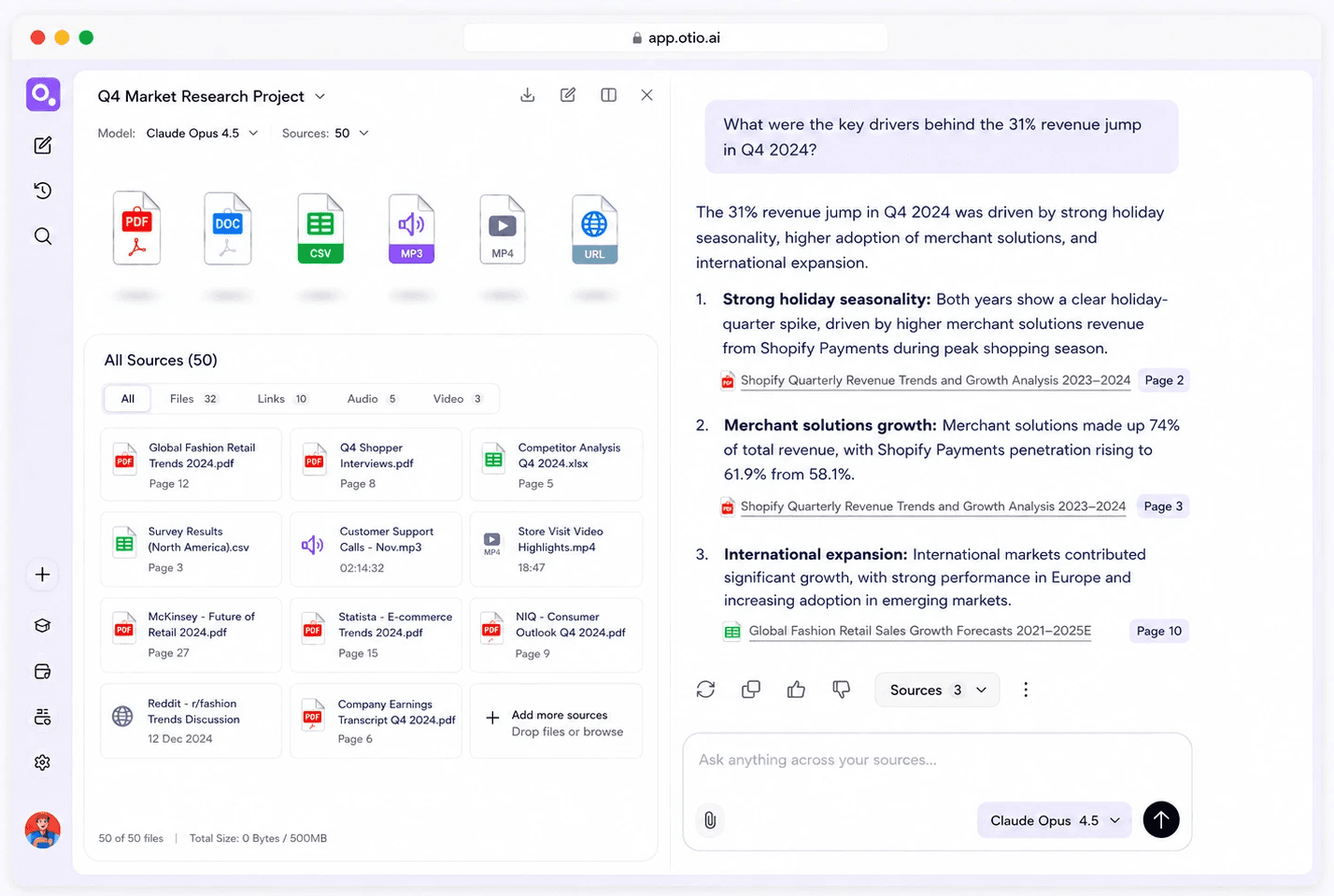
The earnings data and the transcript explaining it. The survey results and the literature they inform. Upload both, ask one question across both, get cited answers spanning your data and your text.



200,000+
Professionals worldwide
CSV + PDF
In the same workspace
Every
AI model on every plan
$7
Lite Tier
The fragmentation problem
Stop losing context between your data tool and your document tool
Analysts and researchers spend mental energy bridging data and text across separate platforms. Every tool switch loses the thread.
Financial analysts upload CSVs to one platform and read earnings transcripts in another. Environmental consultants analyse survey data separately from the compliance reports that contextualise it. The findings sit disconnected from the documents that explain them.
Extract a figure from your CSV. Switch to your document tool. Paste the number into a prompt. Wait. Switch back. Compare. Lose momentum somewhere in the middle. The workflow breaks your focus.
ChatGPT and Claude accept file uploads but don't store your data. Every session starts from scratch. No persistent workspace, no connection between your CSV and your PDFs. The analysis you did yesterday is gone.
Power BI and Tableau are powerful for dedicated data teams. But they don't analyse PDFs, transcripts, or research papers. If your work spans data and text, you're still using two tools.
Cross-source capability
Ask one question across your CSV and your PDFs
Upload your CSV and the reports that explain it. Get cited answers that span both sources. Every claim traced back to the exact page or data point.

Plain-language visualisations
No formulas, no config. Ask 'show me revenue trends by quarter.' Otio generates the chart. Trends, comparisons, outlier detection.
Earnings data + transcript
Upload quarterly earnings CSV + earnings call transcript. Ask: what drove Q3 revenue and what did leadership say? Cited answers from both sources.
Survey data + compliance doc
Upload environmental monitoring data + regulatory compliance filing. Otio flags outliers in your data and cites the specific regulatory limits.
Every AI model, no restrictions
Choose Claude, GPT, Gemini, or DeepSeek to interpret your data. Switch between models to compare. All models on all plans.
How it works
Three steps: upload, ask, export
CSVs and documents in the same workspace. Plain-language questions. Charts and cited answers, in one place.
1
Upload your CSV and your documents
Drag and drop CSVs, PDFs, articles, transcripts, reports. Connect Google Drive, Zotero, Mendeley, Dropbox, OneDrive, Box. Everything stays in one workspace.
2
Ask in plain language
"Show me revenue trends by quarter." "Which data points exceed the threshold in the compliance doc?" Every answer cites the exact page or data point. Switch AI models any time.
3
Export your analysis when ready
Generate charts and visualisations. Pull key findings from your documents. Build your deliverable from a structured synthesis. Analysis stays in your workspace - come back any time.
Honest framing
Otio is not a BI platform
For enterprise dashboards, live data connections, and full BI workflows, Power BI and Tableau are the right tools. Otio is built for analysts and researchers who need ai data analysis to connect to their documents.
Where Otio wins
CSV analysis and chart generation inside the same workspace as PDFs. Cross-source questions spanning data and text simultaneously. Every AI model, every plan.
Permanent storage
The CSV and its analysis stay in your workspace. Come back next week. Ask new questions. Nothing resets between sessions.
Research-scale, not enterprise-scale
Optimised for research CSVs and data files. Not for enterprise-scale data pipelines or real-time dashboards - use a dedicated BI tool if that's the workflow.
What Otio does NOT do
No financial modelling. No live data feeds. No enterprise BI dashboards. Otio accelerates the research phase that feeds your models and reports.
Use cases
Built for the intersection of data and text
Financial analysts, environmental consultants, academic researchers, policy professionals. Anyone whose work spans CSVs and documents.
Financial analysts
Upload quarterly earnings CSVs and earnings call transcripts. Ask: what drove the revenue increase, and what did leadership say about it? Otio pulls figures from data and executive commentary from transcripts. One answer, two sources, fully cited.
Environmental consultants
Upload environmental monitoring data and regulatory compliance filings. Ask: are there any data points that exceed the thresholds in the compliance doc? Otio flags outliers and cites the specific regulatory limits.
Academic researchers
Upload experimental survey data and 20 research papers. Ask: how do my results compare to findings in the literature? Otio identifies patterns and cross-references with papers, every comparison cited to the exact source.
Policy professionals
Upload market analysis CSVs and policy briefing documents. Ask: what trends in the data align with the policy recommendations? Otio connects data trends to policy context, every claim traced back to source.
Testimonials
What our users say

@otio is really an excellent tool for understanding my papers. It is just like my personal librarian for the internet!

Feng Chun
Neuroscience PhD
I took a 2 hour YouTube video and had the AI in Otio summarise it. I then asked follow-up questions about the highlighted pieces that got my attention. All told, I was able to collect key takeaways in less than 10 mins. Amazing.

DnA
Researcher
I was fed up fighting with ChatGPT every time I wanted to do a deep dive on a library of research papers I had collected. It's the small things that made me switch - can't recommend it enough.

Karthik S.
Policy Analyst






Common questions from financial professionals
Is Otio a replacement for Power BI or Tableau?
No. Otio is a research workspace that includes CSV analysis, not a BI platform for dashboards, live data connections, or enterprise reporting. For dedicated BI workflows, Power BI and Tableau are the right tools. Otio is built for analysts and researchers who need CSV data to connect to their documents.
What can I ask about a CSV in plain language?
Can I analyse my data alongside PDFs in the same session?
What size CSV files can Otio handle?
What types of charts can Otio generate?
Can I trust Otio to give me accurate information?
Why wouldn't I just use ChatGPT for data analysis?
Is there a free plan?
Analyse your data in the same workspace as your documents
CSV + PDF in one session. Every AI model. Cited answers. No credit card.