
Document Research Workflows
Extract Data From Multiple PDFs Without Losing Source References
Extract comparable fields from multiple PDFs while preserving document titles, page numbers, quoted evidence, and uncertainty. Follow a repeatable workflow for text-based and scanned files.

Updated October 19, 2026.
The reliable way to extract data from multiple PDFs
To extract data from multiple PDFs without losing source references, do the work in this order: define the fields first, collect and label the PDFs, extract the same fields from every file, validate the evidence, and only then export the structured results.
The useful output is not just a spreadsheet of values. It is an evidence set: every row can be traced back to a document, page, section or table, and supporting passage.
That is the difference between structured extraction and summarization. A summary gives you a readable overview. Structured extraction gives you comparable values, claims, measurements, or definitions with provenance. If you are reviewing studies, contracts, policy reports, diligence materials, or regulatory filings, provenance is the work.
A compact evidence record should include:
Source ID: a stable label such as
Study-03orReport-02Document title or identifier: not just the filename
Page number: with a note on whether it is the PDF viewer page or printed page
Section, table, figure, or appendix: when available
Verbatim supporting text: the passage that justifies the extracted value
Extracted value: the structured field value
Uncertainty note:
not found,OCR checked,conflicting,low confidence, or similar
For a broader tool-by-tool view of PDF extraction, see Otio’s companion guide to AI tools to extract data from PDF. This workflow is narrower: it focuses on multi-PDF extraction where comparable fields and page-level references matter.
Define the extraction schema before opening the PDFs
Start with the research question, not the documents. If the question is “Which studies report an effect on hospital readmission?”, the schema might include study design, sample size, population, intervention, comparator, outcome definition, unit, result, follow-up period, and page-level evidence.
If the question is “What obligations differ across supplier contracts?”, the schema might include agreement date, party names, renewal term, termination notice period, governing law, limitation of liability, data-processing clause, and exception language.
A schema is just a fixed structure for what you will extract. Schema-based extraction maps unstructured or semi-structured material into predefined fields, rather than asking the model to decide what matters each time. LlamaIndex gives a concise definition: schema-based extraction pulls specific structured information from unstructured or semi-structured data by mapping it to a predefined format (LlamaIndex).
A practical schema should specify the expected format for every field:
Number: sample size, contract value, percentage, rate, page count
Date: publication date, effective date, follow-up date, filing date
Controlled term: randomized trial, retrospective cohort, master services agreement
Short quotation: exact clause, outcome wording, definition, eligibility criterion
Multiple values: several outcomes, several jurisdictions, several cohorts
Explicit absence:
not found, rather than leaving a blank cell
Decide how ambiguity will be represented before extraction begins. This is where many datasets become unusable. Use distinct labels for distinct problems:
Unknown: the value may exist, but extraction did not establish it
Not reported: the document appears not to state the value
Not applicable: the field does not apply to that document type
Illegible: the source exists but cannot be read reliably
Conflicting: the document or corpus reports more than one value
Add provenance fields directly to the schema. Do not treat citations as something to paste in later. At minimum, every extracted value should carry a source ID, page, section or table, evidence quote, and confidence or verification status.
The University of North Carolina’s systematic review guidance makes the same operating point in review language: extraction templates should be determined by the needs of the specific review (UNC Health Sciences Library). In other words, there is no universal “PDF extraction” template. There is a template for this decision, this review, this dataset.
Changing field definitions midway creates incomparable rows. If outcome means the primary endpoint for the first 12 PDFs and any reported endpoint for the next 18, the export will look clean but answer the wrong question. When a field must change, version the schema and record which files were extracted under which definition.
Collect, label, and prepare the PDF corpus
Before extraction, create stable labels. Use labels that will survive renaming, exporting, and re-uploading:
Study-01Study-02Report-2026-01Contract-2026-03Filing-APolicy-Brief-04
Keep the original filename, document title, version, publication date, and access date beside the stable label. A filename like final_final_v3.pdf is not a citation. A stable label plus source metadata is.
Next, check whether each PDF contains selectable text or is scanned image-only. Text-based PDFs can usually be searched, copied, and parsed directly. Scanned PDFs need optical character recognition, or OCR, before most AI or extraction tools can work with their contents.
OCR is useful, but it is not neutral. It can misread digits, decimal points, minus signs, Greek letters, footnote markers, columns, headers, and superscripts. A sample size of 184 can become I84. A confidence interval can lose a bracket. A table row can be joined to the wrong column.
For that reason, OCR output should be checked against the page image for values that matter. This is especially important for scanned clinical studies, financial statements, handwritten forms, old contracts, photocopied appendices, and low-resolution exhibits. If the file is scanned, mark the extraction record as OCR-derived until it has been visually checked.
Separate document versions. Report-02-v1 and Report-02-v2 may differ in exactly the field you care about. Remove exact duplicates, but do not silently delete near-duplicates. In policy, legal, scientific, and diligence work, a small revision can carry the central update.
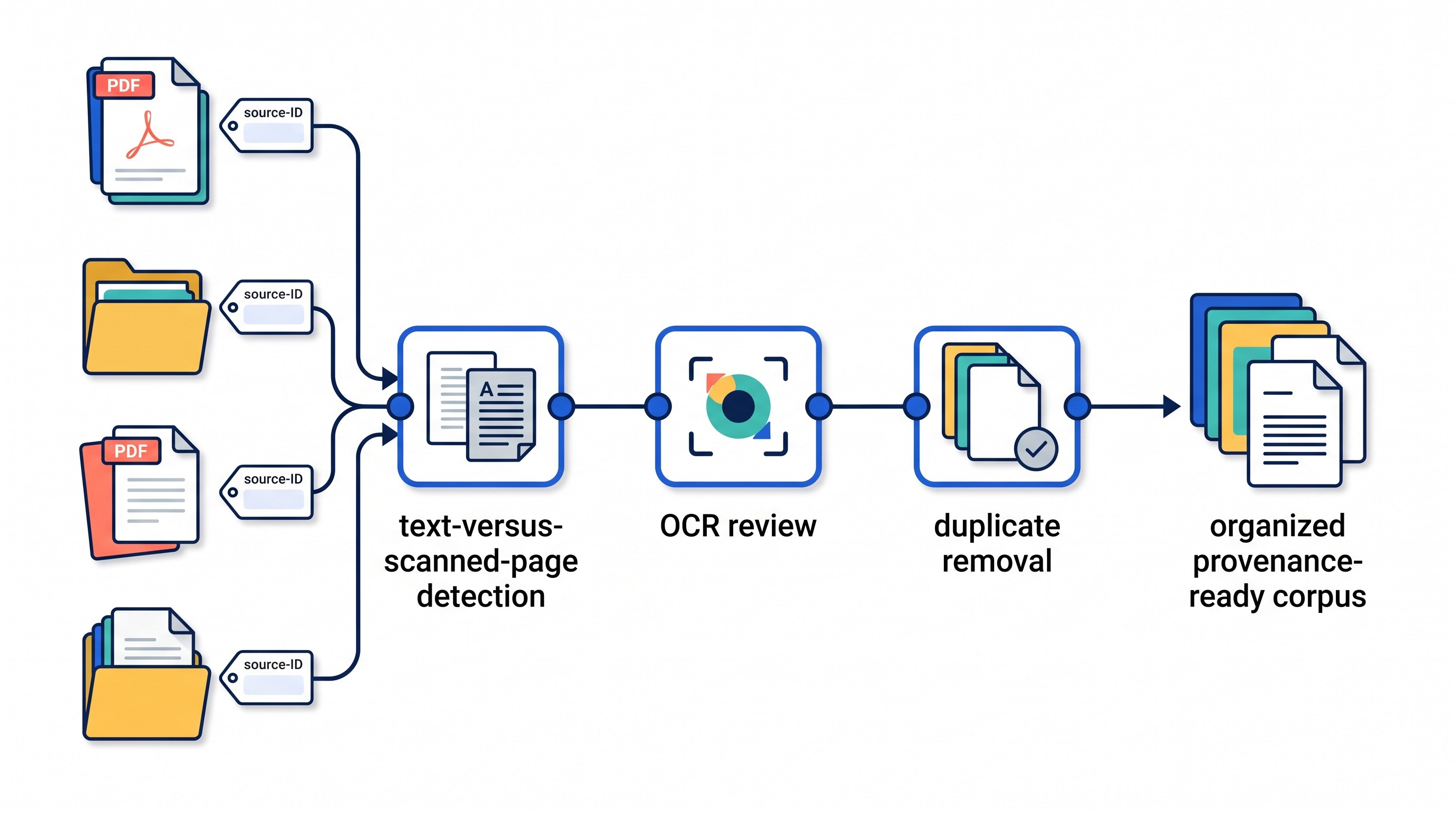
A workspace helps here because preparation is rarely linear. You find a missing appendix. A colleague sends a corrected version. OCR fails on one file. A note from yesterday explains why a duplicate was not removed.
Otio’s AI PDF reader is useful at this stage because the PDFs, notes, folders, and follow-up questions stay in one library instead of being split across a file manager, chat window, and scratch document. For scanned files, Otio’s AI OCR for PDFs can help make image-only PDFs searchable, while still leaving the important work of checking extracted values against the original page.
Extract the same fields from every PDF with a controlled prompt
The extraction prompt should behave like a contract. It names the schema, defines the output rules, prohibits invented values, and requires source evidence for every populated field.
A good prompt does five things:
Uses a fixed schema: the same fields in the same order for every PDF
Requires one record per document: no merging documents unless explicitly asked
Forces absence to be explicit: use
not foundwhen the document does not report a fieldRequires evidence: include a verbatim quote and page reference for every populated value
Preserves uncertainty: flag ambiguous page numbers, illegible text, conflicting values, or inferred values
Prompt research on structured data extraction treats reusable prompt patterns as building blocks for extracting desired information from unstructured text (Moundas, Prompt Patterns for Structured Data Extraction). The practical implication is simple: do not improvise a new instruction for each file if you need comparable output.
Here is a reusable pattern for research PDFs:
Task: For each PDF, extract one row using the schema below.
Schema: author, publication year, study design, sample size, population, intervention, comparator, primary outcome, reported unit, result, PDF page, printed page if different, section or table, verbatim evidence, uncertainty.
Rules:
Use the same schema for every document.
Use
not foundwhen a field is absent.Do not infer values from context.
Preserve original units, dates, terminology, ranges, and statistical notation.
For every populated field, include a short verbatim quote from the source.
Include the document label and page number for every quote.
If page mapping is uncertain, say so.
If the value comes from a table, identify the table number and relevant row or column labels.
If a footnote changes the interpretation, include the footnote in the evidence or uncertainty note.
That last part matters more than it sounds. Tables are where many extraction errors happen. A model may pull a number from the right table but the wrong row. It may miss that the denominator changed between columns. It may ignore a footnote saying that values are medians rather than means.
Ask for table and footnote handling directly:
Identify the table, figure, appendix, or exhibit.
Record row and column labels when the value comes from a table.
Preserve footnote symbols and definitions.
Do not normalize units until the original unit has been recorded.
Flag multi-page tables where headers repeat or change.
For long documents, process consistently in batches or one document at a time. The main risk in batching is that the extractor blends sources, especially when documents share authors, titles, sections, or tables. Combine rows only after each source has been extracted against the same schema.
For legal, policy, or diligence PDFs, the pattern is the same but the fields change:
Task: For each contract PDF, extract one row using this schema: source ID, agreement title, effective date, parties, term, renewal clause, termination notice period, governing law, liability cap, data-processing clause, assignment clause, PDF page, section number, verbatim evidence, uncertainty.
Rules: Use not found when absent. Do not infer missing terms from similar agreements. Quote the exact clause language for each populated field. Preserve defined terms and exceptions. Flag conflicting amendments or schedules.
That “do not infer” instruction is not cosmetic. AI systems are often helpful in exactly the wrong way for extraction: they complete patterns. Structured extraction needs the opposite behavior. If the source does not report a value, the correct answer is not found.
[[OTIO_INLINE_PROMO:%7B%22title%22%3A%22Need%20one%20cited%20row%20for%20every%20PDF%3F%22%2C%22description%22%3A%22Use%20Otio%20to%20keep%20the%20corpus%20together%20and%20ask%20for%20one%20schema-matched%20row%20per%20PDF%20with%20%E2%80%9Cnot%20found%E2%80%9D%20values%2C%20verbatim%20evidence%2C%20and%20page%20citations.%22%7D]]
Preserve page-level provenance instead of trusting a bare citation
A bare citation like Study-03, p. 7 is not enough. It tells a reviewer where to look, but it does not show what was extracted, how it was interpreted, or whether the cited page actually supports the field.
A defensible evidence row looks more like this:
Study-03 | sample size: 184 | PDF page 7 | Table 2 | “A total of 184 participants were randomized...” | OCR checked | medium confidence
That record contains the source, the value, the location, the quote, the validation status, and the uncertainty. If someone later asks why the sample size is 184 rather than 182, the answer is traceable.
Keep the source title and stable identifier with every value. Page numbers alone are ambiguous across documents. They can also differ inside the same document: the PDF viewer may say page 12 while the printed article page says 1043. Appendices may restart numbering. Exhibits may use labels instead of pages.
Record the numbering system used:
PDF page: the page shown by the PDF viewer
Printed page: the number printed on the source page
Section or clause: useful when page numbers shift
Table or figure identifier: often more precise than a page alone
Appendix or exhibit label: essential for contracts, filings, and reports
The supporting passage is as important as the location. A page reference helps a reviewer find the claim. A quotation shows what was actually extracted. If the quotation does not support the value, the extraction is weak even if the page number is correct.
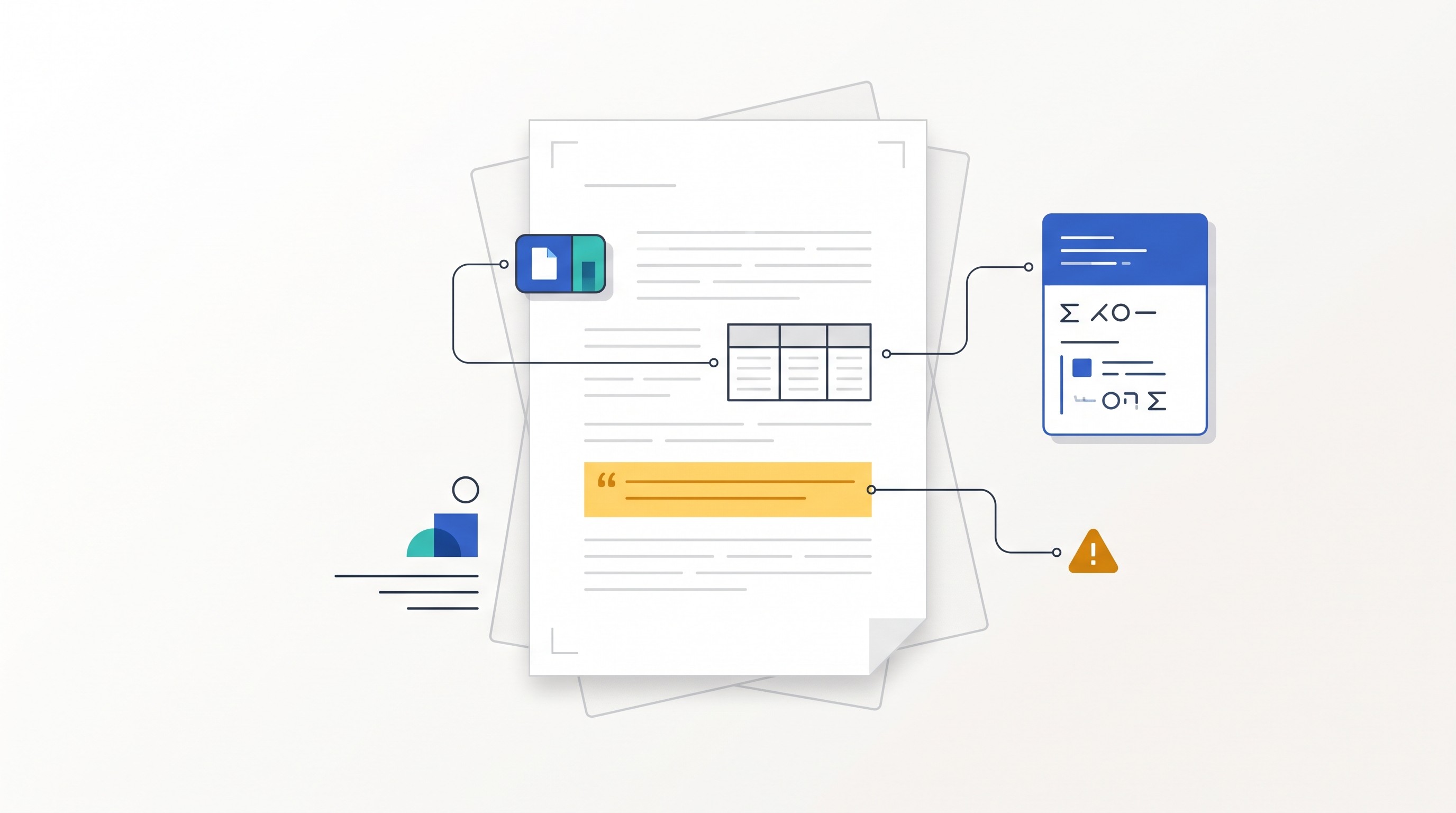
Page-level citations are not automatically reliable for every layout. Multi-column text can be read in the wrong order. Scanned pages can produce faulty OCR. Unnumbered appendices can break page mapping. Tables that span pages can lose headers. Some parsers flatten columns into incoherent text.
This is why manual corrections need their own record. If the model extracts 1.8 but visual inspection shows 18, keep a note that says the original extracted value was corrected after checking the page image. Silent overwriting makes later audit impossible.
For larger projects, this starts to resemble an evidence matrix: rows of claims or values, each tied to locatable evidence. Otio has a separate workflow on building an evidence matrix from PDFs, web pages, and interviews if the project extends beyond PDFs.
Validate the extracted dataset before exporting it
Export is the last step, not the proof that extraction worked. A clean spreadsheet can still contain unsupported values, mixed definitions, OCR errors, and rows copied from the wrong source.
Start with a field-completeness check. Every required field in every document should contain one of three things: a value, not found, or an explicit uncertainty status. Blank cells are dangerous because they do not tell you whether the value is absent, skipped, unreadable, or not yet reviewed.
Then normalize terminology only after preserving source wording. If one study says “hospital readmission,” another says “rehospitalisation,” and another says “unplanned admission within 30 days,” you may decide to map them to a common outcome category. But keep the original term in the evidence column.
Check the high-error fields first:
Units: mg vs µg, dollars vs thousands, person-years vs participants
Decimals and separators:
1.000may mean one or one thousand depending on conventionDates: publication date, study period, effective date, revision date
Ranges:
18–65is not the same as mean ageDenominators: percentages without denominators are easy to miscompare
Footnotes: exceptions often change what a number means
Negative values and symbols: minus signs, less-than signs, confidence intervals, p-values
Look for duplicate records and duplicate documents. Also look for repeated study populations. In literature review and medical evidence work, two papers may report the same cohort at different follow-up points. In diligence, a contract and its amendment may both state a term, but only one may be current.
Do not force conflicting values into one “correct” answer too early. Record the conflict:
Study-04 reports n=184 on PDF page 7. Registry record reports n=182. Needs review.Contract-03 master agreement sets liability cap at fees paid; Amendment 02 changes cap for data breach claims.Report-01 executive summary says 2026; Table A uses 2025 data. Keep both with context.
Systematic review researchers have long treated data extraction as a difficult and error-prone stage, especially in complex reviews with multiple interventions or outcomes (Afifi et al., 2023). The same problem appears outside academia: the more fields, sources, versions, and exceptions you have, the more validation matters.
Sample-check extracted rows against the original page image. Prioritize:
OCR-derived documents
Numerical fields
Tables with many rows or columns
Negative or null results
Values with unusual precision
Claims that will drive a decision
Any row with low confidence or parser uncertainty
Only export after validation. And when you export, preserve the evidence fields with the structured data. A CSV without source ID, page, section, quotation, and uncertainty status is no longer an evidence set. It is a list of claims.
Use a multi-source workspace for extraction, comparison, and verification
Extraction usually starts as a file task and becomes a research task. The moment you ask “Which studies disagree?”, “Which contract has the stricter clause?”, or “Which report changed its estimate?”, a one-off chat or converter stops being enough.
That is where Otio fits: as a persistent multi-source research workspace after the PDFs have been collected. You can keep the corpus, notes, extracted answers, folders or Spaces, and follow-up comparisons together instead of scattering the project across a PDF reader, spreadsheet, chat tool, and note app.
Use multi-document questions to compare the same field across sources:
“Across these reports, list the stated baseline year, target year, metric, page, and evidence quote.”
“Compare the termination notice periods across these agreements and cite the relevant clause.”
“For these studies, extract sample size, primary outcome, result, and table or page reference.”
“Which PDFs report a conflicting value for the same population or period?”
Then inspect the cited answer against the original PDF. Inline citations are a starting point, not a substitute for verification. If a cited answer looks right, record it in your extraction sheet or evidence note. If it is wrong, keep the correction and the reason.
Otio supports PDF reading and search, inline citations in AI answers, notes, folders and Spaces, and the option to retry an answer with multiple AI models. Retrying with another model can expose fragile answers or alternate interpretations, but model agreement does not prove accuracy. The source page still wins.
For academic literature work, the Otio for academics page is the closest fit. For medical, pharmaceutical, legal, policy, or analytical work, the same principle applies: keep the corpus, cited extraction, notes, and comparison questions in one project space.
The boundary is important. Otio can support evidence gathering, comparison, and verification. It does not replace a dedicated database, spreadsheet, OCR engine, systematic-review platform, discovery tool, or human review. If the output will feed a regulated process, publication, legal memo, or investment decision, treat AI extraction as assisted evidence handling, not final authority.
Try Otio as the workspace for storing your PDF corpus, extracting cited answers across documents, and checking the results against the original sources.
FAQ
Q: Can AI extract the same fields from several PDFs?
A: Yes, if you define a fixed schema and require one result per document, explicit not found values, verbatim evidence, and a citation for every field. The output still needs human validation, especially for tables, scans, and conflicting values.
Q: How do I cite a value extracted from a PDF?
A: Record the document title or identifier, PDF page number, section or table identifier, and a short verbatim quotation alongside the extracted value. If printed and viewer page numbers differ, record which numbering system you used.
Q: What should I do when a PDF is scanned?
A: Run OCR to make the page searchable, then compare the extracted text and values with the original page image. Pay particular attention to numbers, decimals, symbols, columns, footnotes, and low-quality or skewed pages.
Q: How can I avoid losing references when exporting extracted data?
A: Keep provenance as part of every row or record rather than in a separate notes file. Include the source ID, page, section or table, quotation, uncertainty status, and any validation note in the final evidence set.
[[OTIO_FOOTER_PROMO:%7B%22title%22%3A%22Apply%20this%20workflow%20to%20your%20own%20PDFs%22%2C%22description%22%3A%22Keep%20your%20PDFs%20and%20notes%20together%2C%20ask%20cross-document%20questions%2C%20and%20check%20each%20cited%20answer%20against%20the%20original%20page.%22%7D]]



