
Named Research Tools
Rayyan: How to Use It for Systematic Review Screening
A practical Rayyan workflow for systematic review screening: import citations, remove duplicates, apply inclusion criteria, resolve conflicts, and preserve an auditable record.

Rayyan is useful when the search is done and the hard part begins: turning a pile of citations into defensible include/exclude decisions. In a systematic review screening workflow, Rayyan helps organize imported records, flag likely duplicates, support reviewer decisions, surface disagreements, and move eligible studies toward full-text review.
The mistake is treating Rayyan as the review method. It is not. The method is the protocol: your research question, eligibility criteria, search strategy, duplicate policy, reviewer process, extraction plan, and reporting rules.
Use Rayyan as the screening workspace, then preserve exports and decision records outside the platform so the review can be reconstructed later.
What Rayyan Does in a Systematic Review Screening Workflow
Rayyan is a web and mobile application built for evidence-review screening. The original Rayyan paper described it as a free web and mobile app intended to help expedite initial screening for systematic reviews, and the current Rayyan site positions it around screening, deduplication, collaboration, and PICO-related review work (Systematic Reviews, 2016; Rayyan).
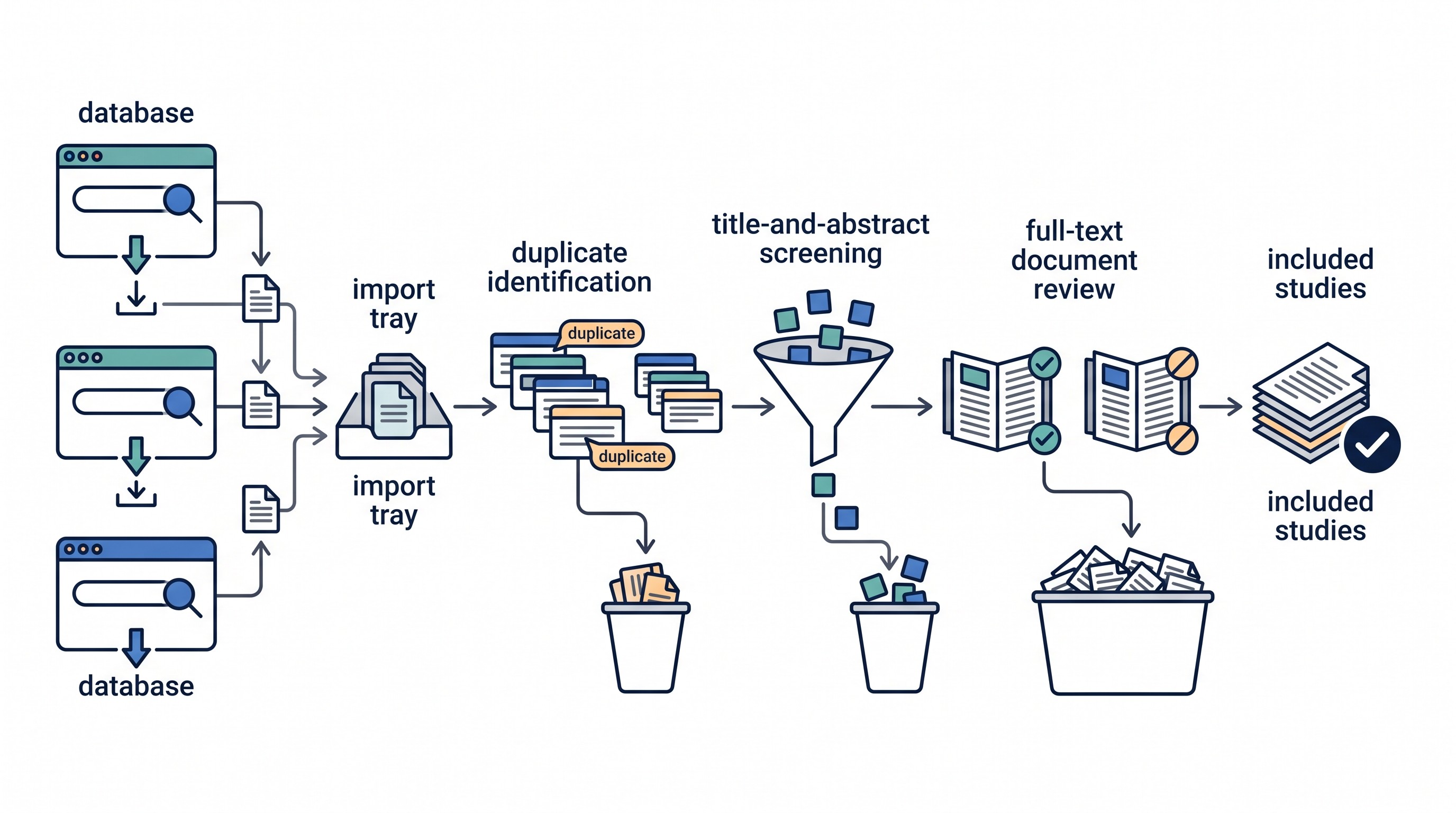
In practical terms, Rayyan sits between the search and the full-text review:
Import citations from databases or reference managers.
Inspect and clean records before reviewers begin.
Handle duplicates carefully.
Screen titles and abstracts against predefined criteria.
Resolve conflicts between reviewers.
Export decisions for audit, reporting, and full-text follow-up.
Rayyan does not replace PubMed, Embase, Scopus, Web of Science, Google Scholar, Zotero, EndNote, Covidence, RevMan, or your protocol. It is not where the review question is invented, the search strategy is validated, or the final synthesis is written.
Also check Rayyan’s current help pages before locking a workflow. Interfaces, plan limits, export options, collaboration permissions, AI-assisted features, and account controls can change. The safest approach is to document the version of your workflow, not rely on memory of what the platform displayed.
Prepare Your Review Before Importing Records Into Rayyan
The quality of Rayyan screening depends on what happens before the first upload. If the eligibility rules are vague, the software will only help the team make vague decisions faster.
Write inclusion and exclusion criteria in operational language. A reviewer should be able to apply each rule from the title and abstract without asking what the rule means.
At minimum, define:
Population or problem: who or what the study must examine.
Intervention, exposure, or phenomenon: what qualifies and what does not.
Comparator: if required by the review question.
Outcomes: required outcomes, secondary outcomes, and outcomes that are insufficient on their own.
Study design: randomized trials, cohort studies, qualitative studies, diagnostic accuracy studies, mixed methods, reviews, editorials, protocols, animal studies, and so on.
Publication type: peer-reviewed article, preprint, conference abstract, thesis, report, protocol, correction, commentary.
Language and date limits: only if justified by the protocol.
Setting: country, care setting, education level, industry, or domain, if relevant.
Then decide how the team will treat messy cases before reviewers encounter them:
Duplicate database records.
Conference abstracts later published as full articles.
Protocols without results.
Corrections, errata, and retractions.
Multiple reports from the same underlying study.
Records with no abstract.
Titles with unclear population or design.
Non-English records.
Preprints and ahead-of-print articles.
Create a short screening guide. It does not need to be long; one or two pages is often enough for title-and-abstract screening. Include examples of clear include, clear exclude, and borderline records.
A good screening guide prevents a common failure: one reviewer excludes aggressively at abstract stage while another sends uncertain records to full text. That difference can create dozens or hundreds of conflicts that are really protocol problems, not judgment problems.
Rayyan is not a search database. If you are still building the search, use source-discovery tools and database-specific strategies first. For Google Scholar, see Otio’s guide to Google Scholar search strategies for literature reviews.
Import and Organize Citations in Rayyan
Plan the import sequence before adding records. The goal is not just to get citations into Rayyan; it is to preserve enough provenance that the search can be reconstructed.
A clean import plan usually records:
Database or source name.
Search date.
Search string or saved strategy.
Export file name.
Number of records exported.
Import order.
Any filters applied before export.
If records come from a reference manager, keep the original database provenance there too. A citation that arrives from “Zotero library” or “EndNote export” may not tell you whether it came from MEDLINE, Embase, Scopus, PsycINFO, CINAHL, Google Scholar, or a hand search.
After importing, inspect the fields reviewers will rely on:
Title.
Abstract.
Authors.
DOI.
Journal or source.
Publication year.
Record type.
Database/source label.
Keywords or subject headings, if imported.
URL or accession number, if available.
Malformed records are not rare. Titles can appear in the abstract field. Abstracts can be missing. Author names can be truncated. Special characters can break. Journal names can be inconsistent. A few minutes of cleanup before screening can prevent bad decisions later.
Use Rayyan labels, tags, notes, or other organizing fields only when they support a documented decision. Do not create a second hidden classification system that competes with the eligibility criteria.
Good uses include:
Marking “missing abstract” for records needing special handling.
Tagging “conference abstract” when the protocol treats abstracts differently.
Noting “possible duplicate report” when the record may describe the same study as another paper.
Recording a specific uncertainty, such as “population unclear” or “no outcome visible.”
Bad uses include:
Creating ad hoc labels that only one reviewer understands.
Using tags as private exclusion reasons.
Mixing topic labels with eligibility decisions.
Changing label meanings halfway through screening.
Before independent screening begins, run a quick record-quality check. Open a small sample from each source and confirm that titles, abstracts, source labels, and identifiers survived the export/import process.
Handle Duplicate Records Before Screening
Duplicate removal matters because systematic review counts are part of the review record. Repeated records inflate workload, create inconsistent decisions, and can distort the number of records screened.
Do not accept every automated duplicate match without inspection. A cautious duplicate check compares:
Title.
Authors.
Year.
DOI.
Journal or proceedings title.
Volume, issue, and pages, when available.
Publication type.
Database source.
Exact DOI matches are usually strong evidence, but even then, inspect the record if the title or publication details differ. Database metadata can be messy.
The harder edge case is multiple reports from one underlying study. These are not necessarily bibliographic duplicates. A trial protocol, conference abstract, primary article, subgroup analysis, and long-term follow-up may all refer to the same study but contain different information.
Your protocol should say how to handle these. Often, the records remain visible through screening and are reconciled at the study level later. If they are deleted too early as “duplicates,” the team can lose data needed for risk-of-bias assessment, outcome extraction, or study identification.
Record what was removed, merged, or retained. At minimum, preserve:
Number of imported records.
Number of duplicates removed.
Duplicate rule or tool used.
Date of deduplication.
Who checked uncertain duplicate pairs.
Any records retained because they may be separate reports of the same study.
The final review should be able to explain how many records entered screening and why that number changed.
Run a Consistent Title-and-Abstract Screening Process
Title-and-abstract screening should be conservative enough to avoid throwing away eligible studies, but not so loose that full-text review becomes unmanageable.
If the protocol requires two independent reviewers, set up the Rayyan project so each reviewer screens separately. Do not let one reviewer’s decision overwrite, bias, or replace another’s before conflict resolution.
Use the predefined criteria. At abstract stage, reviewers should make decisions from what is visible in the title and abstract. If a record might meet criteria but the abstract is incomplete, mark it for full-text assessment rather than guessing.
A practical screening sequence:
Pilot a shared batch. Use records from multiple databases and include at least a few borderline cases.
Compare decisions. Identify disagreements that come from unclear criteria, not just reviewer error.
Revise the guide. Add examples and clarify ambiguous rules.
Lock the screening rules for the main phase. If changes are needed later, record the date and affected records.
Screen independently.
Use specific exclusion reasons.
Resolve conflicts after independent screening, not during it.
Exclusion reasons should be specific enough to explain the decision. “Not relevant” is usually too vague.
Better abstract-stage reasons include:
Wrong population.
Wrong intervention or exposure.
Wrong comparator, if required.
Wrong outcome.
Wrong study design.
Not primary research.
Protocol only.
Conference abstract only, if excluded by protocol.
Animal or in vitro study, if excluded.
Wrong publication type.
Outside date or language rule, if protocol-defined.
Do not overstate what title-and-abstract screening can prove. Many records lack enough detail to determine eligibility. The usual rule is simple: if exclusion is not justified from the title and abstract, move the record forward.
Citation-context tools can help later when evaluating how papers are cited or whether a claim has been supported, disputed, or merely mentioned. For that adjacent task, see the guide to scite AI for citation checking and literature reviews. That is not a substitute for eligibility screening; a study can be highly cited and still fail your inclusion criteria.
Manage Conflicts and Move to Full-Text Screening
Conflict resolution should follow a sequence, not a negotiation mood.
Use a predefined process:
Identify records with reviewer disagreement.
Re-read the relevant eligibility rule.
Check the title and abstract together.
Decide whether the record clearly fails, clearly passes, or remains uncertain.
Escalate to a third reviewer if the protocol requires it.
Record the final decision and reason.
Keep title-and-abstract decisions separate from full-text decisions. A record that looks eligible from the abstract may fail once the complete paper is reviewed. That is normal.
Full-text exclusions need more careful documentation than abstract exclusions because the team has now reviewed the report itself. Avoid vague labels such as “not relevant.” Use defensible reasons tied to the criteria:
Wrong population after full-text review.
Wrong intervention or exposure.
No eligible outcome.
Ineligible study design.
Duplicate report with no additional usable data.
Companion paper linked to included study.
Full text unavailable after documented attempts.
Retracted article, if excluded by protocol.
Protocol or registry entry without results.
Secondary analysis outside scope.
Track special cases separately. Do not silently treat all of them as excluded studies.
For example, “full text unavailable” is not the same as “wrong population.” A companion paper linked to an included study is not the same as an ineligible study. A registry record for an ongoing trial may need to be listed differently from a published article with extractable results.
This is where source organization matters. PDFs, notes, and citation records often spread across Rayyan, Zotero, Mendeley, shared drives, and local folders. If that is becoming hard to control, Otio’s guide to a research paper organizer workflow for sources, notes, and citations is a useful adjacent process.
[[OTIO_INLINE_PROMO:%7B%22title%22%3A%22How%20will%20you%20organize%20full%20texts%20after%20screening%3F%22%2C%22description%22%3A%22Add%20eligible%20PDFs%20and%20review%20notes%20to%20Otio%E2%80%99s%20library%2C%20then%20chat%20with%20those%20sources%20to%20compare%20eligibility%20details%20and%20keep%20evidence%20organized.%22%7D]]
Export Decisions and Preserve an Audit Trail
Rayyan can help preserve screening decisions, but the research team remains responsible for the audit trail. Do not wait until submission week to discover that exported labels, notes, conflicts, or reviewer names are incomplete outside the platform.
Export decision data at milestones, not only at the end:
After initial import.
After duplicate removal.
After title-and-abstract screening.
After conflict resolution.
After full-text screening.
After final study-level reconciliation.
Each export should preserve enough metadata to be interpreted later:
Record identifiers.
Title and citation details.
Source database or import label.
Duplicate status.
Reviewer decisions.
Conflict status.
Final title-and-abstract decision.
Full-text decision.
Exclusion reason.
Notes needed to explain borderline calls.
Export date.
Version of the eligibility criteria used.
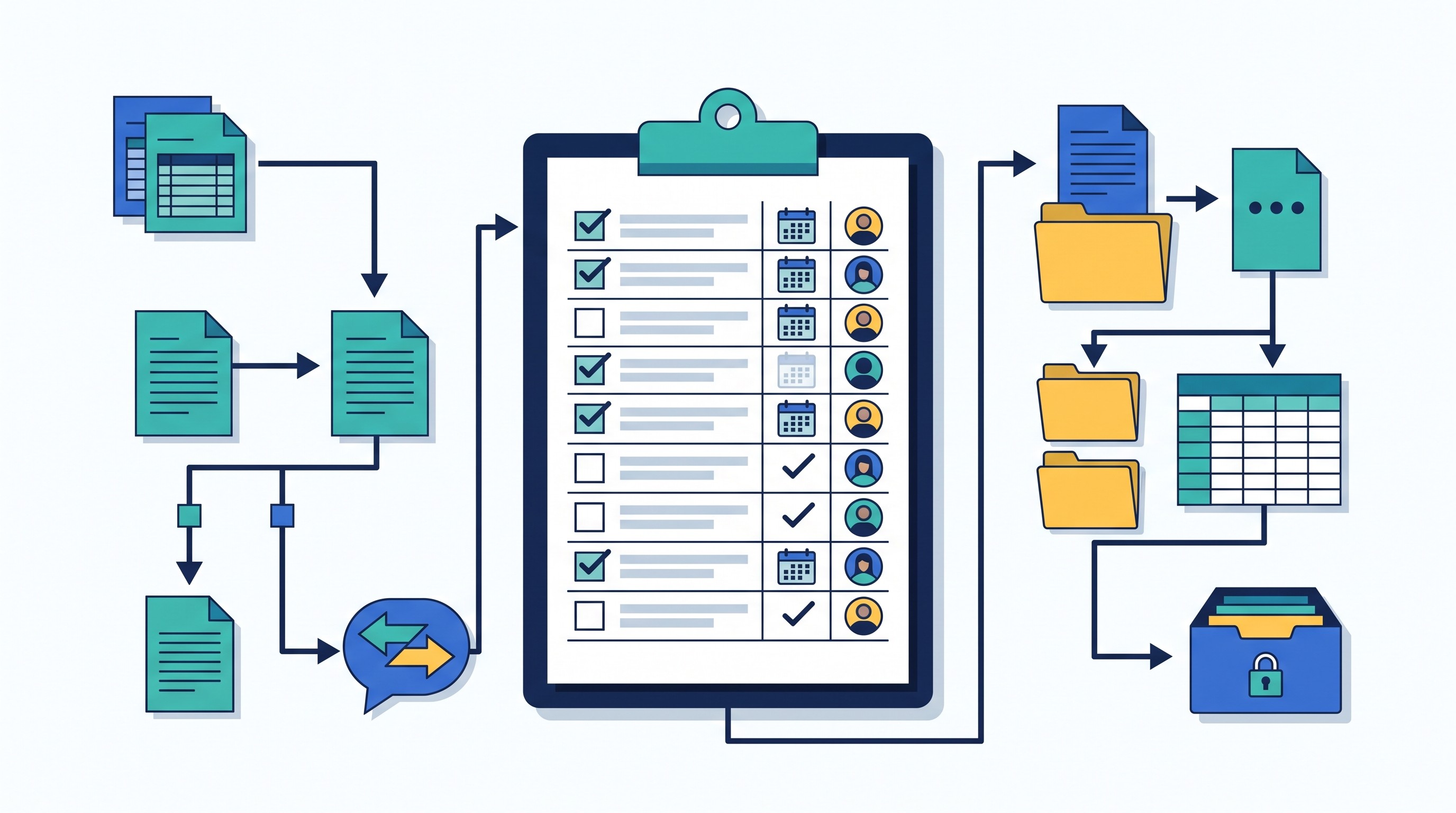
Before deleting, merging, or changing a project, test the export. Open it outside Rayyan and ask whether a person who was not on the project could understand the decisions.
Preserve a dated copy of the screening guide with each major phase. If eligibility criteria changed after the pilot, keep both versions and note which records were screened under each. If records were re-screened after a rule change, document that too.
Rayyan supports the screening record; it does not automatically produce the final review logic. The team still has to reconcile record-level decisions into study-level decisions, identify multiple reports from the same study, and produce final flow counts.
Where Rayyan Fits Beside Search, Reference, and Research Tools
The cleanest workflow gives each tool one primary job.
Tool type | Main job | What not to expect |
|---|---|---|
Bibliographic databases | Find records through reproducible searches | Screening governance |
Google Scholar and citation search | Supplement discovery and citation chasing | Complete reproducible database coverage |
Reference manager | Store citations and PDFs | Independent screening decisions |
Rayyan | Screen citations and manage decisions | Final synthesis or protocol design |
Research workspace | Organize PDFs, notes, summaries, and source context | Rayyan decision management |
For source discovery and citation-network exploration, Semantic Scholar can be useful before or alongside database searching. Keep the boundary clear: discovery tools help find candidate records; Rayyan helps screen records against eligibility criteria.
Otio fits beside Rayyan as an evidence workspace, not a Rayyan replacement. It can hold PDFs, web sources, notes, and imported research material in one library; it also supports reading PDFs, asking questions over selected text, and keeping project material in Spaces.
If your sources already live in Zotero, Otio’s Zotero integration can help bring research papers into a workspace for reading and note-making. Keep Rayyan as the source of truth for screening decisions if that is where the team is voting, resolving conflicts, and exporting eligibility records.
The non-obvious tradeoff is version drift. Centralizing documents and decisions improves continuity, but copying records across tools can create mismatches. Pick one system as the decision authority. For many review teams, that will be Rayyan for screening and a reference manager or research workspace for PDFs and notes.
Common Rayyan Screening Mistakes to Avoid
The platform is rarely the root problem. Most failures come from weak rules, unclear reviewer roles, or poor recordkeeping.
Avoid these mistakes:
Starting before criteria are operational. “Relevant to diabetes” is not a screening rule. Define population, intervention or exposure, outcomes, study design, and publication type.
Treating duplicate detection as fully automatic. Similar records may be separate studies, separate reports, or the same citation with messy metadata.
Deleting multiple reports too early. A protocol, abstract, primary paper, and follow-up paper may all matter at different stages.
Letting reviewers influence one another during independent screening. If duplicate independent screening is required, decisions should remain independent until conflict resolution.
Changing criteria midstream without a record. If a rule changes, record what changed, when, why, and which records were affected.
Using vague exclusion reasons. “Irrelevant” does not explain why a study failed eligibility.
Reusing abstract-stage reasons for full-text exclusions without checking. Full-text review should produce more precise reasons.
Assuming the software guarantees methodological compliance. Compliance comes from the protocol, reviewer training, conflict process, retained records, and transparent reporting.
The strongest Rayyan projects are boring in the right way: clear rules, predictable labels, stable reviewer process, dated exports, and no mystery decisions.
A Practical Next Step for Your Rayyan Project
Before importing the full search set, create a small pilot project.
Include:
A draft eligibility guide.
A sample of records from each database.
At least one record with a missing or thin abstract.
At least one likely duplicate.
At least one conference abstract or protocol, if those appear in your topic.
At least one borderline case.
Have all reviewers screen the same pilot records. Compare disagreements. Do not rush this step; it is cheaper to fix the guide after 50 pilot records than after 5,000 screened records.
Then lock the workflow:
Final inclusion and exclusion criteria.
Reviewer roles.
Duplicate policy.
Conflict-resolution process.
Exclusion-reason scheme.
Source of truth for screening decisions.
Export location and naming convention.
Rule for handling multiple reports from one study.
Process for documenting protocol changes.
Once that is done, Rayyan becomes much more useful. It is no longer just a place where citations go; it is the workspace where a documented screening method gets applied consistently.
FAQ
Q: Is Rayyan a reference manager or a screening tool?
A: Rayyan is primarily used to organize and screen citations for evidence reviews. It can complement a reference manager, but it does not replace the database search, citation library, or full review protocol.
Q: Can Rayyan remove duplicate citations?
A: Rayyan can help identify and manage duplicate records, but potential matches should be checked against bibliographic details and the review’s rules. Multiple publications from one study may require separate handling rather than simple deletion.
Q: Should two reviewers screen the same records in Rayyan?
A: When the review protocol requires independent duplicate screening, two reviewers should assess records separately and resolve disagreements using a predefined process. The required number of reviewers depends on the protocol, team, and review standards.
Q: Does using Rayyan make a systematic review reproducible?
A: Rayyan can help preserve screening decisions and exclusion reasons, but reproducibility also requires documented searches, eligibility criteria, reviewer procedures, protocol changes, full-text decisions, and retained exports.
[[OTIO_FOOTER_PROMO:%7B%22title%22%3A%22Apply%20this%20workflow%20to%20your%20review%20sources%22%2C%22description%22%3A%22Bring%20your%20screening%20guide%2C%20eligible%20PDFs%2C%20database%20exports%2C%20and%20decision%20notes%20into%20Otio%20to%20compare%20sources%20and%20maintain%20a%20working%20research%20record.%22%7D]]



