
AI Research Workflows
How to Use ChatGPT and Claude Together for Research
Use ChatGPT and Claude side by side for research with a shared source packet, task-based model handoffs, and a citation-first verification process. Includes current upload limits and a persistent workflow for larger source sets.

Updated October 28, 2026.
The most reliable way to use ChatGPT and Claude together for research
The best answer to how to use ChatGPT and Claude together is not “ask both and pick the nicer answer.” Use one model to extract structured evidence from a shared source packet, use the other to critique the extraction, then return to the original sources before synthesis and drafting.
That division matters because agreement between two chatbots is not verification. ChatGPT and Claude can both summarize, classify, infer, and draft, but neither is guaranteed to be more accurate, more “research-ready,” or citation-correct for every question. Treat them as two workstations in a research process, not as interchangeable authorities.
A defensible workflow has five stages:
Discover and collect sources.
Prepare one source packet both models can inspect.
Use one model for structured extraction.
Use the other for critique, counterarguments, and omission checks.
Verify against the original sources before synthesis and drafting.
That boundary is important. ChatGPT and Claude can help analyze and draft, but they do not replace source discovery, original-source checking, systematic-review software, or researcher judgment. A 2025 academic review of LLMs in medical and scientific research makes the same broad point: these tools have useful research applications, but they carry limitations and require caution in academic use (PMC).
Start with a source packet both models can inspect
Parallel chats fail when each model sees a different version of the project. Before opening ChatGPT and Claude, assemble the source packet: PDFs, web pages, reports, transcripts, videos or podcasts, and working notes.
The goal is not to upload “everything” and hope the model finds the right material. The goal is to preserve the version of the evidence used for this project, so outputs can be compared and audited later.
A good source packet has two parts: a manifest and an evidence brief.
The source manifest should include:
Source ID: S01, S02, S03, and so on.
Full title: Do not rely on filenames.
Author or organization: Especially for reports, standards, and policy sources.
Publication date: Include version date for living documents.
URL, DOI, or archive location: Enough for another person to retrieve it.
Page, section, or timestamp range: Particularly for long PDFs, web pages, video, and audio.
Why it matters: One sentence explaining inclusion.
The research-question brief should include:
The claim being investigated.
Definitions that matter.
Inclusion and exclusion boundaries.
Known disagreements or competing interpretations.
The exact output needed, such as a memo, literature matrix, annotated outline, slide brief, or draft section.
The standard of evidence required.
For high-value sources, add page-level quotations or timestamped excerpts. That prevents a subtle but common failure: one model answers from the source packet while the other fills gaps from general knowledge.
A compact evidence-packet structure works well:
Source ID
Claim
Quotation or paraphrase
Location: page, section, paragraph, figure, table, or timestamp
Confidence: direct evidence, indirect evidence, weak evidence, or not supported
Relevance: core, contextual, background, or disputed
Unresolved question
If the broader job is a literature review, use the same packet to compare methods, populations, definitions, measures, and conclusions. For a fuller writing-stage workflow, Otio’s guide to writing a literature review covers the review structure; this workflow focuses on the two-model orchestration layer.
Divide the research work by task, not by claims about which model is best
Do not start with “Claude is better at analysis” or “ChatGPT is better at writing.” Those claims become stale quickly, and they are rarely true across all source types, model versions, plans, and domains.
Start with the task.
A clean division of labor looks like this:
Extraction: One model reads the shared packet and populates a fixed schema.
Classification: One model groups findings by method, population, jurisdiction, theme, or evidence strength.
Critique: The other model checks unsupported inferences, missing sources, contradictions, and overconfident wording.
Counterargument generation: The second model looks for alternative explanations and plausible objections.
Synthesis: Either model drafts only from verified rows.
Editing: Either model improves structure and clarity without adding new factual claims.
For extraction, ask for a fixed output schema:
Source ID
Finding
Exact supporting passage
Page, section, figure, table, or timestamp
Method
Population or context
Limitation
Open question
Whether the source directly supports the claim
The most important instruction is simple: return “not found” when the packet does not support a claim. That single constraint prevents a lot of plausible but uncited filler.
For critique, give the second model the same source packet and the extraction output. Ask it to flag:
Claims that go beyond the quoted evidence.
Missing sources or missing viewpoints.
Contradictory findings.
Alternative explanations.
Methodological weaknesses.
Ambiguous definitions.
Citation drift, where the source ID remains but the meaning changes.
Phrases that sound more certain than the evidence allows.
For source comparison, require both models to distinguish three things:
What the source explicitly says.
What the model infers from the source.
What remains unresolved.
That distinction is the difference between useful AI assistance and a confident mess. Two plausible answers do not make a fact. They make a review queue.
If the task is tool selection rather than source synthesis, see Otio’s broader comparison on when to use Claude vs ChatGPT vs Perplexity for research. For this workflow, the point is narrower: use ChatGPT and Claude side by side only when the second pass reduces research risk.
A practical ChatGPT-and-Claude research workflow from discovery to draft
Here is the end-to-end version.
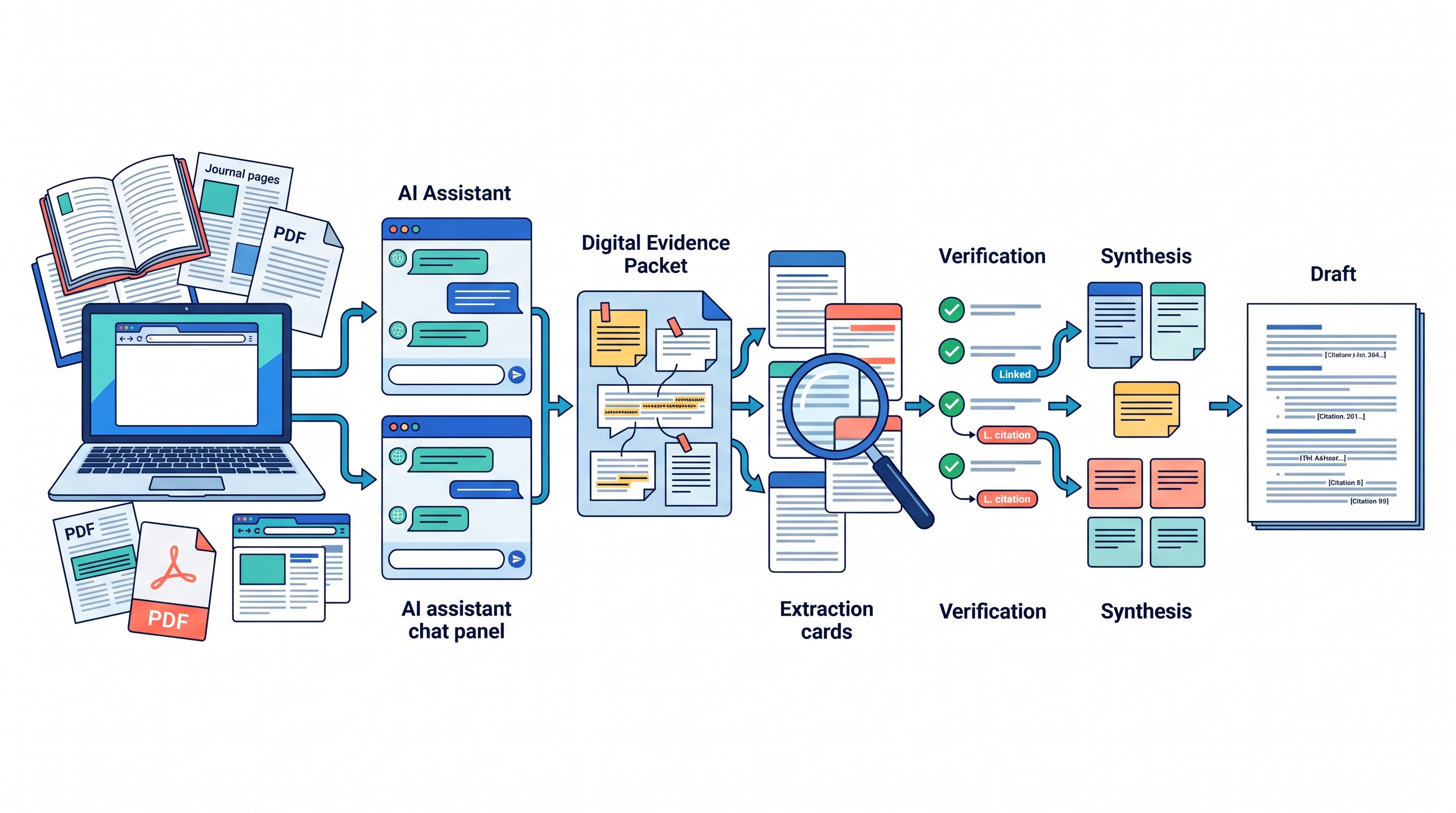
Step 1: Discover and collect
Use search engines, scholarly databases, institutional repositories, paper finders, citation tools, or specialist discovery systems to build the source set. Record why each source is included.
Do not outsource the discovery logic to a chatbot without checking coverage. ChatGPT and Claude can help generate search terms, screen abstracts, and summarize candidate sources, but the project still needs a documented inclusion path.
If the search stage is the main bottleneck, start with research databases and evidence tools rather than a chat window. Otio has separate reviews of discovery tools such as Semantic Scholar, Consensus AI, and Elicit AI.
Step 2: Normalize the corpus
Before analysis, clean the source set.
Remove duplicate versions. Label preprints and published versions separately. Check that PDFs are readable. Preserve URLs, DOIs, page numbering, and media timestamps.
For web pages, save the version used or record access details. For video and audio, keep the transcript alongside the original recording. For spreadsheets, preserve the raw file and note any transformations.
This step feels administrative until a model cites the wrong version of a paper, quotes a page number from a different PDF, or treats a transcript excerpt as the full interview.
Step 3: Prepare shared context
Give both chats the same manifest, research question, definitions, excerpts, and output schema. Use identical source IDs.
Add explicit boundaries:
Use only the supplied sources unless asked otherwise.
Mark unsupported claims as “not found.”
Do not invent citations.
Distinguish source statements from interpretation.
Preserve source IDs and page, section, or timestamp references.
List omitted sources if the full packet is not included.
If the corpus is too large, send the same excerpts to both models and state that the output is based on a subset. “No evidence found in this packet” is not the same as “no evidence exists.”
Step 4: Extract with the first model
Ask the first model to populate the evidence matrix. The output should be boring, structured, and citation-heavy.
A strong extraction pass should not sound like a polished essay. It should look like a working file: rows of evidence, locations, limitations, and open questions.
Useful extraction checks:
Does every row have a source ID?
Does every substantive finding point to a page, section, or timestamp?
Are limitations captured, or only conclusions?
Are methods and populations recorded?
Are unsupported claims marked as not found?
For paper-specific summarization, Otio’s guide to summarizing research papers with ChatGPT is useful. In a two-model workflow, summarization is only the first pass; the second pass should test the summary.
Step 5: Critique with the second model
Give the second model the same source packet and the extraction output. Do not ask it to repeat the same extraction unless the first pass was poor.
Ask for targeted critique:
Which findings are not directly supported?
Which citations do not support the sentence attached to them?
Which sources disagree?
Which methods weaken the conclusion?
Which definitions differ across sources?
Which populations, jurisdictions, or time periods should not be merged?
What source types are missing?
What would a skeptical reviewer challenge?
This is where the two-model workflow earns its keep. The second model should be adversarial, not redundant.
Step 6: Reconcile disagreements
Compare the outputs row by row. When ChatGPT and Claude disagree, do not average the answers. Return to the source.
Mark each conclusion as:
Directly supported: The source says it clearly.
Interpretation: Reasonable, but not directly stated.
Unresolved: The packet is incomplete or conflicting.
Rejected: The source does not support it.
Needs more evidence: The claim may be true, but the packet is insufficient.
Most of the value comes from this reconciliation step. It forces the project to become a traceable argument rather than a stitched-together chatbot answer.
Step 7: Draft from verified rows
Only now should drafting begin.
Ask either model to produce an outline or draft using the verified evidence matrix. Require every substantive statement to retain a source ID and location. Do not add citations after the prose is written; keep citations attached while editing.
This is especially important for medical, legal, policy, pharmaceutical, financial, and academic work, where a small qualifier can change the claim.
Step 8: Audit the final document
Before circulation, check every important claim against the original PDF, web page, transcript, or recording.
Preserve:
The final source manifest.
The research-question brief.
Prompts used for extraction and critique.
Model outputs.
Rejected claims.
Reconciliation notes.
Final source checks.
Draft revisions.
That audit trail is what lets another researcher reconstruct the reasoning.
How to give both models the same context without duplicating the project
The hard part is not opening two chat windows. The hard part is making sure both models are working from the same evidence.
Use identical source names and IDs in both chats. Do not rely on upload order, shortened filenames, or memory from prior conversations.
Paste the same research-question brief and evidence schema into both tools. Record the date, model name, source version, and conversation link or export for each run.
When the full corpus cannot fit, send the same excerpts to both models. State which sources are omitted. Otherwise, a partial answer can be mistaken for a full review.
For large projects, batch the work:
Split sources by theme, method, date range, jurisdiction, or format.
Keep one master manifest outside both chats.
Process each batch with the same extraction schema.
Reconcile batch outputs before synthesis.
Maintain a master evidence matrix outside the individual chat threads.
This is where upload limits and project limits become workflow risks, not minor inconveniences.
As of October 2026, OpenAI’s ChatGPT upload documentation says users can upload up to 80 files every three hours, while Free users have 3 uploads per day. Shared storage is capped at 25 GB per user and 100 GB per organization. The same documentation lists limits of 512 MB for documents and presentations, 2 million tokens for text and document files, about 50 MB for CSVs and spreadsheets, 20 MB per image, and 512 MB per audio file. ChatGPT Projects allow up to 5 files on Free, 25 on Go and Plus, and 40 on Edu, Pro, Business, and Enterprise (OpenAI Help Center).
For ChatGPT Enterprise, OpenAI says uploaded documents are limited to 110,000 tokens in the context window. Content beyond that is sent to a private search index; when multiple documents exceed the limit, context is allocated across them (OpenAI Help Center).
As of October 2026, Anthropic’s Claude documentation says chat uploads allow up to 500 MB per file and 20 files per chat. Claude project files support persistent reference across conversations, with a 30 MB-per-file limit and unlimited file count subject to Claude’s context window. PDFs up to 100 pages include visual analysis, PDFs from 101 to 1,000 pages are text-only, and PDFs over 1,000 pages cannot be uploaded (Anthropic Help Center).
Those numbers change, so check the vendor help centers before designing a large workflow. The durable rule is simpler: keep the master source packet and evidence matrix somewhere persistent, then use ChatGPT and Claude as analysis passes over that controlled corpus.
If Claude upload constraints are the immediate problem, Otio’s guide to Claude file upload limits covers fixes. If ChatGPT Projects are the bottleneck, see the workflow for ChatGPT project limits.
[[OTIO_INLINE_PROMO:%7B%22title%22%3A%22Need%20one%20source%20packet%20for%20both%20models%3F%22%2C%22description%22%3A%22Keep%20your%20manifest%2C%20PDFs%2C%20web%20pages%2C%20transcripts%2C%20and%20notes%20together%20so%20ChatGPT%20and%20Claude%20work%20from%20the%20same%20cited%20research%20context.%22%7D]]
The verification protocol that keeps a two-model workflow defensible
A second model agreeing with the first is not independent proof. It is a signal to inspect the source.
Use this protocol before a claim enters the final document.
Check the original source
For every important claim, open the original PDF, web page, transcript, dataset, or recording. Confirm that the source says what the draft says it says.
Check qualifiers:
Population
Sample size
Time period
Jurisdiction
Intervention or exposure
Comparator
Outcome measure
Statistical or methodological caveat
Version of the document
Citation drift often happens at the qualifier level. A model may preserve the broad idea while changing the scope.
Preserve location-level citations
Use page-level citations for PDFs, section-level citations for web reports, paragraph-level citations where useful, and timestamps for audio or video.
A source ID alone is not enough for serious research. It tells the reader where to start, not where the evidence lives.
Label interpretation separately
Separate direct evidence from model-generated interpretation.
Use labels such as:
Direct quotation
Close paraphrase
Researcher interpretation
Model-generated hypothesis
Needs verification
Not supported by packet
This is tedious only if done at the end. Done during extraction, it prevents hours of cleanup.
Treat negative claims with care
“No evidence found in this packet” is a valid finding. “No evidence exists” is a much larger claim.
Use the first phrase unless the search strategy and source coverage justify the second.
Resolve conflicts by returning to definitions and methods
When ChatGPT and Claude conflict, inspect the underlying sources before choosing a conclusion. Many disagreements come from differences in definitions, populations, publication versions, endpoints, or time periods.
If one paper studies adults and another studies adolescents, do not merge them into “patients.” If one report discusses proposed regulation and another discusses enacted law, do not merge them into “policy.”
Keep the reasoning trail
Save the prompts, intermediate evidence tables, rejected claims, and final source checks. A defensible AI-assisted workflow is reconstructable.
That does not mean every draft needs a long appendix. It means the project files should show how a conclusion moved from source to evidence row to synthesis to final wording.
When using ChatGPT and Claude together becomes inefficient
Using both models is not always worth it.
For a small source set, a simple transformation, or low-stakes drafting, two parallel chats can add friction without improving the answer. The second pass should address a real uncertainty, not satisfy a ritual.
The main failure points are predictable.
Repeated uploads create version drift. If one chat sees the final PDF and the other sees an earlier preprint, their answers may appear to disagree when they are simply reading different sources.
Context and project limits create partial analysis. Each model may see only part of the corpus. That is acceptable if stated clearly; it is dangerous if presented as comprehensive.
Citation drift compounds during drafting. A model may keep a source ID while changing the claim attached to it. The final sentence can become broader, more certain, or less qualified than the cited source.
Duplicated extraction wastes time. If both models produce similar summaries, the second pass added little. Use the second model for targeted adversarial review instead.
Parallel chats can destroy the reasoning trail. Copying outputs into a draft without source IDs, prompt versions, and decision notes makes it hard to reconstruct the argument.
A practical stopping rule: use both models only when the second pass addresses a high-stakes claim, disputed interpretation, complex multi-source synthesis, or meaningful uncertainty. Otherwise, use one model, verify carefully, and move on.
Use Otio as the persistent layer after discovery
Two separate chats are fragile because the sources, notes, evidence matrix, and draft decisions live in too many places. That is the part Otio’s multiple AI models workspace is designed to handle: one permanent research library with model choice layered on top.
Otio is not a replacement for ChatGPT, Claude, discovery engines, or systematic-review platforms. It is the persistent workspace beside them: PDFs, web pages, video or podcast sources, transcripts, and notes can live together in one library, then stay available for follow-up questions and cited synthesis.
That matters after discovery. A typical workflow looks like this:
Use search engines, databases, paper finders, or evidence tools to discover sources.
Move the selected source packet into Otio.
Store PDFs, web pages, media, transcripts, and notes in the same project space.
Use different models for extraction, critique, comparison, or drafting.
Keep answers connected to the source context instead of rebuilding the project in each chat.
Otio’s AI PDF reader supports source-grounded work with document context, while the broader library can hold web, audio, video, and note-based evidence. For projects that involve papers plus interviews, reports, webpages, and recorded material, that mixed-format permanence is often the difference between a reusable research workspace and a folder of disconnected summaries.
For academic work, see Otio for academics. For current plan details, check Otio pricing.
Move the sources and notes from this workflow into Otio, choose the model that fits each research step, and keep the resulting answers connected to a cited, reusable library.
FAQ
Q: Should I give ChatGPT and Claude exactly the same prompt?
A: Give them the same source context, research question, definitions, and output schema so the results can be compared. The task instruction can differ when one model is extracting evidence and the other is critiquing it.
Q: Can I treat agreement between ChatGPT and Claude as verification?
A: No. Agreement is a review signal, not proof. Check important claims against the original source and preserve page-, section-, or timestamp-level citations.
Q: What is the best division of labor between ChatGPT and Claude for research?
A: Use a task-based division: one model can extract and structure evidence, while the other tests interpretations, counterarguments, and omissions. Do not assume either model is universally better for a research task.
Q: When should I stop using two separate chats?
A: Stop when the second pass adds no meaningful critique, the corpus must be repeatedly uploaded, or the reasoning trail becomes hard to preserve. A persistent workspace is more useful when the project involves many formats, sources, citations, and follow-up questions.
[[OTIO_FOOTER_PROMO:%7B%22title%22%3A%22Apply%20this%20workflow%20to%20your%20own%20sources%22%2C%22description%22%3A%22Move%20your%20PDFs%2C%20web%20pages%2C%20media%2C%20and%20notes%20into%20Otio%20to%20compare%20models%20while%20keeping%20answers%20connected%20to%20a%20cited%2C%20reusable%20library.%22%7D]]



