
Named Research Tools
How to Use NotebookLM for Research: A Source-Based Workflow
Use NotebookLM for research with a source-first workflow: prepare documents, ask traceable questions, verify citations, and turn grounded notes into a research brief.

To learn how to use NotebookLM for research, treat it as a source-bound research assistant: upload a defined set of documents, ask questions only against those documents, inspect the cited passages, and move verified findings into your own notes or draft. The quality of the output depends less on clever prompts than on the source set, document preparation, and verification discipline.
A good NotebookLM research workflow has seven moves: define the question, gather sources, prepare files, build a clean notebook, ask traceable questions, verify claims, and turn the checked evidence into a brief. NotebookLM can help organize and synthesize what you give it. It cannot make a weak, incomplete, or biased source collection reliable.
The source-based NotebookLM research workflow
NotebookLM works best when the research boundary is clear. Instead of asking it to “research climate migration,” create a notebook around a narrower question such as: “How do recent policy reports define climate-induced internal displacement in coastal South Asia?”
Then use the notebook as a controlled evidence environment.
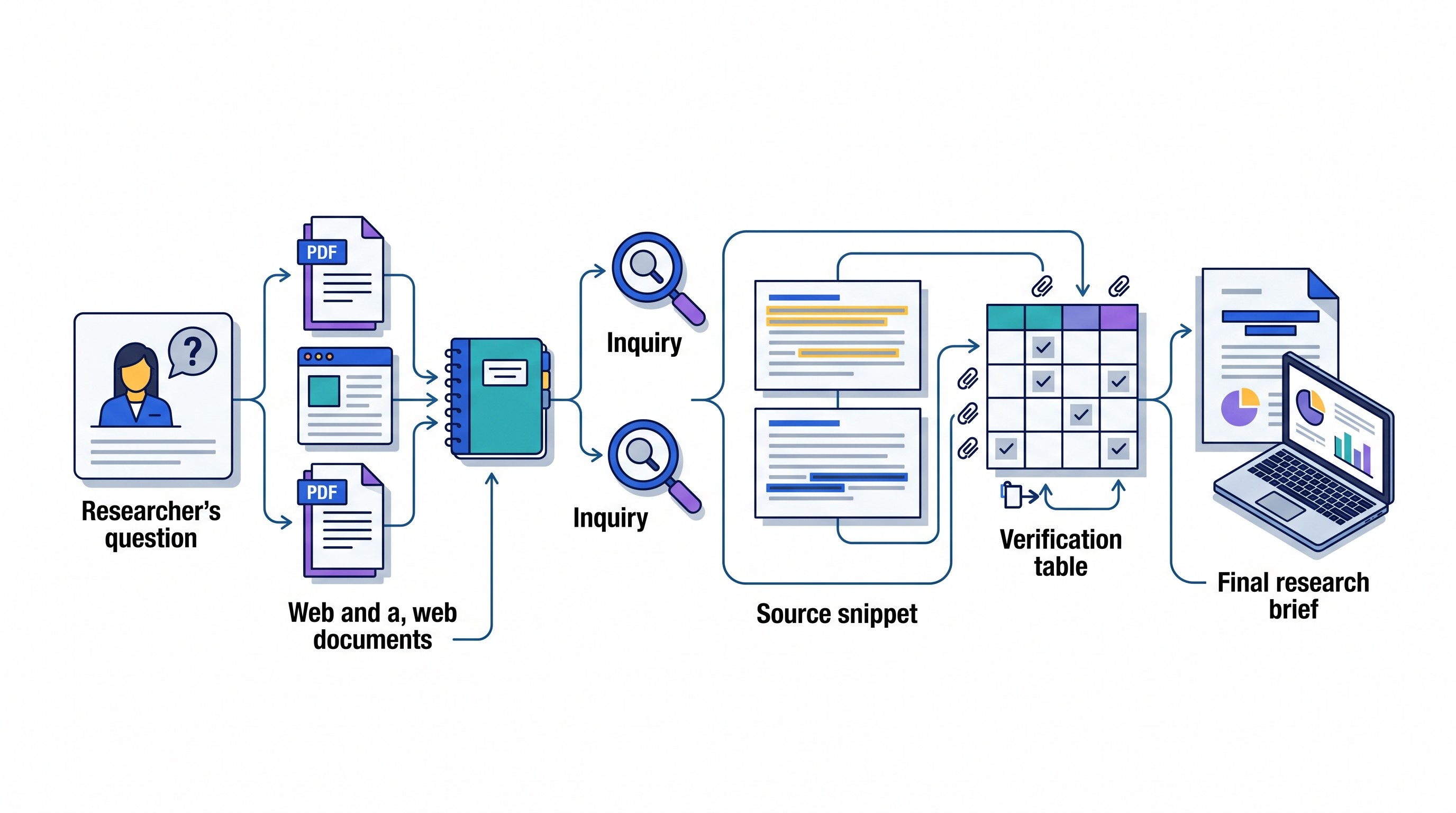
A practical workflow looks like this:
Define the research question. Write one answerable question and 3–6 subquestions.
Gather a controlled source set. Choose papers, reports, datasets, transcripts, or webpages for a reason.
Prepare the documents. Check that PDFs are readable, complete, correctly titled, and not missing tables or appendices.
Create a bounded notebook. Keep one notebook per research question or evidence base.
Interrogate the evidence. Ask source-linked questions before requesting synthesis.
Verify cited claims. Open the original passage and check whether it supports the answer.
Convert verified findings into a brief. Preserve citations, limits, disagreements, and unresolved questions.
The central limitation is simple: NotebookLM summarizes and reasons over the sources supplied to it. If the notebook contains only advocacy reports, only early studies, only one jurisdiction, or poorly extracted scans, the answer will inherit those gaps.
That makes the workflow source-first, not prompt-first.
Start with a research question and a controlled source set
The mistake is uploading a folder before deciding what the folder is supposed to prove. A broad folder produces broad answers. A defined question produces testable notes.
Start by separating two kinds of questions:
Discovery questions: What should I read? Which authors, terms, debates, or datasets matter?
Evidence-bound questions: What do these uploaded sources support? Where do they agree? What do they not establish?
NotebookLM is strongest at the second type. For discovery, use academic databases, library catalogs, citation trails, Google Scholar, Semantic Scholar, publisher sites, institutional repositories, and subject-specific indexes. If Google Scholar is part of the discovery stage, use search operators, date filters, cited-by trails, and author profiles deliberately rather than relying on the first page of results; this guide to Google Scholar search tips covers that stage in more detail.
Once you have candidate sources, select for four criteria.
Relevance: Does the source directly address the question or only share vocabulary with it?
Authority: Is it a primary study, review article, policy document, dataset, legal ruling, technical report, or background explainer? Do not treat these as equivalent.
Coverage: Does the set include the right time period, geography, population, method, and field?
Viewpoint diversity: Are there sources that disagree, use different methods, or define the problem differently?
For most research projects, “upload everything” is worse than a staged source set. Begin with the core documents: the most relevant primary studies, reports, or texts. Add background materials only when they help interpret terms, history, or methods. Add opposing or complicating evidence as a separate stage so it does not disappear into a bland synthesis.
A simple source map helps:
Source type | Research role | Treat as |
|---|---|---|
Primary study or dataset | Direct evidence | High-value, method-dependent |
Review article | Field overview | Useful for context and citation trails |
Policy or legal document | Institutional position or rule | Authoritative within its domain |
Expert commentary | Interpretation | Useful, but not primary evidence |
News or web article | Background or timeline | Check against stronger sources |
If the question itself is still vague, pause before using NotebookLM. A better question will save more time than a larger upload. For topic narrowing, use examples like these research topic examples as a starting point, then convert the topic into a question that can be answered from evidence.
Prepare documents before adding them to NotebookLM
NotebookLM can only work with the text it can read. A PDF may look fine to a human and still contain broken extraction, missing columns, unrecognized footnotes, or scanned page images with no usable text.
Before uploading, check each file for five things:
Readability: Can you select and copy the text from the PDF?
Completeness: Are tables, appendices, references, figures, and supplementary sections included?
Structure: Are headings, page numbers, table labels, and section labels preserved?
Metadata: Is the filename meaningful enough to identify the source later?
Scope: Is the document the version you intend to cite, not a preprint, excerpt, or duplicate?
For scanned PDFs, run OCR first. OCR, or optical character recognition, converts page images into machine-readable text. This matters because an AI summary can sound fluent even when the underlying extraction skipped a table, garbled a formula, or merged footnotes into body text.

This is the non-obvious failure mode: a clean-looking summary can conceal a broken document. If a table was omitted during extraction, NotebookLM may summarize the surrounding discussion and miss the actual result. If page numbers are absent, verification becomes slow. If references are cut off, citation trails break.
Create a source log before upload. It does not need to be elaborate.
Field | Example |
|---|---|
Short label | Smith 2023 cohort study |
Full title | Full article or report title |
Author / institution | Author, agency, company, court, lab |
Year / version | Publication year, report version, access date if needed |
Source type | Primary study, review, policy, dataset, transcript |
Research role | Core evidence, background, counterevidence, method reference |
Known limitation | Small sample, older data, narrow geography, industry funding |
For large PDF collections, a dedicated reader can help before the NotebookLM stage. Otio’s AI PDF reader is useful when you need to inspect, summarize, search, and ask questions inside PDFs as part of a broader research library. If the problem is scanned documents, an AI OCR for PDFs workflow can help convert files into readable text before analysis.
Neither replaces verification. The point is to make the source readable and traceable before asking any AI tool to synthesize it.
Build the notebook so sources remain interpretable
Create one NotebookLM notebook for one bounded research project. A notebook called “Dissertation” will become noisy fast. A notebook called “Chapter 2: definitions of climate displacement in South Asian policy reports” is much easier to interrogate.
Use filenames and source labels that make answers interpretable. Avoid names like paper_final.pdf, download (12).pdf, or report_new.pdf. Use a consistent pattern:
AuthorYear_short-topic_source-typeInstitutionYear_policy-report_regionCaseName_year_judgmentDatasetName_year_codebook
Good names help you spot whether an answer is grounded in the right kind of evidence. If NotebookLM cites a background explainer for a core empirical claim, the filename itself becomes a warning.
Split a project into separate notebooks when the source logic changes. Good reasons to split include:
Different research questions
Different chapters or deliverables
Competing evidence bases
Separate time periods
Distinct jurisdictions, populations, or disciplines
Raw sources versus final included sources
For example, a literature review on telemedicine adoption might use one notebook for randomized or quasi-experimental studies, another for policy and reimbursement documents, and another for patient-experience qualitative studies. That separation prevents a policy statement from being blended with empirical findings as if both carry the same evidentiary weight.
Keep a separate research log outside NotebookLM. The log should record:
Why each source was included
Which sources were excluded and why
Contradictions that remain unresolved
Claims that require external checking
Search strings or databases used
Version changes in reports, guidelines, or working papers
This matters because a final paper or report needs an audit trail. NotebookLM can help you query a source set, but it should not be the only place where the research process exists.
Ask questions that produce useful, traceable research notes
Do not start by asking for a polished literature review. That encourages the tool to compress evidence before you have inspected it.
Start with orientation questions for each source or small group of sources:
What is the purpose of this source?
What method or evidence does it use?
What population, jurisdiction, dataset, or time period does it cover?
What is the main finding or argument?
What limitations does the source acknowledge?
Which claims are direct findings, and which are author interpretation?
Then move to cross-source questions. The best prompts force structure and traceability:
Compare the methods used across the uploaded studies.
Identify where the sources agree and disagree.
Extract definitions of the central term and cite the source for each definition.
List all stated limitations, grouped by source.
Separate empirical findings from policy recommendations.
Identify claims supported by more than one source.
Identify claims that appear in only one source.
Show where the supplied sources do not support a conclusion.
The phrase “from the supplied sources” matters. So does asking the tool to say when the sources are insufficient. You want an answer that marks gaps, not one that fills them with general knowledge.
A good sequence is broad, then narrow:
Map the source set. What kinds of evidence are included?
Extract claims. What does each source say?
Compare claims. Where do they converge or conflict?
Test interpretation. Does the cited passage support the synthesis?
Draft notes. Convert verified evidence into a structured brief.
For example, if you are reviewing studies on online learning outcomes, do not ask first, “Does online learning work?” Ask:
Which studies define the outcome as grades, retention, satisfaction, completion, or test performance?
Which populations are studied?
Which sources compare online learning with in-person instruction?
Which findings are statistically reported versus narratively described?
Which limitations affect generalizability?
That kind of questioning makes NotebookLM useful as a reading partner rather than a shortcut around reading.
Avoid prompts that ask for:
A final answer before evidence inspection
Fabricated references or “additional sources” not in the notebook
A literature review with citations you have not checked
A single consensus when the sources use different definitions
Broad claims about a field from a narrow source set
If you need source summaries alongside other academic-reading tools, compare the workflow with alternatives built around paper summaries, flashcards, or extraction. This guide to Scholarcy alternatives for academic reading and source summaries is useful for that narrower job. NotebookLM’s distinct value is the bounded notebook: a defined set of sources that can be queried together.
[[OTIO_INLINE_PROMO:%7B%22title%22%3A%22Need%20to%20compare%20sources%20without%20losing%20citations%3F%22%2C%22description%22%3A%22Add%20your%20PDFs%2C%20webpages%2C%20and%20notes%20to%20Otio%2C%20ask%20source-bound%20questions%2C%20and%20inspect%20inline%20citations%20while%20comparing%20methods%2C%20claims%2C%20and%20limitations.%22%7D]]
Verify every important claim against the original source
Treat NotebookLM citations as navigation aids, not proof. A citation may point near the right passage while missing a qualifier, population, date, or condition that changes the meaning.
For every central claim, open the cited passage and check six things:
Wording: Does the answer preserve what the source actually says?
Scope: Is the claim limited to the right population, geography, period, or sample?
Method: Was the evidence experimental, observational, qualitative, legal, archival, or interpretive?
Strength: Does the source show a finding, suggest a possibility, or make an argument?
Date: Is the source current enough for the claim?
Inference: Did NotebookLM add a conclusion the source does not support?

Use a claim-evidence table for anything that will appear in a paper, memo, report, grant, or literature review.
Research claim | Cited source | Page / section | Exact support | Limitation | Status |
|---|---|---|---|---|---|
Claim you may use | Source label | Page, section, paragraph | What the source actually states | Scope or caveat | Verified / revise / reject |
This table does two jobs. It prevents unsupported claims from entering the draft, and it makes the final writing stage faster because the evidence is already sorted.
Pay special attention to contradictions. Do not average conflicting sources into a vague sentence like “research is mixed.” Compare the reason for the disagreement.
Common causes include:
Different definitions
Different populations
Different measures
Different time periods
Different study designs
Different legal or policy contexts
Different levels of evidence
A contradiction between a randomized trial and an opinion essay is not the same as a contradiction between two well-designed studies using different outcome measures. Your synthesis should explain the source of the conflict, not hide it.
Also check quotations manually. If a sentence will be quoted, copy it from the original source and confirm page or section location. AI-assisted tools can paraphrase plausibly while shifting modality: “may,” “can,” “is associated with,” and “causes” are not interchangeable.
Turn verified answers into a research brief or literature-review outline
Once claims are verified, stop working in NotebookLM’s answer order. Organize the material according to the argument.
The right structure depends on the research question:
Argument-based: Best when the brief needs to defend a position.
Theme-based: Best for literature reviews with recurring concepts.
Method-based: Best when study design explains disagreements.
Chronological: Best for policy history, legal development, or field evolution.
Population-based: Best when findings differ across groups or settings.
Keep three layers separate:
What a source states. The exact finding, argument, definition, or rule.
What multiple sources suggest. A synthesis supported by more than one source.
What remains uncertain. Gaps, contradictions, outdated evidence, or missing primary data.
A simple research brief can use this structure:
Research question
Provisional answer
Key definitions
Strongest supporting evidence
Counterevidence or complications
Method or source limitations
Open questions
Sources to verify or add
Reference list
For a literature-review outline, convert the claim-evidence table into sections:
Theme or argument
Sources supporting it
Sources complicating it
Methodological notes
Gaps in the evidence
Draft synthesis sentence
Citation placeholders
AI-generated prose can help with structure, transitions, and compression. It should not be treated as the final interpretation. The researcher remains responsible for attribution, source hierarchy, citation style, and the decision about what the evidence actually supports.
A reliable drafting rule: if a sentence contains a substantive claim, you should be able to point to a row in the claim-evidence table. If you cannot, it is not ready for the draft.
Where NotebookLM fits—and where another research workspace may help
NotebookLM is well suited to questioning a bounded source collection. It is useful when the core task is: “Given these documents, what do they say, where do they agree, and what evidence supports each answer?”
A broader research workspace is useful when the job extends beyond that bounded notebook: collecting web links, PDFs, notes, videos, transcripts, citation-library items, and drafts across a longer project. That is a different problem.
Job | NotebookLM is a good fit when… | A broader workspace helps when… |
|---|---|---|
Reading a defined source set | The sources are already chosen | Sources are still being collected and organized |
Asking grounded questions | Answers should come from uploaded files | You need web links, PDFs, notes, and media in one library |
Synthesizing a chapter or memo | One research question is in scope | Multiple projects or evidence bases run in parallel |
Managing citations | You verify sources separately | You need tighter connection to a reference manager |
Drafting notes | You export verified material | Notes, source excerpts, and drafts need to live together |
This is where tool choice should be based on workflow, not brand preference. If the bottleneck is asking questions of a closed source set, NotebookLM may be enough. If the bottleneck is managing a long-running research library, switching between a PDF reader, ChatGPT or Claude, Zotero, web tabs, and a notes app may become the larger cost.
Otio fits that second case: it is an AI research workspace with a unified library for PDFs, webpages, notes, media, and folders; source-linked AI chat; reader views; and an integrated notes editor. Researchers who already manage sources in Zotero can use Otio’s Zotero integration to bring papers into the workspace, then ask source-linked questions and save useful selections into notes.
Otio also supports multiple AI models, which can be helpful when one model is better for fast extraction and another is better for careful synthesis. The tradeoff is discipline: more sources and more models increase the need for consistent naming, provenance tracking, and human verification.
The safest approach is not “use more AI.” It is to keep the source trail intact no matter which workspace is doing the reading assistance.
A repeatable final checklist before using NotebookLM research
Before any NotebookLM-assisted research becomes part of a paper, memo, report, or literature review, run this checklist.
Research question
Is the question specific enough to answer from evidence?
Are the subquestions visible?
Is the notebook scoped to this project rather than a general topic dump?
Source set
Does every included source have a defined role?
Are primary sources, review articles, policy documents, datasets, and background sources labeled differently?
Are important viewpoints, methods, populations, or time periods missing?
Are excluded sources recorded somewhere?
Document quality
Are PDFs readable and complete?
Have scanned documents been OCR-processed?
Are page numbers, tables, appendices, figures, and references preserved?
Are filenames and labels clear enough to identify citations later?
Notebook structure
Is one notebook being used for one bounded project?
Should the project be split into separate notebooks?
Is there a research log outside the AI tool?
Questioning
Did you start with source orientation before synthesis?
Did you ask for agreements, disagreements, definitions, methods, and limitations?
Did you require answers to be based only on supplied sources?
Did the tool identify unsupported claims or gaps?
Verification
Has every important claim been checked against the original source?
Are page or section references recorded?
Have quotations been copied from the original rather than from an AI response?
Are contradictory findings compared by method, definition, measure, and limitation?
Drafting
Are verified notes organized by argument, theme, method, or chronology?
Are source statements separated from your interpretation?
Are uncertainties and limitations preserved?
Has the final citation style been applied manually or through your citation manager?
Can each substantive sentence in the draft be traced back to evidence?
The next action is usually obvious after this checklist: identify the weakest unsupported claim. Find the missing source, verify the primary evidence, or rerun the relevant comparison before drafting around it.
FAQ
Q: Can NotebookLM replace a literature review?
A: No. It can help organize and synthesize a source set, but it cannot decide whether the search was comprehensive, whether sources are authoritative, or whether an interpretation is methodologically sound.
Q: How many sources should I add to a NotebookLM research notebook?
A: Use a manageable, clearly bounded set that directly serves the research question. Add sources in stages and record why each one was included rather than uploading a large uncurated folder.
Q: How do I prevent NotebookLM from inventing information?
A: Ask it to answer only from the supplied sources and to identify when the evidence is insufficient. Then verify every important claim and citation in the original document.
Q: Is NotebookLM useful for scanned PDFs?
A: It is only as useful as the text it can reliably process. OCR scanned PDFs first, check that tables and references were captured, and verify extracted claims against the page image.
[[OTIO_FOOTER_PROMO:%7B%22title%22%3A%22Apply%20this%20workflow%20to%20your%20own%20sources%22%2C%22description%22%3A%22Bring%20your%20research%20documents%20into%20Otio%2C%20compare%20claims%20in%20chat%2C%20and%20save%20verified%20passages%20to%20notes%20for%20a%20traceable%20brief%20or%20literature%20review.%22%7D]]



