
Named Research Tools
Readwise Reader vs Otio: From Saved Articles to a Permanent Research Library
Readwise Reader vs Otio for serious research: compare saved-article reading with a multi-format workspace for source organization, cited synthesis, and long-term project memory.

Updated October 14, 2026.
Readwise Reader vs Otio: the short answer for research workflows
Readwise Reader vs Otio comes down to the stage of work. Readwise Reader is the better fit when the job is saving articles, reading them, highlighting, and resurfacing useful passages; Otio is the better fit when the project needs a permanent multi-source research library across PDFs, web pages, videos, podcasts, notes, and cited synthesis.
This is not always an either-or decision. A researcher can read and triage in Readwise Reader, then move the sources that matter into Otio when the project becomes a real evidence task: comparing claims, asking questions across sources, preserving context, and drafting with citations.
If the main problem is building a Readwise workflow, start with the existing guide to using Readwise Reader for research. If the problem is that saved articles have turned into a messy research archive, the rest of this comparison is the decision point.

What each tool is designed to do
Readwise Reader is built around the reading-stage job. Readwise describes Reader as an “all-in-one reading app” that brings together reading materials such as articles and other saved content into one place, while Readwise itself handles highlight organization, export, and resurfacing across platforms according to its product documentation on what Reader is and how Readwise and Reader relate.
That makes Reader useful when the inputs are mostly articles, newsletters, RSS items, PDFs, ebooks, or web documents and the goal is to read, highlight, annotate, and return to important passages. Its public product page also emphasizes power reading features such as turning articles, PDFs, and ebooks into audio with AI voices and adjustable speed (Readwise Reader).
Otio is designed around the research-stage job. Its library can hold PDFs, DOCX, EPUB, TXT, Markdown, PPTX, CSV, audio files, video files, images, web links, YouTube videos, tweets, notes, and folders in one workspace. The point is not just to save material; it is to ask questions across it.
That distinction matters. Discovery tools help find sources. Reading tools help process them. A research workspace has to preserve the source set, notes, context, and output decisions long enough for a literature review, policy memo, legal analysis, medical evidence brief, or investment thesis to survive more than one sitting.
Otio does not replace search engines, paper-finding tools, citation databases, or systematic-review platforms. It sits after or beside them. You might use Google Scholar, Semantic Scholar, Consensus, ResearchRabbit, PubMed, Westlaw, LexisNexis, or an institutional database to find material, then use Readwise Reader to read article-heavy inputs, and Otio to manage the project corpus when formats and synthesis demands multiply.
Inside Otio, the relevant features are practical:
Library and Spaces: group related files, links, folders, notes, and chats by project.
Reader views: open PDFs, EPUBs, web pages, YouTube videos, CSVs, audio, video, and notes in dedicated views.
Text-selection actions: select text and ask Otio, copy, or quote the selection into chat.
Multi-item chat: ask questions across several selected sources rather than one document at a time.
Cited answers: get answers with inline citations and source lists that point back to the underlying material.
Model switching: choose among multiple AI models for different reasoning, drafting, or analysis tasks through Otio’s multiple AI models.
The workflow fit is the comparison. Readwise Reader is not “worse” because it is centered on reading. Otio is not “better” for every saved article. The right question is: has the job moved from personal reading to evidence management?
Readwise Reader vs Otio across the research tasks that matter
For a serious project, compare the tools by the task, not by a generic feature checklist.
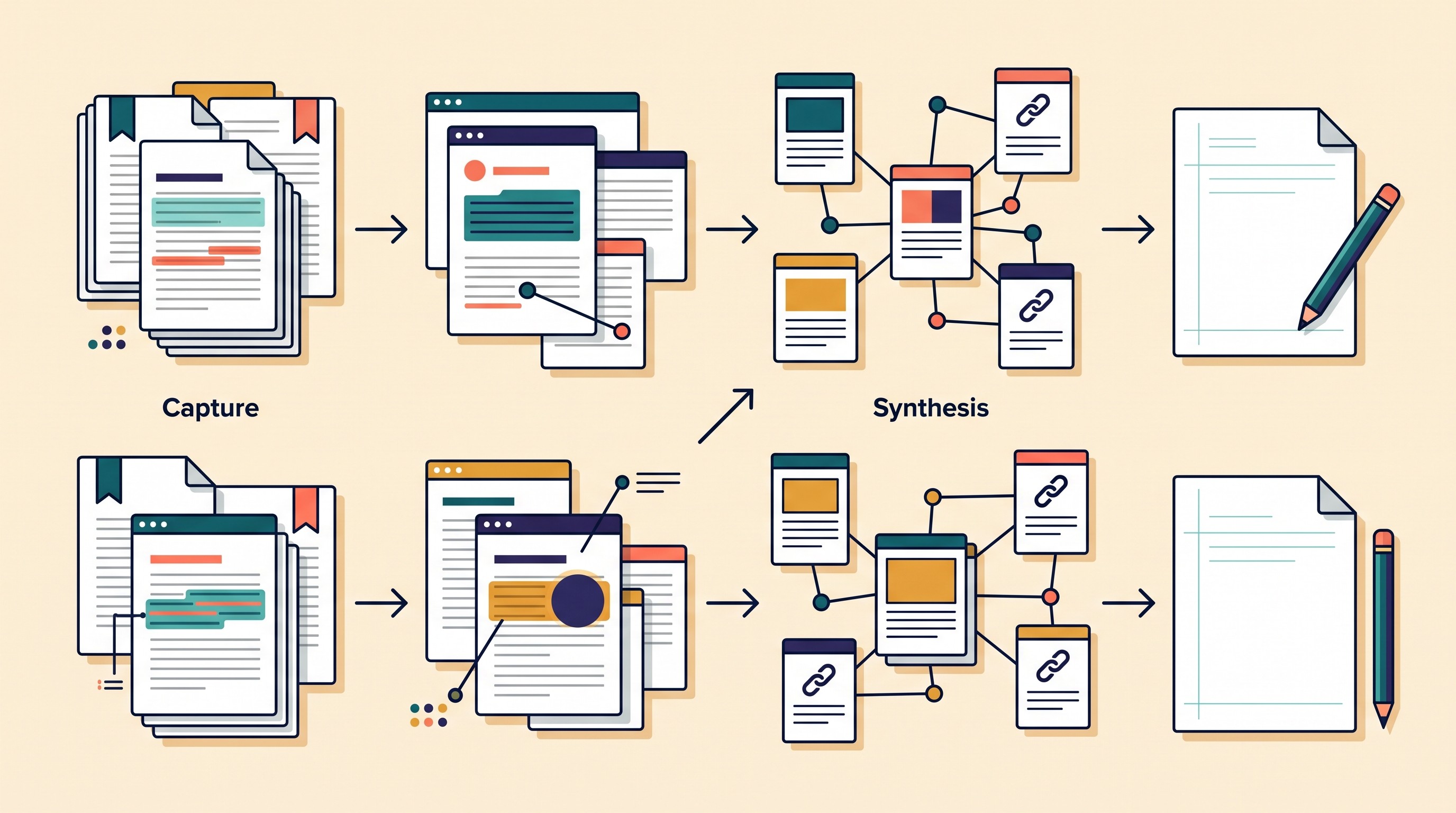
Capture: Readwise Reader is strong when the source stream is article-heavy: web articles, newsletters, RSS feeds, saved reading, PDFs, and ebooks. It gives power readers a place to collect and process material instead of letting links rot in browser tabs or email.
Otio can also store web links and PDFs, but capture is not its only job. It becomes more useful when the source set includes mixed materials: a journal PDF, a government report, a YouTube hearing, an interview recording, a spreadsheet, and a note from a stakeholder call.
Reading: Readwise Reader is usually the simpler starting point for dedicated reading. Its identity is a read-it-later and power-reading environment; Readwise’s public materials frame Reader as a place to read across formats and turn reading into highlights and reviewable knowledge (Readwise).
Otio’s reader views are more research-oriented. A PDF reader, EPUB reader, web reader, transcript panel for YouTube, CSV viewer, and audio/video viewers sit inside the same workspace as chat and notes. That matters less for casual reading and more when the reader view is a gateway into analysis.
Annotation and notes: Readwise Reader is well suited to highlighting and annotating material while reading. For many users, that is the system: collect, highlight, tag, revisit, and export.
Otio’s notes are closer to a project notebook. The editor supports headings, lists, task lists, tables, blockquotes, code blocks, math, images, links, and AI-assisted edits with accept/discard preview. It is useful when notes are not just saved excerpts but working decisions: “Use this study in the methods limitation section,” “Check this statistic against the original dataset,” “Do not cite this source for causality.”
Source formats: This is the largest practical gap. Readwise Reader is strongest when the source universe still feels like reading: articles, newsletters, PDFs, ebooks, RSS, and related web material. That covers a large share of knowledge work.
Otio is better suited when the project’s evidence is not mostly text articles. A policy researcher may need legislative text, consultation PDFs, committee hearing videos, interview audio, CSV data, and background notes in one place. A medical or pharmaceutical researcher may need trial PDFs, conference decks, protocol documents, recorded presentations, and notes. For these workflows, Otio’s multi-format library is the core advantage.
Organization: Readwise Reader organization is useful for a reading queue: feeds, saved items, tags, filters, and a library of highlights. It helps you keep up with an information stream.
Otio organization is project-based. Spaces, folders, tags, chats, and notes help preserve a defined corpus. That is the right structure when the same source set must support several downstream outputs: a memo, annotated bibliography, slide deck, literature review, or client brief.
Cross-source questioning: A searchable set of highlights is not the same as a synthesis engine. If a question is “Where did I read that line about regional grid capacity?”, search and highlights may be enough.
If the question is “Which of these 12 reports make the strongest claims about grid reliability, where do they disagree, and which claims are backed by primary data?”, the workflow changes. Otio is built for asking questions across selected sources and returning answers grounded in that source set.
Citations: Readwise Reader helps preserve what you highlighted and where it came from. That is valuable, but a highlighted archive can still leave the final writer doing a lot of reconstruction: which source supports which paragraph, which quote belongs under which claim, and whether a note has drifted away from its original context.
Otio’s cited answers are designed for source-linked synthesis. The useful distinction is not “AI summary” versus “no AI summary.” It is whether the answer points back to the documents, pages, transcripts, or recordings that support it.
Drafting: Readwise Reader is useful upstream of drafting because it supplies the reading trail. Otio is useful closer to drafting because it can keep the source set, notes, AI-assisted answers, and draft fragments in one project workspace.
This still does not remove judgment. Citations and AI-generated synthesis must be checked against the original page, PDF, transcript, or recording, especially for legal, medical, policy, academic, and financial claims. A cited answer is a faster route back to evidence, not permission to stop verifying.
Collaboration and institutional work: For solo reading, Readwise Reader can be enough. For team research, the evaluation shifts toward permissions, shared workspaces, role-based access, source retention, exportability, and provenance.
Otio supports team spaces with owner, admin, member, and viewer roles, plus shared project areas. For sensitive or unpublished material, the tool decision should also include institutional policies and data-handling rules; if that is the main concern, read the guide on protecting unpublished research data and ideas from AI tools.
[[OTIO_INLINE_PROMO:%7B%22title%22%3A%22Are%20your%20highlights%20ready%20for%20cross-source%20research%3F%22%2C%22description%22%3A%22Select%20one%20article%2C%20PDF%2C%20and%20video%20from%20your%20project%20to%20test%20Otio%E2%80%99s%20cited%20answers%20against%20the%20original%20sources.%22%7D]]
When Readwise Reader is enough—and when it becomes a bottleneck
Stay with Readwise Reader when the research job is really a reading job.
That includes:
An individual reading queue: saved articles, newsletters, PDFs, and web material that you want to process over time.
Highlight-centered learning: the main output is a set of passages, annotations, and reminders.
Lightweight retrieval: you need to find “that thing I read,” not build a defensible synthesis across a source set.
Personal knowledge management: you are reading broadly and exporting notes into a separate system.
Article-heavy projects: most evidence comes from readable web pages and PDFs, and the final output does not require intensive cross-source comparison.
The bottleneck appears when evidence spreads across formats and the project starts asking harder questions than “What did I highlight?”
Common signs:
The evidence is no longer mostly articles. You have PDFs, web pages, videos, audio, spreadsheets, notes, and images.
The question is comparative. You need to know where sources agree, conflict, or rely on the same underlying evidence.
Notes lose their source context. A highlight is useful, but it no longer carries enough surrounding method, date, author, sample, jurisdiction, or limitation.
The final output needs citations. A memo, manuscript, policy brief, legal note, or evidence review needs source-linked claims, not isolated quotes.
The project lasts longer than the reading session. You need a durable project library, not a stream of saved items.
The non-obvious tradeoff is transfer cost. Adding a second workspace can create duplicate notes, broken source links, inconsistent tags, and uncertainty about which copy is authoritative.
The fix is to assign ownership before the archive grows:
Reader owns capture and first-pass reading. Use it for articles, feeds, newsletters, and early triage.
Otio owns permanent project materials. Once a source becomes part of a defined research question, add the source itself—not just the highlight—to the project workspace.
Highlights move with context. Preserve the original URL, title, author, date, and why the passage matters.
Draft decisions live in one place. If a claim will appear in the final output, record the verified evidence and citation path in the project workspace.
Do not assume automatic or lossless migration. Before relying on any handoff, check the current export, import, and integration options in the relevant tools. For a live project, a disciplined manual handoff is often safer than bulk-moving an entire archive and hoping the structure survives.
A practical Readwise Reader-to-Otio workflow for a live research project
Use this workflow when a reading stream turns into a source-backed deliverable.

1. Collect and read candidate sources
Start with discovery tools and Readwise Reader. Save the articles, newsletters, reports, papers, or web pages that plausibly bear on the question.
At this stage, do not over-organize. The goal is to mark passages that matter: claims, definitions, methods, statistics, dissenting arguments, named experts, and limitations.
For literature discovery, tools such as Semantic Scholar and Consensus can help you find candidate material before it enters the reading workflow. Otio has separate guides on Semantic Scholar after discovery and Consensus AI for evidence search if the bottleneck is finding papers rather than organizing them.
2. Keep only sources that survive relevance triage
Do not move everything. A permanent research library should contain project evidence, not every saved item that looked interesting at 11 p.m.
For each source that survives, preserve:
Title
Author or organization
Publication date or access date
Original URL or file source
One-line reason it matters
Key passages or claims
Any obvious limitation, conflict, or uncertainty
This is where many research archives fail. They keep the quote but lose the reason the quote mattered.
3. Add the selected source set to an Otio Space
Create a project Space in Otio for the live question. Add the selected web pages and related materials: journal PDFs, government pages, interview audio, YouTube videos, spreadsheets, slide decks, images, and working notes.
For example, a policy project might include:
three government consultation PDFs
two academic papers
a regulator’s web page
one committee-hearing YouTube video
a stakeholder interview recording
a CSV of public spending data
a note defining the research question and output format
This is the point where Otio becomes more useful than a saved-article library. The source set is no longer just “things to read.” It is the evidence base for a decision or argument.
For academic projects, Otio for academics is the closest product fit; for government, NGO, and think-tank work, Otio for policy research is the more relevant lens.
4. Ask narrow questions across the corpus
Broad prompts produce vague synthesis. Ask questions that correspond to real research decisions.
Useful examples:
Where do these sources agree on the main mechanism?
Which claims are supported by primary data rather than commentary?
Which sources use the same underlying dataset?
What evidence contradicts the draft thesis?
Which quotations support the background section?
What methods or populations limit the applicability of these findings?
Which source should not be cited for this claim?
The value is not that the tool “summarizes everything.” The value is that it helps interrogate a bounded source set while keeping the answer connected to sources.
5. Save useful answers, quotations, and decisions as notes
When an answer is useful, save the decision, not just the generated text.
A good research note should record:
the claim you may use
the supporting source or sources
the quote or paraphrase
the page, section, timestamp, or transcript location where available
any caveat
whether the claim has been verified against the original
Otio’s text-selection toolbar and note editor are useful here because the source, chat, and note can stay close together. The aim is to reduce “Where did this come from?” moments during drafting.
6. Draft from verified evidence
The final draft should come from checked source material, not from an unverified summary in either tool.
Use AI-assisted drafting to structure sections, compress notes, or compare interpretations, but keep the evidence discipline:
Check quoted language against the original source.
Confirm numbers, dates, definitions, and names.
Distinguish what a source says from what it implies.
Keep contrary evidence visible.
Do not cite a source for a claim it does not actually support.
For media-heavy projects, the same rule applies. If a YouTube summary or podcast note looks useful, verify it against the transcript or recording. Otio can help with audio, video, and YouTube materials, but the final evidentiary responsibility remains with the researcher. For a related media workflow, see the guide to taking notes from a podcast for research.
Which researchers should choose Readwise Reader, Otio, or both?
Choose Readwise Reader first if the work is article-centered. It is the natural fit for a personal reading habit, newsletter and RSS processing, saved web articles, highlighting, and resurfacing passages later. If the main deliverable is “I need to read more intelligently and find my highlights again,” start there.
Choose Otio first if the job is a defined research project with a mixed source set. That includes literature reviews, policy memos, legal research, market analysis, medical evidence scans, qualitative interview synthesis, or any project where source formats vary and claims must be traced back to evidence.
Use both when the reading layer and the research layer are different jobs. Reader can remain the front door for articles and newsletters. Otio can become the durable workspace for sources that graduate into a project.
For teams, regulated work, or sensitive material, evaluate the tool choice more conservatively. Check permissions, exportability, retention, provenance, institutional rules, and whether unpublished or confidential material is appropriate for the system at all.
A simple test is better than a full migration. Pick one active research question, gather five representative sources, and run the handoff:
one article from Readwise Reader
one PDF
one web page
one video or audio source
one working note
If the handoff preserves enough context to ask cited cross-source questions and draft a verified paragraph, Otio is earning its place. If it only duplicates your reading archive, keep the workflow simpler.
Once the workflow fit is clear, compare plan constraints on Otio pricing. The right plan depends less on abstract feature lists and more on the number, size, and format of sources in the projects that actually matter.
FAQ
Q: Is Otio a replacement for Readwise Reader?
A: Not necessarily. Readwise Reader is suited to article-centered reading and highlighting, while Otio is designed as a broader multi-source research workspace; many researchers may use Reader for capture and Otio for project synthesis.
Q: Can I use Readwise Reader and Otio together?
A: Yes. Use Readwise Reader to read and annotate, then move selected sources or project materials into Otio for cross-source questioning, cited synthesis, and drafting; confirm current export or integration options before relying on automation.
Q: Which is better for research with PDFs, videos, and podcasts?
A: Otio is the more natural fit when the project combines PDFs, web pages, videos, podcasts, and notes in one corpus. Readwise Reader may still be useful for the reading and capture stage when articles are the dominant input.
Q: Should I move my entire Readwise Reader archive into Otio?
A: Usually not at first. Test one active project with representative sources, then migrate only the material that needs cross-source analysis or long-term project context.
[[OTIO_FOOTER_PROMO:%7B%22title%22%3A%22Test%20the%20handoff%20on%20your%20own%20research%20corpus%22%2C%22description%22%3A%22Use%20five%20representative%20sources%E2%80%94a%20Readwise%20article%2C%20PDF%2C%20web%20page%2C%20video%20or%20audio%20file%2C%20and%20note%E2%80%94to%20see%20whether%20Otio%20preserves%20context%20for%20a%20verified%20paragraph.%22%7D]]



