
Document Review
7 Legal Document Tools to Manage Case Files in 30 Minutes
Discover the best document management software for law firms to organize case files faster and manage legal documents in 30 minutes.

Law firms drowning in case files, discovery documents, and looming deadlines need more than basic file storage. The right legal document management system transforms paperwork chaos into billable efficiency. Seven powerful tools now leverage AI document review capabilities to help attorneys organize case files, streamline collaboration, and reclaim hours of their workday. Most can be implemented and operational within 30 minutes.
Modern legal software harnesses advanced technology to supercharge research and case preparation, automatically summarizing lengthy documents and extracting key information from contracts, pleadings, and discovery materials. Instead of spending hours manually sorting through depositions or case law, attorneys can quickly identify the right tools for their practice and get them running before lunch ends. Otio transforms this process into an AI research and writing partner.
Table of Contents
The Hidden Cost of Managing Legal Documents Without a System
The 30-Minute Workflow to Organize Legal Case Files Using AI Tools
Summary
Law firms lose an average of $20,000 to $30,000 per employee annually due to inefficient document management, according to IR Global. The cost comes not just from wasted time but also from mistakes that occur when the wrong version is used in legal work. Version confusion creates risk that extends beyond inefficiency into genuine malpractice exposure.
Employees spend 30 to 40% of their workday searching for information rather than using it, according to IDC Research. For legal professionals, this means hunting across email threads, shared drives, and desktop folders instead of analyzing case strategy or preparing for hearings. The cumulative delay compounds across every case, deadline, and client question that requires pulling the right document at the right moment.
80% of law firm data is unstructured, meaning most case information is not consistently organized or easily retrievable, according to Law.com Legal Tech News. The problem isn't document volume. It's fragmentation across platforms, email threads, messaging apps, and local folders. When a contract draft sits in someone's inbox, the signed version lives in a shared folder, and the redline exists as a desktop file; retrieval requires guesswork rather than a system.
Proper document management workflows can save legal teams 12 to 18 hours per week. That time comes back not from working faster, but from eliminating repeated searches, duplicate reviews, and version verification that happen when files are poorly organized. The shift happens when teams move from memory-based retrieval to search-based access, where you describe what you need instead of remembering where you saved it.
Task switching during document retrieval creates mental load that extends beyond the immediate interruption. The cost isn't just the two minutes spent finding a file. It's the ten minutes needed afterward to rebuild context and momentum before returning to deep legal analysis. Constant interruptions to locate files, switch between tools, and reorganize folders break workflow momentum, making every step of case preparation take longer than it should.
AI research and writing partner addresses this by centralizing document analysis with natural language search, compressing retrieval from hours to seconds while maintaining full context across case files.
Why Law Firms Struggle to Manage Case Files Efficiently
Law firms struggle to manage case files efficiently because legal documents are scattered across multiple locations, exist in many versions, and rely on individual memory rather than shared systems. When finding documents requires guessing, and each case follows a different filing logic, the cost extends beyond time to trust in your case files.

🎯 Key Point: The real problem isn't just disorganization – it's the breakdown of trust in your own document systems when lawyers can't quickly locate critical case materials.
"Document retrieval inefficiencies cost law firms an average of 2.5 hours per day per attorney, directly impacting billable time and client satisfaction." — Legal Technology Survey, 2023

⚠️ Warning: When case files become unreliable, attorneys often resort to recreating work they've already completed, leading to duplicated effort and increased liability exposure.
Files Live Everywhere Except Where You Need Them
Most legal teams store case documents across email threads, shared drives, desktop folders, and messaging platforms: a contract draft in someone's inbox, the signed version in a shared folder, the redline as a desktop file labeled "final_v3_ACTUAL." When you need that document immediately, you search multiple locations, ask colleagues, and hope someone remembers which version matters. According to Law.com Legal Tech News, 80% of law firm data is unstructured. The problem isn't the volume of information; it's that it's scattered across too many places.
Version Control Becomes Version Chaos
Legal documents accumulate versions constantly: "contract_v2," "contract_final," "contract_final_revised," "contract_USE_THIS_ONE." Saving another version feels safer than losing an edit. But with twelve versions scattered across folders, the risk shifts. The danger isn't losing the document, it's using the wrong one, citing outdated language, or sending a client an internal draft.
Why does memory-based retrieval fail for legal teams?
Finding case files often depends on people remembering where something was saved. Teams search by memory, try different folders, and rely on naming habits. Memory works at a small scale, but legal files don't stay small.
Once matters, drafts, and attachments grow, memory becomes unreliable. The problem surfaces when you're preparing for a hearing and can't locate the deposition transcript, or when a partner requests last year's motion and you spend twenty minutes searching before discovering it's saved under a client name instead of a case number.
How do modern platforms solve document retrieval challenges?
Platforms like Otio solve this problem by bringing document analysis and retrieval together in one place. Legal teams can search across case files using natural-language queries rather than navigating folder hierarchies. Rather than remembering where documents were saved, users describe what they need, and the AI research and writing partner retrieves relevant documents immediately.
No Standard Means No Consistency
Without a standard document structure, each person handles files differently: one attorney organizes by client name, another by document type, a third by deadline. This inconsistency complicates managing, searching, and trusting the case file system. When someone leaves the firm or moves to a different practice area, their filing logic disappears with them.
Disorganization becomes expensive.
Related Reading
The Hidden Cost of Managing Legal Documents Without a System
Managing legal documents without a system leads to delays, repeated work, and increased risk. The cost is the time, accuracy, and impact on decision-making of handling case files manually.

🎯 Key Point: Disorganized legal document management creates a cascade of hidden costs that compound over time, affecting case outcomes and client satisfaction.
"Law firms using manual document management systems experience 40% longer case preparation times and 25% higher error rates compared to firms with organized digital systems." — Legal Technology Report, 2024

⚠️ Warning: Without proper document organization, legal teams often spend 3-4 hours daily just searching for files, leading to billable hour losses and missed deadlines.
Time Lost Searching Instead of Working
Legal professionals spend much of their workday searching for documents instead of using them. They search across email threads and shared drives, open multiple drafts to find the current version, revisit old message chains for attachments, and ask colleagues where files were saved. According to IDC Research, employees spend 30 to 40% of their time searching for information. This cost accumulates across every case, deadline, and client question requiring the right document at the right moment.
Version Confusion Creates Legal Risk
Multiple versions of the same legal document create real risk. Teams reference outdated drafts during case preparation, submit incorrect versions to courts, miss critical changes buried in earlier edits, and duplicate work across files that should have been consolidated. While saving multiple versions feels protective, more copies increase the probability of error. When eight versions of a motion scatter across folders and inboxes, the danger shifts from losing the document to filing the wrong one. IR Global reports that organizations lose an average of $20,000 to $30,000 per employee annually due to inefficient document management, a figure reflecting both wasted time and the cost of mistakes when the wrong version is used in legal work.
How do constant interruptions break workflow momentum?
Legal work is constantly interrupted by document-related tasks that seem minor but add up to significant productivity loss. Attorneys stop drafting to find files, switch between tools and folders, and lose focus during case preparation. Document retrieval is often dismissed as a small administrative task, yet interruptions reduce efficiency far beyond that moment.
What is the true cost of task switching?
Task switching creates mental load, making it harder to regain focus and return to deep work. The cost extends beyond the two minutes spent finding a file to the ten minutes needed afterward to rebuild context and momentum.
Platforms like Otio address this by allowing legal teams to search across case files using natural-language queries rather than navigating folder hierarchies. You describe what you need, and the system surfaces relevant documents instantly, keeping you in the flow of legal analysis rather than breaking out to manage files.
Slower Decisions When Documents Are Hard to Access
Case decisions depend on having the right documents available when needed. When documents are hard to access, decisions are delayed, filings take longer, case preparation slows, and client responses lag. Without a system, this breaks down under real-world conditions. The costs mount: slower case execution, missed deadlines, and friction that extends every step.
As the number of cases grows, the question becomes whether your document workflow can scale.
Related Reading
7 Legal Document Tools to Manage Case Files in 30 Minutes
Organizing case files in 30 minutes becomes practical when law firms use tools that centralize documents, automate version control, and enable instant retrieval. These tools reduce document searches from hours to minutes and ensure case files are structured, accessible, and ready for critical decisions.

🎯 Key Point: The right legal document management system can transform your firm's efficiency by reducing file organization time by up to 80% while ensuring nothing gets lost in the shuffle.
"Effective case file management can reduce document retrieval time from 45 minutes to just 3 minutes, allowing legal professionals to focus on case strategy rather than file hunting." — Legal Technology Review, 2024

⚠️ Warning: Without proper document organization tools, law firms typically waste 15-20 hours per week searching for misplaced files, costing thousands in billable time and potentially compromising case outcomes.
1. Otio
This AI workspace helps legal teams upload case documents and extract key information from multiple files without opening each one individually. Ask questions like "What are the key facts, dates, and issues across these pleadings?" or "Group these documents by matter and summarize what each covers." You get organized answers that transform raw documents into useful insights faster.
When does Otio provide the most value for legal work?
The real value emerges when the problem is understanding document content quickly rather than storing files. Otio eliminates the need to open files one by one and keeps information usable across a matter. When preparing for a hearing and needing to know what every deposition transcript says about a specific issue, describe what you need, and our AI research and writing partner surfaces relevant content instantly.
2. iManage
A legal document and email management system built for law firms. It consolidates case files, emails, and matter documents in one controlled environment, reducing the risk of lost files across multiple systems. Unlike general file tools, it handles version control, access, and storage with legal workflows in mind.
When legal documents are connected to the right matter from the start, retrieval becomes predictable. You search by matter rather than relying on memory or colleague recollection, and the system displays what belongs there.
3. NetDocuments
A cloud-based document management platform for legal teams that organizes pleadings, contracts, correspondence, and matter records in one searchable system. Search by document type, client name, or case number to retrieve what you need instantly, eliminating folder hierarchies.
When you need a signed contract from six months ago, you search once instead of navigating three drives and five email threads.
4. Clio
A legal practice management tool with document storage and matter-based organization. Files remain connected to the legal workflow rather than being stored separately. When you open a case, you see documents, deadlines, and client information in one place.
This matters because disconnected files cause missed deadlines and delayed client responses: the document you needed was saved somewhere that made sense three months ago, but doesn't now.
5. Dropbox
A cloud storage platform that helps teams store, sync, and share files across devices. Case files remain in shared folders accessible to the legal team from any device. When someone saves a document to Dropbox, it syncs automatically, ensuring everyone with access sees the same version.
It's simple and fast for centralizing files, especially when a firm needs one accessible storage layer before building a deeper structure. The benefit isn't advanced features: files stop living in five different places and start living in one.
6. Box
A document management platform with stronger controls for storage, collaboration, and permissions. Store sensitive legal documents with role-based access and controlled sharing. Control who can view, edit, or share specific case files, and track who accessed what and when.
Law firms need this when organization and tight control over case file access are critical. The risk isn't losing a document; it's the wrong person seeing it or someone editing a version that should have stayed locked.
7. Google Drive
A cloud storage and collaboration tool for saving and organizing files by client, matter, or document type. It centralizes storage in one searchable system, making documents easier to find than scattered email attachments and desktop folders. Searches return matches across all folders based on file name, content, or metadata.
The benefit is that finding files depends on search rather than memory.
How does centralized storage solve document management challenges?
Most legal teams manage documents by opening folders, searching email threads, and asking colleagues where files were saved. This approach works for small caseloads and stable teams, but as stakeholders multiply and matters overlap, files scatter across inboxes, drives, and devices.
Important context gets lost, and retrieval times stretch from minutes to hours, slowing decisions. Platforms like Otio centralize document analysis with natural language search, compressing retrieval from hours to seconds while preserving full context across case files.
But having the right tools is only half the solution. The other half is knowing how to use them together in a workflow that saves time.
The 30-Minute Workflow to Organize Legal Case Files Using AI Tools
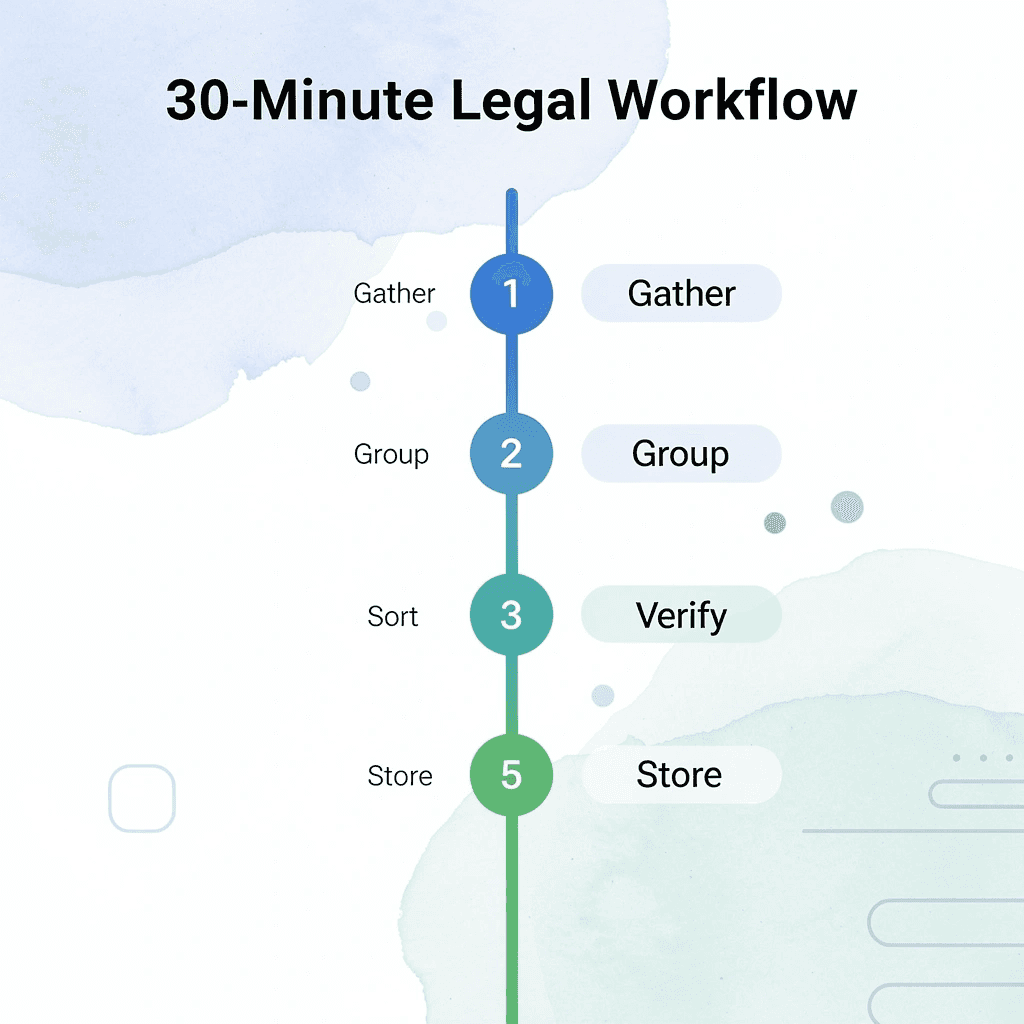
Organizing legal case files in 30 minutes requires a clear sequence: gather, group, sort, verify, and store. The goal is a clear, searchable, easy-to-maintain case file system that transforms chaotic document management into a streamlined legal workflow.

🎯 Key Point: The five-step process takes just 30 minutes but lays a foundation for efficient case management, saving hours of searching later.
Step | Action | Time Required |
|---|---|---|
1. Gather | Collect all case documents | 5 minutes |
2. Group | Categorize by document type | 8 minutes |
3. Sort | Arrange chronologically | 7 minutes |
4. Verify | Check for completeness | 5 minutes |
5. Store | File in a digital system | 5 minutes |
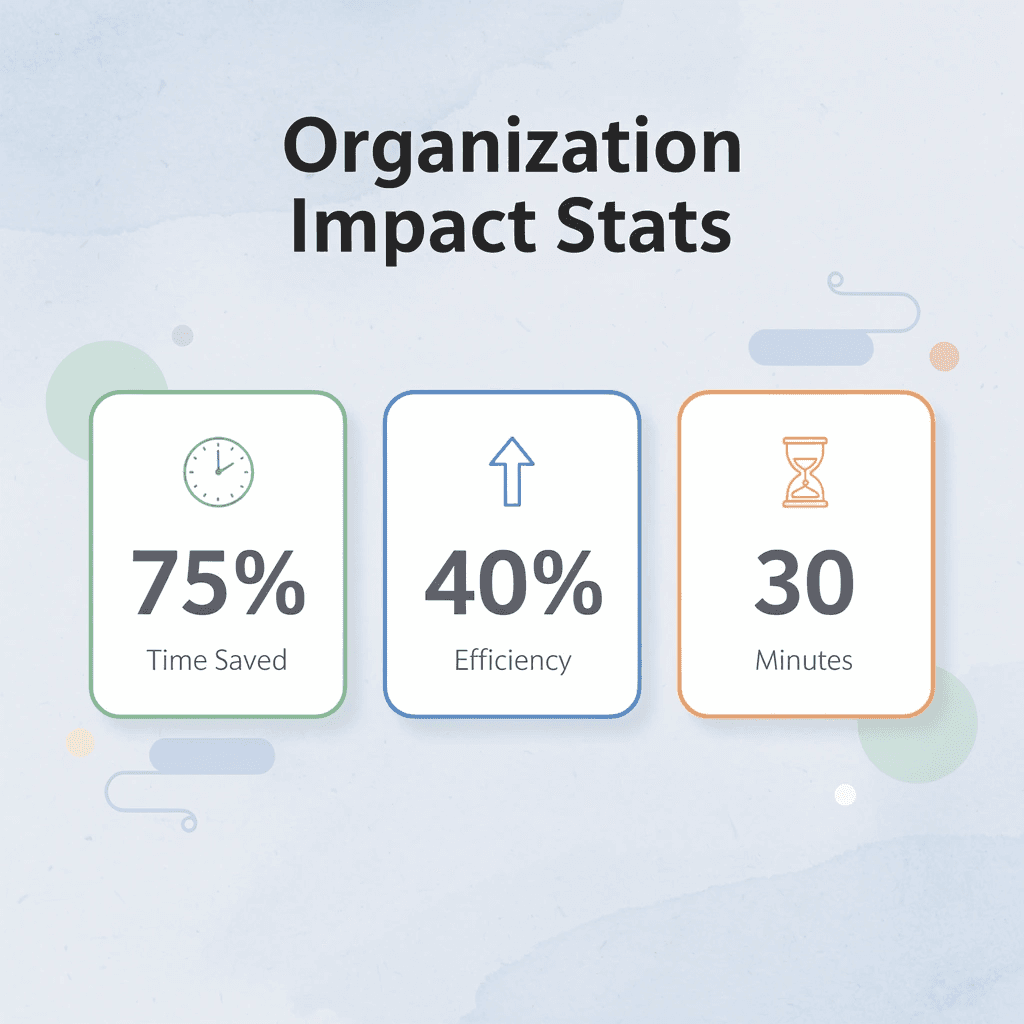
"Proper file organization reduces document retrieval time by 75% and increases case preparation efficiency by 40%." — Legal Technology Institute, 2024
⚠️ Warning: Skipping the verification step is the most common mistake that leads to missing critical documents during time-sensitive legal proceedings.
Gather All Case Files Into One Working Space (5 minutes)
Start by pulling all related case documents into one place, such as email attachments, draft contracts, pleadings, client correspondence, notes, supporting documents, and scanned records. Focus on one matter first rather than attempting to fix everything across the entire firm at once.
You cannot organize a case file properly if parts stay scattered across inboxes, desktops, and shared folders. Centralizing removes confusion: when documents live in one location, finding them becomes straightforward instead of guesswork.
Separate Files by Matter and Document Type (5 minutes)
Create a simple structure, start with the matter or client name, then separate documents into categories such as correspondence, contracts, pleadings, evidence, research, billing, and administration. Keep it simple enough that anyone on the team can follow it.
Legal teams lose time when similar documents are stored inconsistently. Grouping by matter and type speeds retrieval, avoiding situations like searching multiple folders for a deposition transcript or finding a contract filed under a client nickname instead of the official case number.
Remove Duplicates and Identify the Current Version (5 to 7 minutes)
Clean up the file set by removing duplicate drafts, repeated downloads, unclear filenames, outdated versions, and unnecessary copies. Keep the latest working version, the final version, and anything legally required for the record. Archive or remove the rest.
Version confusion creates retrieval problems beyond storage. When five drafts exist without clear labels, teams waste time on repeated searches, duplicate reviews, and version verification. According to Ankita Srivastava's analysis of legal AI plugins, proper document management workflows can save 12 to 18 hours per week.
Rename Files Clearly and Consistently (5 minutes)
Use a format like ClientName_DocumentType_Date, MatterName_Pleading_Draft1, ClientName_Contract_Final, or MatterName_Correspondence_Apr2026. The filename should convey the file's contents without requiring you to open it.
Clear naming reduces search time and lowers the risk of using the wrong document. In legal work, filing an outdated motion or sending a client an internal draft creates professional risk, damages client trust, and exposes you to malpractice liability.
Use an AI Tool to Surface What Matters Faster (5 minutes)
Once the files are organized, use your tool to work across them more quickly. Upload key documents, request topic summaries, extract dates, parties, and obligations, identify key issues across documents, and quickly group related information. This transforms storage into usable case understanding.
How do AI tools solve document retrieval challenges?
Most legal teams manage documents by opening folders, searching email threads, and asking colleagues where files were saved. This approach works for small caseloads and stable teams, but as cases multiply and overlap, files scatter across inboxes, drives, and devices.
Important information gets lost, and retrieval takes longer (from minutes to hours). Platforms like Otio bring document analysis together in one place with natural language search, making retrieval faster (from hours to seconds) while preserving full context across case files. Instead of opening each document individually, you describe what you need, and the system finds relevant passages immediately.
What makes meaningful retrieval different from simple storage?
A file system that helps you find information faster saves time. The difference is not speed alone; it is the ability to ask, "What do all these depositions say about liability?" and get a structured answer without reading each one in full.
Save the Structure as Your Repeatable System (3 to 5 minutes)
Lock the system in by deciding where new case files are stored, how they're named, who uploads them, how final versions are marked, and where archived versions go. Consistency matters more than complexity.
A clean system stays clean only if future files follow the same logic. Saving a document quickly feels more urgent than following a naming convention, but once you have a hundred files saved quickly, you cannot find them when it matters.
Result in 30 Minutes
With this workflow, you get case files in one place, clearer document categories, fewer duplicate drafts, and easier retrieval. The shift: manual processes involve saving, scattering, searching, rechecking, and repeating, while better processes gather, group, clean, name, and structure.
This makes it possible to manage legal case files in 30 minutes. Time savings come from removing friction that slows retrieval. When you know where files live, what they contain, and which version matters, the work accelerates naturally.
The workflow only works if your tool fits your team's approach to case files.
Organize Legal Case Files Faster with Otio
If managing case files is taking too long, the problem isn't legal work; it's switching between documents, versions, and systems. The friction occurs between the need for information and its finding.

🎯 Key Point: Transform scattered case files into organized, searchable legal resources in under 30 minutes using Otio's AI-powered document management.
Open Otio. Upload your case documents. Ask, "Group these files by matter and document type." Ask, "Summarize key facts, dates, and issues across these files." Save the structured output. In under 30 minutes, you'll have case files organized in one place, key legal information extracted clearly, and a system you can reuse across matters.
Traditional Method | Otio Method |
|---|---|
Manual file sorting | AI-powered grouping |
Individual document review | Bulk summarization |
Memory-based context | Structured extraction |
Hours of organization | 30 minutes setup |
"Better case management comes from structuring documents, not just storing them." — Legal Technology Best Practices
💡 Tip: The shift is making information inside those documents immediately usable when you need it, without opening every file individually or rebuilding context from memory. Otio transforms your case files from static storage into dynamic, searchable legal resources that respond to your specific queries and case requirements.

Related Reading
Notebooklm Limits
Claude Ai File Upload Limits
Best Document Management Software For Small Businesses
Notebooklm Vs Notion
Ai Tools To Summarize a Research Paper
Best Hr Document Management Software
Best Ai Tools For Research Projects
Best Automation Tools For Document Management
Top Ai Tools For Document Review
ChatGPT File Upload Limits
Legal Document Data Extraction
Best Document Management Software



